

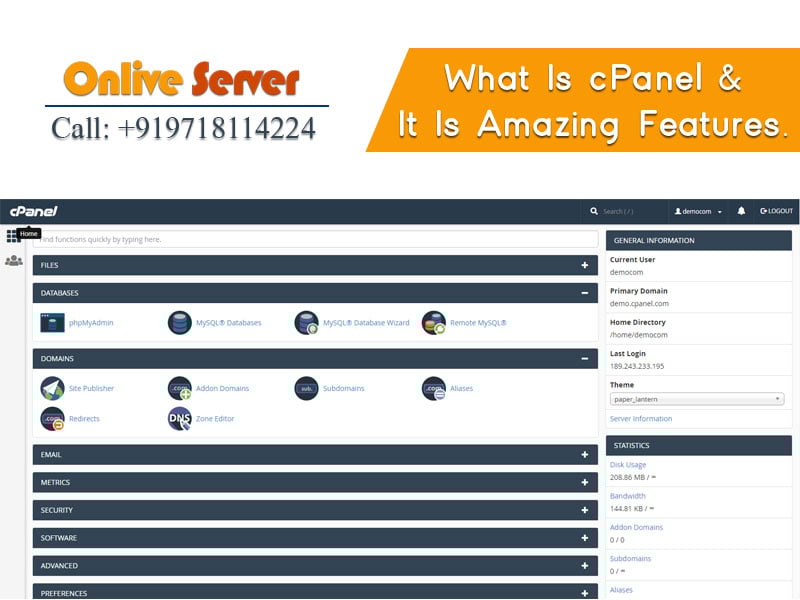
Quick Answer: What Is cPanel?
cPanel is an industry-leading, web-based graphical hosting control panel designed for Linux operating systems. Working alongside WebHost Manager (WHM), cPanel simplifies server and domain administration by providing point-and-click tools for website deployment, email routing, DNS zone configuration, database administration, and security hardening without requiring manual Linux terminal commands.
Managing a Linux web server through command-line shell scripts requires specialized technical expertise that many website owners, web developers, and digital agencies do not possess. Exploring what is cPanel reveals why this Linux-based graphical control panel became the global standard for web hosting management. By converting complex system administration tasks—such as configuring virtual hosts, generating SSL certificates, managing MySQL databases, and routing email accounts—into an intuitive browser interface, cPanel bridges the gap between raw server infrastructure and everyday website administration.
What Is cPanel? (Definition & The WHM Relationship)
Introduced in 1996, cPanel has grown into the most widely adopted hosting management ecosystem on the internet. To understand cPanel thoroughly, it is essential to distinguish between its two complementary tiers:
- WebHost Manager (WHM): The root-level administrative panel used by server owners, sysadmins, and resellers. WHM controls global server settings, system updates, service monitoring, package creation, and account provisioning.
- cPanel (User Level): The customer-facing dashboard allocated to individual domain owners. It allows users to manage their specific web files, mailboxes, subdomains, and databases without access to the wider server configuration.
This two-tier structure provides robust security and operational isolation. While server administrators maintain full root control over hardware resources in WHM, end users enjoy autonomy over their web properties within their cPanel boundary.
Key Functional Modules & Core Features of cPanel
cPanel organizes server management into intuitive functional blocks. The platform’s most vital technical modules include:
1. File and Directory Management
The cPanel File Manager provides an in-browser interface for uploading, compressing, editing, and extracting website archives. Administrators can configure custom FTP/SFTP accounts with directory-level access restrictions, inspect disk usage breakdowns, and configure automated Git repository deployments directly from GitHub or GitLab.
2. Domain and DNS Zone Administration
Managing multi-domain hosting environments is straightforward with cPanel’s Zone Editor. Administrators can manage A, AAAA, CNAME, MX, TXT, and SRV records in real time. The platform natively handles addon domains, subdomains, park domains, and HTTP-to-HTTPS redirect rules with automatic Apache/Nginx rewrite configuration.
3. Database Management (MySQL & MariaDB)
Modern Content Management Systems like WordPress, Drupal, and Magento require optimized database backends. cPanel provides a MySQL Database Wizard for rapid database and user creation, paired with phpMyAdmin for advanced query execution, database imports/exports, and table optimization.
4. Enterprise Email Infrastructure
cPanel turns a Linux server into a comprehensive mail hosting platform. Features include POP3/IMAP account creation, webmail access (Roundcube), automated spam filtering via Apache SpamAssassin, email forwarders, auto-responders, and crucial email authentication records including SPF, DKIM, and DMARC keys to ensure maximum deliverability.
5. Integrated Security & SSL Automation
Security features built directly into cPanel include AutoSSL (providing automatic, free domain-validated SSL certificates via Let’s Encrypt or Sectigo), IP Blocker to ban malicious visitor subnets, ModSecurity web application firewall management, hotlink protection, and two-factor authentication (2FA) for dashboard access.
cPanel vs. Plesk vs. DirectAdmin vs. Webmin
Evaluating cPanel against other popular control panels clarifies its strengths and infrastructure trade-offs:
| Metric | cPanel / WHM | Plesk | DirectAdmin | Webmin |
|---|---|---|---|---|
| Operating System Support | AlmaLinux, Rocky, CloudLinux, Ubuntu | Linux + Windows Server | RHEL, Debian, Ubuntu | All major Unix/Linux distros |
| Hardware Footprint | Moderate-Heavy (1GB – 2GB RAM min) | Moderate (1GB – 2GB RAM) | Lightweight (512MB RAM) | Very Low (< 150MB RAM) |
| Target Audience | Hosting providers, agencies, developers | Agencies, Windows/Docker setups | Budget hosters & VPS users | Linux systems administrators |
| Licensing Model | Commercial (Per-account tiers) | Commercial (Per-domain tiers) | Commercial (Affordable flat rate) | Free & Open Source (BSD) |
For high-traffic production environments, configuring cPanel with an Nginx reverse proxy front-end significantly reduces Apache process overhead. Allocating dedicated RAM for MariaDB InnoDB buffer pools and enforcing strict user filesystem quotas prevents individual accounts from monopolizing server resources. Pairing this setup with Onlive Server high-frequency NVMe dedicated servers ensures sub-second page loads.
For organizations that manage high-traffic e-commerce operations or large multi-tenant hosting environments, running cPanel on dedicated hardware unlocks full hardware acceleration. Deploying bare metal dedicated server infrastructure ensures your cPanel installation has exclusive access to NVMe storage, multi-core processing, and 1Gbps unmetered network bandwidth without hypervisor contention.
- MultiPHP & PHP-FPM Pools: Fine-tune individual execution parameters to prevent memory exhaustion.
- CSF & LFD Security: Kernel-level iptables connection tracking to throttle automated brute-force attempts.
- ModSecurity OWASP Rule Sets: Deep layer-7 payload inspection defending against SQL injection and XSS.
- Automated Remote Snapshots: Incremental encrypted backups offloaded to secondary cloud storage nodes.
Best Practices for Deploying and Optimizing cPanel
To ensure fast page load speeds and airtight security on a cPanel server, follow these production guidelines:
- Implement CloudLinux with CageFS: In shared hosting or agency environments, pairing cPanel with CloudLinux isolates each cPanel account into a virtualized container, preventing a compromised account from reading system files.
- Enable Nginx Reverse Proxy / FastCGI Caching: Use cPanel’s Nginx caching integration to serve static assets and cached HTML directly from memory, slashing server response times (TTFB) significantly.
- Automate Remote Backups: Configure WHM Backup Manager to push encrypted snapshots to external S3-compatible cloud storage, safeguarding your data against hardware anomalies.
- Deploy on High-Performance VPS: If your project is scaling beyond shared hosting, deploying cPanel on a dedicated high-speed Linux VPS hosting instance gives you full control over PHP-FPM worker pools and database buffers.
To compare how cPanel compares to free open-source administrative solutions, explore our comprehensive review of the Webmin server management panel.
Enterprise Security Hardening & Automated WHM Backup Architecture
In enterprise production environments, deploying cPanel and WebHost Manager (WHM) demands rigorous configuration beyond default installation parameters. The cornerstone of a hardened cPanel infrastructure begins with the integration of ConfigServer Security & Firewall (CSF) and Login Failure Daemon (LFD). By binding CSF directly with iptables and native Linux kernel connection tracking, administrators can establish dynamic rate-limiting thresholds that automatically throttle distributed brute-force attacks against cPanel services (ports 2083, 2087, and 22). Furthermore, activating the OWASP ModSecurity Core Rule Set (CRS) provides deep layer-7 packet inspection, screening inbound HTTP payloads for SQL injection, cross-site scripting (XSS), and malicious remote file inclusion signatures before requests ever strike Apache or Nginx reverse proxies.
Automated disaster recovery architecture represents another vital pillar of reliable cPanel server administration. WHM’s native Backup Configuration engine should be configured to run nightly incremental snapshots using encrypted transport layers. Rather than storing archive packages locally on the same physical disks—which exposes the organization to catastrophic hardware failure—sysadmins should route backups offsite to secondary S3-compatible cloud storage buckets or remote dedicated backup nodes via rsync over SSH. Leveraging separate storage volumes for the /backup mount point with strict mount options (such as noexec,nosuid) prevents arbitrary script execution within archive directories, ensuring high-compliance operational resilience.
To maximize resource efficiency across multi-tenant hosting environments, migrating legacy PHP execution handlers to PHP-FPM (FastCGI Process Manager) managed directly through WHM’s MultiPHP Manager delivers immense concurrency gains. Fine-tuning individual pool directives—specifically pm.max_children, pm.start_servers, and pm.max_requests—prevents rogue visitor spikes from triggering out-of-memory (OOM) kernel kills, guaranteeing steady performance across all hosted accounts.
Frequently Asked Questions (FAQ)
Is cPanel free to use?
No. cPanel is a commercial proprietary software that requires a monthly or annual license based on the number of hosted cPanel accounts. Most reputable hosting providers bundle cPanel licenses directly into their managed VPS and dedicated server plans.
Can cPanel run on Windows Server?
No. cPanel is engineered exclusively for Linux operating systems including AlmaLinux, Rocky Linux, CloudLinux, and Ubuntu LTS. For Windows Server environments requiring a similar control panel, Plesk is the industry-standard recommendation.
What is the difference between WHM and cPanel?
WHM (WebHost Manager) is the administrative back-end used by server owners to configure global server parameters, security rules, and create accounts. cPanel is the customer-facing front-end used by individual website owners to manage their domain files, databases, and emails.
How does cPanel install SSL certificates?
cPanel includes AutoSSL, an automated feature that provisions, validates, and installs free Let’s Encrypt or Sectigo SSL certificates for all primary domains, subdomains, and mail hostnames automatically upon DNS propagation.
Can I migrate a website from one cPanel server to another?
Yes. cPanel features full account backup and restoration utilities. Furthermore, WHM includes a Transfer Tool that can migrate full accounts—including files, databases, emails, and DNS records—directly between servers over SSH with zero data loss.
Conclusion: The Enduring Value of cPanel Hosting
cPanel remains the undisputed market leader in web hosting management because it consistently balances deep system capabilities with effortless end-user usability. Whether you are an agency managing hundreds of client websites or an enterprise hosting critical web applications, pairing cPanel with robust, dedicated server infrastructure guarantees reliable automation, top-tier security, and complete administrative confidence.
