

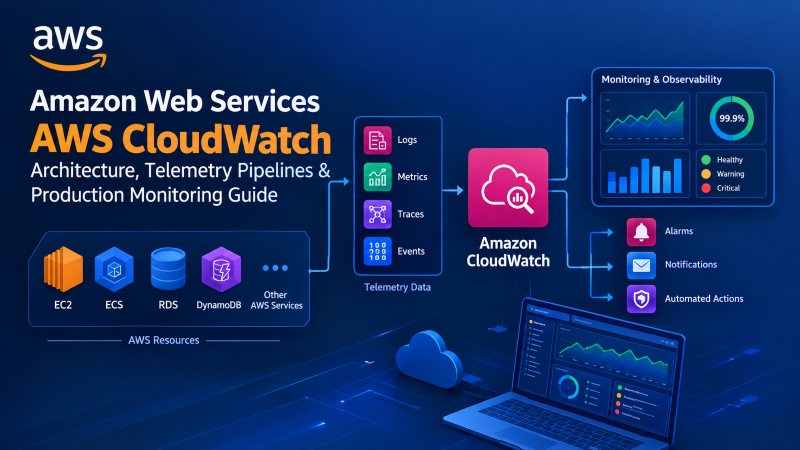
Amazon Web Services AWS CloudWatch is the unified observability platform that infrastructure teams rely on to monitor, alert, and respond to cloud workload anomalies in real time. This guide covers everything from Unified Agent installation and metric namespace configuration to composite alarm logic and Logs Insights query optimization.
EXECUTIVE TELEMETRY SUMMARY
Amazon Web Services AWS CloudWatch serves as the centralized observability and telemetry backbone for modern cloud computing environments. In operational practice, it continuously ingests high-frequency infrastructure metrics, structured application logs, and system events across containerized clusters and virtual instances. Furthermore, configuring automated metric alarms alongside CloudWatch Synthetics canaries and composite alert policies enables engineering teams to isolate compute bottlenecks, mitigate unhandled exceptions, and automate infrastructure remediation workflows before end-user response latencies degrade.
Deploying Amazon Web Services AWS CloudWatch provides uninterrupted visibility into processor pipelines, memory allocation, storage throughput, and network socket responsiveness across hybrid and hyperscale cloud infrastructure. When distributed applications scale across multiple availability zones, unexpected database connection pool exhaustion or silent memory leaks can abruptly compromise customer transactions. Consequently, modern infrastructure architects rely on Amazon Web Services AWS CloudWatch as a comprehensive telemetry pipeline that unifies system logs, raw hardware metrics, and synthetic probes into actionable operational intelligence.
However, managing high-density enterprise systems purely through native cloud telemetry frequently introduces steep operational costs and data retention bottlenecks. By establishing robust telemetry standards and pairing cloud monitoring with high-performance bare metal compute, organizations achieve resilient system observability without incurring excessive per-metric surcharges. For organizations managing complex enterprise footprints, exploring verified AWS cloud management services delivers balanced operational visibility and cost-efficient cloud engineering.
- Unified telemetry pipelines integrate basic host hypervisor metrics with detailed in-guest operating system memory and disk performance counters.
- CloudWatch Unified Agent installations collect vital low-level performance metrics that external hypervisors cannot inspect directly.
- Composite alarms eliminate alerting fatigue by evaluating multiple interdependent conditions before triggering critical incident management workflows.
- Structured JSON logging paired with CloudWatch Logs Insights provides sub-second query performance across petabyte-scale distributed application logs.
Core Observability Pillars of Amazon Web Services AWS CloudWatch
Deploying Amazon Web Services AWS CloudWatch delivers comprehensive cloud observability that extends far beyond passive monitoring of basic server uptime. Specifically, it operates across three fundamental technical pillars: time-series metrics, structured log aggregation, and real-time event routing. By correlating these three distinct data streams, systems administrators can track an operational anomaly from a customer-facing latency spike directly down to an exhausted database worker pool or faulty systemd service.
NUMERIC DATA
In contrast to plain logging, metrics record numerical performance variables across discrete timestamps, allowing real-time statistical evaluation, mathematical rollups, and automated dynamic threshold alerting.
INGESTION & SEARCH
Similarly, CloudWatch Logs collects event streams across operating system kernels, application runtimes, and access logs, indexing text records for structured forensic investigation during outages.
AUTOMATION
Furthermore, event buses like Amazon EventBridge capture state transitions across cloud resources, triggering automated Lambda recovery routines and auto-scaling group expansions within seconds.
Standard Resolution vs High-Resolution Metric Ingestion
Importantly, CloudWatch records performance variables utilizing two distinct granularity levels: standard resolution and high-resolution metrics. For instance, standard cloud metrics publish data points at one-minute or five-minute intervals, which works reliably for capacity planning and baseline monitoring. Conversely, high-resolution metrics record intervals down to one second, capturing instantaneous microbursts in processor utilization and rapid memory spikes that standard sampling completely misses. As a result, critical production databases require high-resolution metrics to diagnose elusive performance hiccups accurately.
Hypervisor Metrics vs Amazon Web Services AWS CloudWatch Agent
A frequent architectural mistake in cloud operations is relying exclusively on external hypervisor metrics to gauge system health. By default, the underlying hypervisor tracks gross physical interactions, such as raw network packet transfers, aggregate hypervisor CPU cycles, and block device read/write throughput. However, the hypervisor possesses zero visibility into the guest operating system kernel memory tables, virtual memory swap usage, or individual process execution states.
PHYSICAL HARDWARE
Inspects raw hypervisor CPU cycles, aggregate network packets, and block disk I/O. However, it cannot inspect guest kernel tables, memory leaks, or swap thrashing.
INTERNAL KERNEL
Directly accesses the Linux /proc and /sys filesystems to collect real-time memory pressure, buffer cache flushing, swap utilization, and TCP socket metrics.
Key Guest Metrics Monitored by the Unified Agent
Specifically, the Unified Agent captures critical telemetry counters that standard cloud monitoring neglects. For example, tracking mem_used_percent reveals creeping memory exhaustion long before processes crash. In addition, collecting diskio_iops_in_progress isolates storage bus saturation during intense indexing operations. Furthermore, monitoring netstat_tcp_time_wait prevents socket exhaustion under high concurrent visitor loads, ensuring smooth application gateway performance.
Advanced Amazon Web Services AWS CloudWatch Metric Alarms
In enterprise infrastructure operations, alert fatigue represents a severe threat to operational reliability. When monitoring systems broadcast hundreds of non-actionable notifications across on-call channels, engineers inevitably overlook critical alerts during genuine system emergencies. To eliminate this issue, Amazon Web Services AWS CloudWatch provides sophisticated alarm evaluation mechanisms that evaluate multi-condition states rather than naive static thresholds.
Anomaly Detection
Applies machine learning to historical patterns, creating adaptive statistical thresholds that accommodate predictable diurnal traffic peaks and weekend lulls.
Composite Alarms
Combines multiple alarm states using Boolean operators (AND/OR), ensuring on-call notifications fire only when compute spikes coincide with latency degradation.
M-out-of-N Evaluation
Requires a specified threshold violation across consecutive evaluation periods, effectively preventing momentary CPU spikes from initiating false restarts.
Automated Remediation
Routes alarm state changes directly through Amazon SNS and EventBridge to automatically reboot crashed services, detach unhealthy pods, or trigger scaling events.
Eliminating False Alarms with Composite Rule Sets
Consequently, combining multiple alarm evaluations prevents false emergency escalations during routine cron operations. For example, when an hourly database vacuum process drives CPU usage above 90% without inflating query latency, a composite alarm remains in an OK state. Conversely, if high CPU load occurs simultaneously with elevated 5xx error rates, the composite rule immediately broadcasts an alert to incident engineers.
Amazon Web Services AWS CloudWatch Logs Insights Runbook
Troubleshooting complex software failures across thousands of containerized microservices requires an agile query engine capable of parsing terabytes of log records on demand. For instance, CloudWatch Logs Insights provides a purpose-built interactive query syntax that executes fast aggregations without requiring dedicated Elasticsearch or OpenSearch infrastructure. Detailed technical parameters for distributed log ingestion are maintained in the official AWS CloudWatch Technical Documentation.
PRODUCTION QUERY
fields @timestamp, @message, status, responseTime, clientIP
| filter status >= 500
| stats count(*) as errorCount, avg(responseTime) as avgLatency by bin(5m), clientIP
| sort errorCount desc
| limit 25
By running targeted queries, DevOps engineers can isolate failing API endpoints and pinpoint IP addresses triggering unhandled exceptions. Additionally, converting recurring queries into custom metric filters allows systems administrators to generate alarmable metrics directly from unstructured application stack traces.
Production Linux Terminal Runbook: Installing & Configuring the Unified Agent
To establish standardized telemetry across enterprise Linux environments, systems administrators execute automated installation runbooks via shell scripts or configuration management engines like Ansible. The following hands-on runbook details package installation, configuration calibration, and daemon management across modern Ubuntu and Debian enterprise servers.
Controlling Amazon Web Services AWS CloudWatch Costs
While Amazon Web Services AWS CloudWatch delivers exceptional operational convenience, unmanaged telemetry pipelines can rapidly inflate monthly cloud bills. In practice, high-cardinality custom metric dimensions, excessive logging verbosity, and uncompressed retention policies generate unexpected billing shocks for growing businesses. Therefore, establishing a disciplined FinOps framework is vital for sustainable cloud operations.
| Telemetry Component | Pricing Driver | Common Cost Trap | Optimization Solution |
|---|---|---|---|
| Custom Metrics | Metric volume per month | High-cardinality user IDs in dimensions | Aggregate metrics before ingestion |
| Log Ingestion | Gigabytes ingested | Verbose debug logging in production | Filter info/debug logs at edge proxy |
| Log Storage | Gigabytes stored per month | Default “Never Expire” retention policy | Configure 14 to 30 day TTL lifecycles |
| Logs Insights Queries | Data scanned per query | Scanning multi-terabyte log groups | Narrow search timestamps strictly |
Exporting Telemetry to Low-Cost Cold Storage
Consequently, organizations seeking long-term regulatory compliance without inflated storage invoices implement metric streams and log subscription filters. For example, piping real-time CloudWatch data streams through Amazon Kinesis Data Firehose directly into Amazon S3 glacier tiers reduces storage overhead by up to 80%. As a result, active monitoring remains responsive in CloudWatch while compliance archives rest securely in cost-effective object storage.
Hybrid Cloud Telemetry: Integrating CloudWatch with Dedicated Infrastructure
Today, high-growth digital enterprises increasingly adopt hybrid cloud architectures, deploying database clusters and egress-intensive application nodes on dedicated bare metal while hosting elastic public microservices on cloud providers. In such hybrid environments, establishing centralized observability is essential to prevent fragmented operational silos. Fortunately, the CloudWatch Unified Agent is fully transportable and operates seamlessly across on-premise hardware and private virtual servers.
COMPUTE TIER
Deploy database clusters on high-performance bare metal hardware to handle high-IOPS transactional storage without cloud hypervisor latency.
SECURE BRIDGE
Configure kernel-level WireGuard VPN bridges to connect private servers with AWS Virtual Private Clouds (VPCs) across encrypted pathways.
TELEMETRY STREAM
Authenticate the in-guest agent via AWS Systems Manager (SSM) to stream physical disk I/O, CPU temperature, and RAM usage directly into CloudWatch.
FINOPS GAIN
Pairing cloud-native telemetry with reliable dedicated server infrastructure eliminates unpredictable cloud bandwidth surcharges completely.
Synthetics Canary Probing for External Reliability
Finally, internal server metrics must be validated against external user experience. To achieve this, CloudWatch Synthetics deploys automated browser canaries running Node.js Puppeteer scripts that simulate end-user interactions 24/7. Consequently, if checkout gateways fail or SSL certificates approach expiration, canary alarms trigger immediate incident protocols before customer revenue suffers.
Frequently Asked Questions
01 What is the primary operational purpose of Amazon Web Services AWS CloudWatch?
Amazon Web Services AWS CloudWatch provides centralized telemetry collection across infrastructure metrics, system logs, and operational events. Therefore, engineering teams use it to detect anomalies, automate incident remediation, and maintain continuous application uptime.
02 Why does the default cloud hypervisor fail to show memory and swap metrics?
Default hypervisors track external compute cycles without penetrating guest operating system kernel allocations. Consequently, collecting memory and swap counters requires installing the in-guest CloudWatch Unified Agent.
03 What is the technical difference between standard and high-resolution metrics?
Standard metrics record performance data at one-minute or five-minute intervals. Conversely, high-resolution metrics capture data down to one-second granularity, enabling instant detection of microbursts.
04 How do composite alarms suppress alert fatigue in production environments?
Composite alarms evaluate multiple underlying metric conditions using Boolean logic before sounding notifications. Thus, non-critical isolated spikes do not page on-call engineers unless application latency degrades simultaneously.
05 Can the CloudWatch Unified Agent run on on-premise dedicated servers?
Yes, the Unified Agent installs cleanly on physical servers, virtual machines, and private data centers. Furthermore, using AWS Systems Manager credentials allows remote servers to securely publish metrics to cloud dashboards.
06 What is the most effective FinOps strategy to prevent CloudWatch bill shock?
Configuring explicit log retention periods between 14 to 30 days prevents perpetual storage charges. Specifically, streaming older logs to S3 cold storage archives slashes monthly telemetry costs significantly.
07 How do CloudWatch Synthetics canaries verify external user experience?
Synthetics canaries run automated headless browser scripts simulating login workflows, checkout forms, and endpoint checks. As a result, teams receive proactive alerts when user flows fail, regardless of backend CPU health.
Optimize Your Enterprise Cloud Architecture with Onlive Server
Pair cloud-native Amazon Web Services telemetry with dedicated, unmetered bare-metal compute. Eliminate unpredictable cloud bandwidth taxes, isolate mission-critical workloads, and achieve comprehensive observability across Tier III data centers.
