

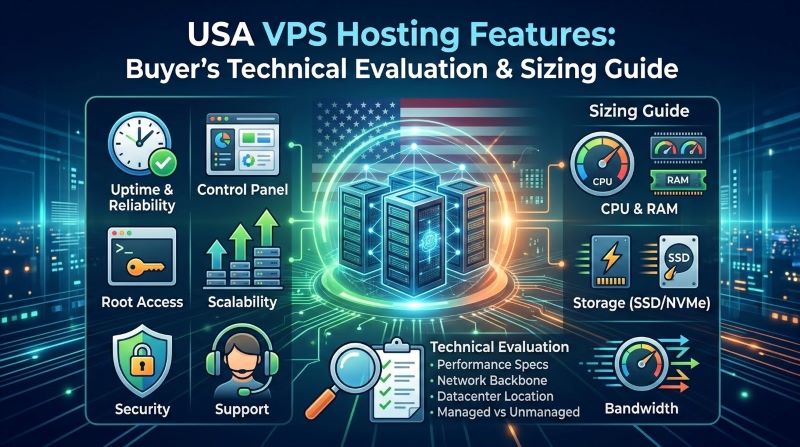
What Are the Essential Architectural Features of an Enterprise USA VPS?
Direct Technical Answer: An enterprise USA VPS delivers dedicated compute isolation through Type-1 KVM hypervisors, non-volatile memory express (PCIe Gen4 NVMe) enterprise storage arrays, and multi-homed Tier-1 BGP transit across carrier-neutral North American datacenters. Evaluating a high-performance USA VPS hosting environment requires auditing dedicated vCPU scheduling (guaranteeing zero CPU steal time), unmetered DDoS mitigation pipelines, root-level SSH orchestration, and quantifiable memory sizing formulas mapped to application concurrency.
innodb_buffer_pool_size), and bounding PHP-FPM or Node.js workers to match dedicated physical core threads.
Selecting cloud server infrastructure for North American operations has evolved far beyond comparing generic gigabytes of RAM and advertised bandwidth numbers. When deploying latency-sensitive web applications, high-concurrency e-commerce platforms, or distributed database clusters, hosting performance is dictated by hypervisor virtualization architecture, storage bus throughput, and regional network transit engineering. Budget providers frequently obscure multi-tenant overcommitment behind attractive introductory rates, resulting in unpredictable CPU throttling, high disk I/O wait times, and erratic page load speeds during traffic surges.
This technical evaluation and sizing guide provides system administrators, engineers, and infrastructure buyers with an objective, data-driven framework. We examine the core architectural mechanics of enterprise virtual servers, benchmark PCIe Gen4 NVMe against legacy SATA SSD storage, detail domestic and transatlantic BGP network routing, and deliver actionable sizing heuristics alongside terminal-tested Linux kernel optimization runbooks.
📌 Executive Chapter Index
8 Core Sections
1. Core Compute Isolation: KVM Hypervisor vs. Shared Container Virtualization
The foundation of server stability begins at the virtualization layer. Virtual private servers are primarily provisioned using either Kernel-based Virtual Machine (KVM) hardware virtualization or shared-kernel container models such as OpenVZ or LXC. For production enterprise workloads, choosing KVM is non-negotiable.
KVM functions as a true Type-1 hypervisor integrated directly into the Linux kernel. Each virtual guest operates completely isolated with its own virtualized hardware stack—including independent network interfaces, virtual disk controllers, and a private kernel. This architecture guarantees that resources allocated to your server cannot be dynamically harvested or overcommitted by the host node to sustain neighboring instances.
Diagnostic Insight: Tracking CPU Steal Time (%st)
CPU Steal Time measures the percentage of time a virtual CPU is ready to execute tasks but is forced to wait because the physical hypervisor CPU is occupied servicing other virtual instances. On an optimal USA VPS: VPS sizing guide configuration, steal time should consistently measure under 1.0%. Sustained values exceeding 5.0% indicate host node CPU oversubscription, directly penalizing database queries and SSL/TLS handshakes.
In contrast, containerized environments share the host node’s underlying kernel and file system tables. If a rogue tenant executes a denial-of-service attack, triggers an out-of-memory (OOM) storm, or experiences a sudden traffic spike, the entire host kernel can become memory-starved. Furthermore, containerized virtualization restricts kernel-level modifications—preventing system administrators from loading custom network modules such as WireGuard, setting advanced sysctl TCP congestion parameters, or creating custom cryptographic keyrings.
2. High-Throughput Storage Architecture: PCIe Gen4 NVMe vs. SATA SSD Arrays
Storage subsystem bottlenecks represent the single most common cause of application latency spikes. While legacy solid-state drives (SATA SSDs) represented a significant upgrade over mechanical hard drives, they remain fundamentally constrained by the legacy Advanced Host Controller Interface (AHCI) protocol and a 6.0 Gbps SATA interface bus.
Modern enterprise server deployments utilize PCIe Gen4 Non-Volatile Memory Express (NVMe) drive arrays configured in redundant hardware RAID 10 topologies. NVMe communicates directly with the CPU over high-speed PCIe lanes, eliminating the protocol translation overhead inherent in SAS/SATA host bus adapters. This delivers radical improvements in Input/Output Operations Per Second (IOPS) and queue depth management.
| Storage Technology | Protocol & Bus | Random 4K Read IOPS | Queue Depth Capacity | Typical Access Latency | Production Workload Impact |
|---|---|---|---|---|---|
| Legacy SATA SSD | AHCI / SATA III (6 Gbps) | 50,000 – 95,000 | 1 Queue / 32 Commands | 50 – 100 µs | Bottlenecks high-concurrency database queries; slow backup compression. |
| Enterprise PCIe Gen3 NVMe | NVMe 1.3 / PCIe 3.0 x4 | 400,000 – 550,000 | 64,000 Queues / 64k Commands | 20 – 30 µs | Sustains high-traffic WordPress & WooCommerce stores without query stalls. |
| Enterprise PCIe Gen4 NVMe | NVMe 1.4 / PCIe 4.0 x4 | 800,000 – 1,200,000+ | 64,000 Queues / 64k Commands | < 10 µs | Instant index rebuilding, microsecond API latency, and zero I/O wait state. |
To verify disk throughput upon provisioning your virtual instance, execute a synthetic 4K random read/write benchmark using fio (Flexible I/O Tester). The following command accurately isolates raw hardware performance without operating system cache distortion:
BASH — fio NVMe Benchmark
# Install fio testing suite on Ubuntu/Debian
sudo apt update && sudo apt install -y fio

# Execute direct random 4K read/write test (isolating buffer cache)
sudo fio --name=nvme-randwrite-test   --ioengine=libaio   --direct=1   --bs=4k   --iodepth=64   --size=4G   --readwrite=randrw   --rwmixread=75   --runtime=60   --time_based   --group_reporting
3. Tier-3 Carrier-Neutral Network Routing & US Geographic Latency Dynamics
Host server location dictates the baseline physical latency of your application. Electromagnetic signals traveling over fiber-optic lines encounter physical propagation delays of approximately 1 millisecond per 100 kilometers. When targeting users across the United States or handling transatlantic international traffic, deploying within a carrier-neutral Tier-3 datacenter equipped with multihomed Border Gateway Protocol (BGP) routing is critical.
A multihomed network infrastructure dynamically balances inbound and outbound traffic across multiple Tier-1 transit backbones (such as Lumen, Arelion, NTT, and Cogent) alongside major public Internet Exchange Points (IXPs). If a transcontinental fiber line experiences degradation or a cut, BGP routing automatically converges onto redundant paths within sub-second intervals, preventing connection timeouts.
| Primary Hub Region | Destination Region | Expected Round-Trip Latency (RTT) | Backbone Transit Routing | Optimal Workload Deployment |
|---|---|---|---|---|
| US East Coast (NY / VA) | East Coast Domestic (Boston / Atlanta) | 8 – 18 ms | Direct Tier-1 Metro Dark Fiber | High-frequency fintech APIs, SaaS platforms, corporate portals. |
| US East Coast (NY / VA) | Western Europe (London / Frankfurt) | 68 – 78 ms | Transatlantic Subsea Cable Express | Cross-border e-commerce, global media distribution, REST backends. |
| US Central (Dallas / Chicago) | Coast-to-Coast Balanced (NY & LA) | 22 – 32 ms | BGP Multihomed Transcontinental | Nationwide enterprise applications seeking uniform domestic response. |
| US West Coast (California) | Asia-Pacific (Tokyo / Sydney) | 95 – 135 ms | Transpacific Optical Fiber Consortium | Pacific Rim development environments, gaming relays, global CDNs. |
To audit path stability, packet loss, and jitter between your remote administrative workstation and your USA server, use modern network tracing utilities such as mtr (My Traceroute). Unlike traditional single-pass traceroutes, mtr evaluates ongoing packet routing quality over 100 consecutive ICMP/UDP packets:
BASH — mtr Network Route Analysis
# Run high-precision report mode mtr across 100 probes
sudo mtr --report --report-cycles=100 --show-ips your-server-ip

# Test raw TCP throughput and window scaling using iperf3
iperf3 -c us-east.speedtest.server.net -P 4 -t 30
4. Workload Capacity Sizing Heuristics: Sizing vCPU, RAM, and Storage
One of the most frequent missteps when provisioning a USA VPS is miscalculating the RAM-to-vCPU ratio required for modern dynamic applications. A common industry fallacy is assuming that an application consuming 2 GB of memory in a local Docker test environment will perform reliably on a 2 GB cloud instance under 100 concurrent production users.
To size memory accurately, apply the standard System Memory Allocation Formula:
For example, a high-traffic WordPress WooCommerce portal handling 50 concurrent checkouts with PHP-FPM workers consuming 60 MB each requires: 1.0 GB (OS) + 3.0 GB (DB buffer) + (50 × 0.060 GB = 3.0 GB) + 1.0 GB (Redis) = 8.0 GB baseline RAM, placing it squarely within a 4 vCPU / 8 GB RAM tier.
| Workload Classification | Target Concurrency | Recommended vCPU | Recommended RAM | NVMe Storage Allocation | Key Architecture Focus |
|---|---|---|---|---|---|
| API Microservices / Node.js | 500 – 1,500 req/sec | 2 vCPU (High Clock) | 4 GB – 8 GB | 50 GB NVMe | High single-core CPU frequency; non-blocking asynchronous event loop. |
| WooCommerce / Magento Store | 50 – 150 concurrent checkouts | 4 vCPU – 8 vCPU | 8 GB – 16 GB | 100 GB – 160 GB NVMe | Large InnoDB buffer pool; Redis object caching; isolated OPcache. |
| PostgreSQL / MySQL DB Cluster | Heavy OLTP Read/Write | 8 vCPU – 16 vCPU | 16 GB – 32 GB | 250 GB+ NVMe RAID 10 | Random 4K write IOPS; zero memory paging; high queue depth handling. |
| Docker / Kubernetes Worker | Multi-container orchestration | 4 vCPU – 8 vCPU | 16 GB | 120 GB NVMe | Container overlay filesystem I/O; virtual bridge networking limits. |
5. Production Linux Terminal Runbook: Kernel Tuning & High-Concurrency Optimization
Default Linux distribution kernels (Ubuntu 22.04/24.04 LTS, AlmaLinux, Rocky Linux) are intentionally configured for conservative, general-purpose desktop or low-traffic environments. Out of the box, TCP socket buffers are constrained, network queues are small, and file descriptor limits will prematurely choke incoming web connections under load.
When managing a how to configure USA VPS: VPS optimization deployment, hardening your SSH gateway and tuning Linux network stack parameters unlocks significant throughput gains. Execute the following terminal commands to enable Google’s BBR (Bottleneck Bandwidth and RTT) congestion control algorithm and increase socket buffer capacities:
BASH — /etc/sysctl.conf High-Throughput Tuning
# Append production network optimizations to sysctl.conf
sudo tee -a /etc/sysctl.d/99-custom-network.conf << 'EOF'
# Enable TCP BBR Congestion Control
net.core.default_qdisc = fq
net.ipv4.tcp_congestion_control = bbr

# Maximize TCP socket read/write buffers (up to 16MB)
net.core.rmem_max = 16777216
net.core.wmem_max = 16777216
net.ipv4.tcp_rmem = 4096 87380 16777216
net.ipv4.tcp_wmem = 4096 65536 16777216

# Increase backlogs for burst connection handling
net.core.somaxconn = 65535
net.core.netdev_max_backlog = 10000
net.ipv4.tcp_max_syn_backlog = 8192
net.ipv4.tcp_tw_reuse = 1
EOF

# Reload kernel parameters immediately
sudo sysctl --system
Next, modify the system file descriptor limits in /etc/security/limits.conf. When running high-concurrency Reverse Proxies (NGINX, Caddy) or database daemons, exceeding default open file limits (often set as low as 1024) triggers fatal "Too many open files" (HTTP 502/504) gateway errors:
BASH — /etc/security/limits.conf File Descriptors
# Elevate file handle concurrency for all users
sudo tee -a /etc/security/limits.conf << 'EOF'
* soft nofile 65535
* hard nofile 65535
root soft nofile 65535
root hard nofile 65535
EOF

# Verify active session limits
ulimit -n
6. Enterprise Edge Defense: Automated DDoS Scrubbing & Disaster Recovery
North American IP ranges represent the primary target for global volumetric Distributed Denial of Service (DDoS) attacks. Unprotected virtual servers are easily knocked offline by UDP amplification, NTP reflection, or SYN floods saturating the host node’s uplink interface.
Enterprise infrastructure incorporates an inline hardware DDoS mitigation pipeline. Incoming traffic passes through multi-stage scrubbing centers that inspect packet headers at line rate (Layer 3/4), filtering out malicious syn-ack floods and ICMP reflection within milliseconds while passing clean legitimate HTTP/HTTPS traffic through to your virtual instance without added latency. For comprehensive server-level security rules and firewall policies, consult our detailed guide on USA VPS security practices.
Point-in-Time Snapshots
Execute instant, crash-consistent block-level snapshots prior to major software updates, database migrations, or kernel patches. Restore your instance to its exact operational state within seconds.
Offsite Automated Backups
Scheduled daily or weekly incremental backups replicated to physically separated secondary storage nodes ensure complete business continuity against catastrophic local hardware failures.
7. Buyer’s Pre-Deployment Audit: Questions to Eliminate Oversold Providers
Before committing production workloads to any virtual server provider, conduct an upfront technical audit. Reputable infrastructure operators will transparently provide exact hardware and network specifications. If a provider deflects or provides vague responses, it typically indicates high multi-tenant overcommitment.
📋 Critical Go-Live Production Verification Matrix:
- Hypervisor Architecture: Is the instance provisioned via pure KVM with dedicated hardware virtualization, or is it an OpenVZ/LXC container?
- Physical Storage Topology: Are drives enterprise PCIe Gen4 NVMe configured in redundant hardware RAID 10, or shared Network Attached Storage (NFS/Ceph) over saturated 10GbE links?
- CPU Allocation Policy: Are vCPUs provisioned on modern AMD EPYC™ or Intel® Xeon® processors with dedicated clock allocations, or throttled after baseline burst periods?
- Network Uplink Port Speed: Is the node backed by dedicated 1 Gbps / 10 Gbps unmetered network ports, or choked on a shared 100 Mbps uplink?
- Root Control & OS Freedom: Does the management console permit installing custom Linux distributions (Ubuntu, AlmaLinux, Rocky Linux, Debian) or custom ISO mounting via Out-of-Band VNC?
- Service Level Agreement (SLA): Is the 99.9% uptime guarantee backed by contractual financial credits for power, cooling, and network disruption?
Frequently Asked Questions: USA VPS Features & Sizing
What is the primary technical difference between KVM and OpenVZ VPS hosting?
KVM is a true Type-1 hardware virtualization hypervisor where each virtual server runs its own completely independent Linux kernel, dedicated virtual hardware, and private RAM tables. OpenVZ is container-level virtualization that shares the host machine’s operating system kernel. KVM guarantees dedicated resource allocation with zero memory ballooning and allows custom kernel modules, whereas OpenVZ is prone to noisy-neighbor CPU starvation.
Why is PCIe NVMe storage superior to standard SATA SSD for database workloads?
PCIe NVMe storage connects directly to the CPU system bus rather than through the legacy 6 Gbps SATA/AHCI controller. This expands queue depth capabilities from a single queue of 32 commands (SATA) up to 64,000 parallel queues of 64,000 commands each. For write-heavy MySQL, PostgreSQL, and Redis databases, NVMe slashes I/O wait times to near zero and delivers 600,000+ random 4K read/write IOPS.
How much RAM does a high-traffic WordPress e-commerce store actually require on a VPS?
A production WooCommerce store processing 30 to 50 concurrent checkouts requires a minimum of 8 GB of RAM and 4 dedicated vCPUs. This accommodates 1 GB for the base operating system, 3 GB to 4 GB for the MySQL InnoDB buffer pool (holding database indexes in active memory), 2 GB to 3 GB for active PHP-FPM execution workers, and 1 GB for an in-memory Redis object cache.
What is CPU Steal Time (%st) and how can I verify if my server is being throttled?
CPU Steal Time represents the percentage of clock cycles that your virtual machine wants to execute but cannot because the physical host hypervisor is servicing other instances. You can monitor this metric by running top or vmstat 1 in your SSH terminal and inspecting the %st column. A healthy, unthrottled server should maintain a steal time below 1.0%; values above 5.0% indicate host node overcommitment.
How does hosting in a USA datacenter affect international latency to Europe and Asia?
Deploying in an East Coast USA datacenter (such as New York or Virginia) yields transatlantic round-trip latencies of 68ms to 78ms to London and Frankfurt via direct subsea fiber routes. West Coast datacenters (California) provide optimal transpacific routing to Tokyo and Sydney (95ms to 135ms). Central locations (Dallas/Chicago) deliver uniform 25ms to 35ms response times across the entire continental United States.
Do I get full root SSH access and can I install custom Linux distributions?
Yes. True KVM virtual private servers provide full root administrative credentials via SSH and Out-of-Band VNC emergency console access. You can deploy any standard distribution—including Ubuntu, Debian, AlmaLinux, Rocky Linux, or CentOS Stream—or upload custom ISO installation media to configure customized storage partitioning and security modules.
How does inline DDoS protection work on an enterprise USA virtual server?
Enterprise DDoS protection operates at the datacenter edge network before traffic hits the physical server rack. Proprietary scrubbing appliances analyze incoming packet headers at line rate to detect Layer 3/4 volumetric anomalies—such as SYN floods, UDP reflection, and ICMP bursts. Malicious packets are filtered out in hardware within milliseconds, allowing legitimate user requests to pass unimpeded without latency degradation.
Executive Strategic Takeaways: USA VPS Evaluation & Sizing
Enforce Type-1 KVM virtualization. Monitor %st to maintain CPU steal below 1.0%, guaranteeing dedicated compute cycles during traffic spikes.
Bypass SATA AHCI bottlenecks. Deploy enterprise NVMe arrays delivering 600,000+ random 4K IOPS to eliminate database query latency.
Leverage multihomed Tier-1 transit backbones (Lumen, Arelion, Cogent) for sub-25ms domestic response and automated sub-second route failover.
Protect availability with line-rate inline DDoS scrubbing and instant block-level snapshots before executing major production updates.
