

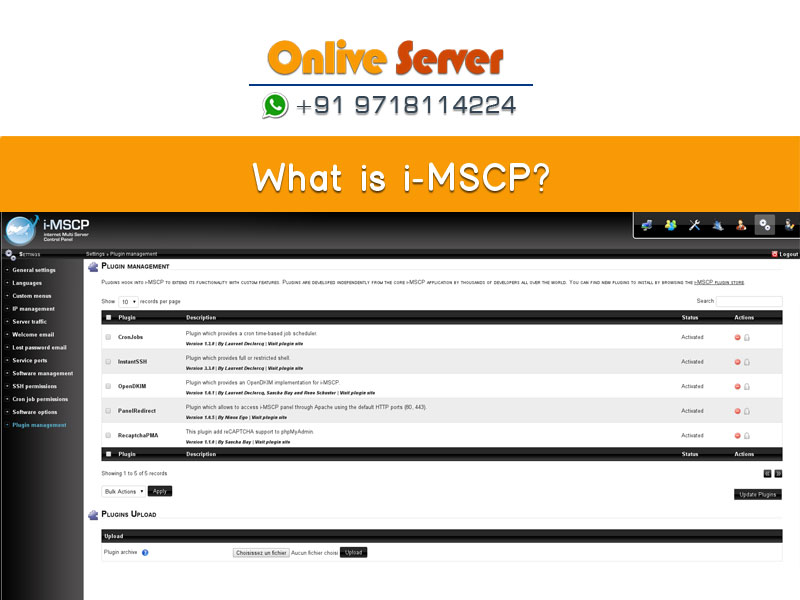
Quick Answer: What Is i-MSCP?
i-MSCP (Internet Multi Server Control Panel) is an open-source web hosting control panel designed for managing shared and multi-server hosting environments on GNU/Linux distributions. Originating as a modular fork of ispCP Omega, i-MSCP automates the provisioning and configuration of core hosting services—including Apache/Nginx web servers, Postfix/Dovecot email servers, Bind9 DNS daemons, and MariaDB/MySQL databases. Through its web-based graphical interface and extensible plugin engine, administrators, resellers, and end users can manage domains, mailboxes, and FTP accounts without requiring continuous manual command-line interaction on a modern Linux cloud VPS hosting with automated backups environment.
Managing internet hosting infrastructure across multiple servers has historically required extensive manual configuration of configuration files, firewall rules, and virtual host definitions. In the early days of open-source hosting automation, platforms like VHCS and ispCP Omega provided sysadmins with free alternatives to proprietary giants like cPanel. Out of this lineage emerged i-MSCP (Internet Multi Server Control Panel), a community-driven initiative engineered to deliver greater modularity, stability, and multi-server flexibility for Linux administrators operating web servers and virtual machines.
- 1. Core Modular Engine Architecture: Coordinates Apache/Nginx web servers, Postfix/Dovecot mail daemons, and Bind9 DNS zones via automated backend daemons.
- 2. Three-Tier User Hierarchy: Segregates server administrator permissions, reseller quotas, and client web hosting accounts cleanly.
- 3. Modern Open-Source Migration Strategy: Provides structured workflows to transition deprecated legacy servers to active control panel alternatives.
The Architectural Evolution of i-MSCP
i-MSCP was conceived to solve the rigid architectural constraints of its predecessor, ispCP Omega. The engineering team rebuilt the backend engine around an event-driven listener architecture and a modular plugin engine. Instead of hardcoding server daemon behavior directly into Perl backend scripts, i-MSCP introduced an extensible hook system that allows developers to intercept configuration generation at any stage of the server provisioning lifecycle. For modern production environments, provisioning workloads on modern Linux cloud VPS hosting with automated backups provides dedicated vCPU allocations, ultra-fast NVMe storage, and complete root administrative access.
Under the hood, i-MSCP functions by coordinating two primary layers: a web frontend written in PHP that presents an intuitive management interface, and an asynchronous backend daemon written in Perl (imscp_daemon) executing with root privileges. When an administrator or domain customer creates a new domain, database, or email box in the browser, the frontend logs transaction requests into a central MySQL management database. The backend daemon regularly polls these queued jobs, validates parameters, and executes the necessary filesystem manipulations, user account creations, and daemon reload signals safely without exposing the web server directly to root execution.
This strict separation of duties between the unprivileged web server process (executing under the web server user) and the root daemon process provided an essential security barrier against privilege escalation vulnerabilities, a common hazard in shared multi-tenant hosting environments.
Core System Components and Service Stack
When deployed on a supported Linux distribution (primarily Debian or Ubuntu LTS), i-MSCP installs and orchestrates a comprehensive suite of enterprise-grade open-source daemons to create a full-featured shared hosting environment:
- HTTP & Web Server Layer: Supports Apache2 with multiple execution engines, including FCGId, ITK, and PHP-FPM for secure multi-tenant isolation, or hybrid setups with Nginx acting as a high-performance reverse proxy for static assets.
- Mail Transport & Delivery: Integrates Postfix as the Mail Transfer Agent (MTA) for SMTP routing, coupled with Dovecot for secure IMAP/POP3 mailbox access with TLS encryption and quota enforcement.
- Domain Name System (DNS): Configures Bind9 to manage authoritative primary and secondary DNS zones automatically, updating serials and records whenever domains or subdomains are provisioned.
- Database Management: Native integration with MariaDB and MySQL, accompanied by phpMyAdmin for browser-based relational schema creation, table editing, and SQL dumps.
- FTP & File Handling: Integrates ProFTPd or Vsftpd with virtual SQL-authenticated user databases, preventing hosting customers from accessing physical server terminal accounts.
Technical Comparison: i-MSCP vs. Modern Hosting Control Panels
To understand where i-MSCP stands in today’s hosting landscape, compare its capabilities, licensing model, and maintenance status against established control panel platforms across enterprise and open-source sectors: For comprehensive implementation details and operational workflows, review our guide on migrating legacy shared hosting to DirectAdmin web hosting control panel.
Multi-User Tier Architecture
i-MSCP was engineered with a strict three-tier administrative hierarchy modeled after traditional web hosting reseller businesses:
- Administrator Level: Root-equivalent web access. Administrators manage core server packages, IP addresses, service restart operations, global hosting plans, system software updates, and create reseller accounts.
- Reseller Level: Sub-administrative accounts capable of provisioning custom hosting packages, managing disk and bandwidth quotas, and onboarding end-user client domains without system-wide administrative access.
- Client / Customer Level: End-user access dedicated to specific domain names. Clients configure subdomains, DNS records, FTP credentials, email accounts, forwarders, auto-responders, and MySQL databases through self-service dashboards.
This strict segmentation enabled hosting companies to run dozens or hundreds of tenant websites on a single migrating legacy shared hosting to DirectAdmin web hosting control panel platform while maintaining organizational isolation across clients.
Plugin Ecosystem and Extensibility
One of i-MSCP’s standout technical accomplishments was its modular plugin management framework. Instead of modifying core PHP and Perl source files, community developers could distribute standalone plugins packaged as zip archives. Key plugins that gained widespread adoption included:
- PhpSwitcher: Allowed hosting administrators to compile custom multiple PHP versions and assign specific runtime versions to individual domain virtual hosts via PHP-FPM pools.
- LetsEncrypt: Automated ACME domain validation challenges and generated free SSL/TLS certificates for domains, aliases, and subdomains before expiration.
- ClamAV & SpamAssassin: Provided anti-virus attachment scanning and real-time Bayesian spam filtering directly inside Postfix mail flow queues.
- Roundcube Webmail: Replaced rudimentary webmail interfaces with a modern, responsive AJAX interface for end-user web-based email interaction.
Practical Operations: i-MSCP Terminal Administration Runbook
For system administrators tasked with maintaining legacy i-MSCP installations, command-line proficiency is essential for debugging stalled daemon queues, rebuilding corrupted virtual hosts, and verifying service health: To strengthen overall system reliability and security, explore our technical tutorial on managing multi-tenant domain accounts on cPanel WHM servers.
# 1. Reconfigure or re-run the i-MSCP installer to rebuild broken configurations
sudo perl /var/www/imscp/engine/setup/imscp-setup --reconfigure

# 2. Check the real-time status of the background processing daemon
sudo systemctl status imscp_daemon.service

# 3. View live execution logs of the i-MSCP backend daemon
sudo tail -f /var/log/imscp/imscp_daemon.log

# 4. Trigger an immediate reconfiguration of all domains and virtual hosts
sudo perl /var/www/imscp/engine/imscp-rqst-mngr -r all

# 5. Check syntax and status of managed web and mail services
sudo systemctl status apache2 postfix dovecot bind9 mysql
Current State, Deprecation, and Security Realities
While i-MSCP served the hosting community admirably for over a decade, system architects must acknowledge its current lifecycle reality. Active development of i-MSCP has dramatically slowed, and official support for modern Linux releases (such as Debian 11/12 and Ubuntu 22.04/24.04 LTS) is either experimental or nonexistent. Running outdated control panel software introduces significant enterprise vulnerabilities:
- Unpatched Open-Source CVEs: Operating systems that have passed End-of-Life (such as Debian 9 Stretch or Ubuntu 16.04 Xenial) no longer receive upstream security patches for OpenSSL, Apache, or the Linux kernel.
- PHP Compatibility Barriers: Modern applications (such as WordPress 6.x, Laravel 11, and modern e-commerce suites) mandate PHP 8.1, 8.2, or 8.3. Legacy i-MSCP environments often struggle to build or route these modern runtime engines.
- Let’s Encrypt ACME API Changes: Older Let’s Encrypt plugins relying on ACME v1 protocols have ceased functioning, requiring brittle custom script workarounds to avoid expired SSL warnings.
Modern Migration Strategy: Upgrading from i-MSCP
Organizations currently operating production websites on legacy i-MSCP instances should prioritize an orderly migration plan toward active, enterprise-ready control panels such as the managing multi-tenant domain accounts on cPanel WHM servers or modern Debian-based ISPConfig instances:
- Audit Existing Tenants: Inventory all active virtual hosts, database instances, DNS entries, and mail accounts on your i-MSCP server.
- Provision Modern Infrastructure: Deploy a modern Linux VPS or dedicated server running AlmaLinux 9 or Ubuntu 22.04 LTS equipped with enterprise NVMe storage.
- Perform File & Data Sync: Transfer website document roots via
rsyncand export MariaDB databases usingmysqldumpwith UTF-8 character encoding preservation. - Import to Destination Panel: Recreate user accounts on your new control panel, map databases and users, and re-issue modern Let’s Encrypt wildcard SSL certificates.
- Switch DNS Records: Update your nameservers or A records to cut traffic over to the modern server environment with zero downtime.
For businesses seeking a stable, easy-to-manage web hosting foundation with cPanel or DirectAdmin control, choosing reliable Linux web hosting guarantees high uptime reliability and automated backups.
Frequently Asked Questions
Is i-MSCP still safe to use for production web hosting?
Due to the cessation of regular security updates and lack of native support for modern operating systems like Debian 12 and Ubuntu 22.04 LTS, using i-MSCP for new production environments is not recommended. Existing deployments should be scheduled for migration to actively maintained alternatives to prevent security vulnerabilities and software obsolescence.
What is the difference between i-MSCP and ispCP Omega?
i-MSCP was created as a fork of ispCP Omega. The primary differences lie in i-MSCP’s modular event-driven architecture, listener hook system, enhanced plugin management, and superior support for dual web server configurations (Apache reverse-proxied behind Nginx).
Can i-MSCP run multiple PHP versions simultaneously?
By default, stock i-MSCP binds to the operating system’s default PHP package. However, administrators could enable multi-PHP functionality by compiling additional PHP binaries and integrating community plugins such as PhpSwitcher, although configuring modern PHP 8.x versions requires manual dependency adjustments.
What are the best modern replacements for an i-MSCP server?
If you require an open-source, free control panel, ISPConfig 3 and CyberPanel are the most direct modern replacements. If you are willing to invest in a low-cost commercial license with enterprise support and weekly updates, DirectAdmin is the industry standard for lightweight, high-performance hosting.
Can i-MSCP manage multiple physical servers from one master node?
Yes, the original design of i-MSCP included remote server capabilities for offloading database, DNS, and mail daemons to dedicated satellite nodes. However, in practice, setting up multi-server nodes required complex manual synchronization and was rarely adopted outside of specialized environments.
Conclusion: Modernizing Beyond Legacy i-MSCP Control Panels
i-MSCP was an influential open-source milestone that democratized shared hosting management for over a decade. However, with modern PHP 8.x requirements, evolving web server technologies, and critical security patch requirements, transitioning workloads to actively maintained platforms like DirectAdmin or ISPConfig is essential for long-term viability.
