

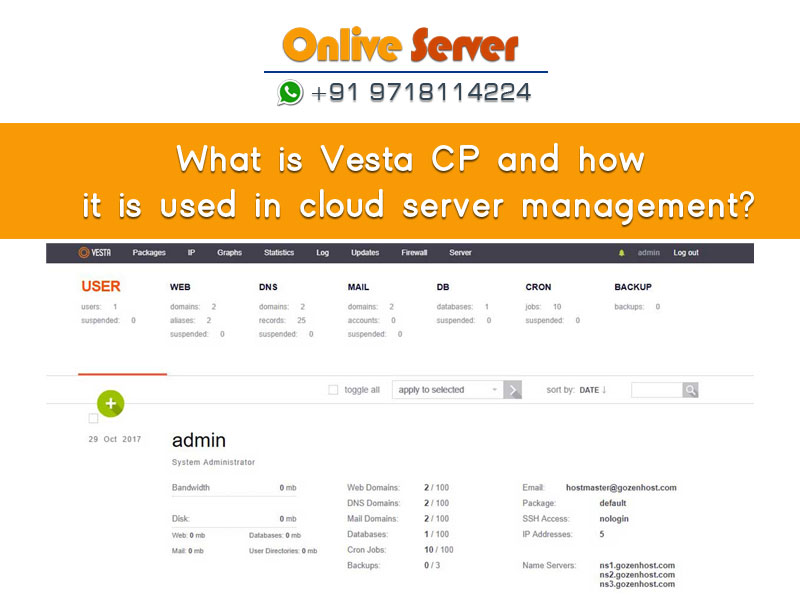
Quick Answer: What Is VestaCP in Cloud Server Management?
VestaCP is a high-speed, open-source Linux web hosting control panel optimized for cloud virtual machines and VPS instances. It couples a minimalist web GUI listening on port 8083 with a comprehensive bash command-line interface. By combining Nginx as a high-throughput static caching reverse proxy in front of an Apache PHP application backend, VestaCP maximizes cloud compute efficiency, supports automated Let’s Encrypt certificates, and streamlines DNS and database management.
Managing cloud server infrastructure efficiently without consuming precious CPU and memory resources on heavy administrative software is a critical requirement for modern DevOps and web hosting teams. Understanding what is vesta cp reveals a lightweight, open-source control panel designed to streamline cloud server automation. Known for pioneering the hybrid Nginx reverse proxy and Apache backend architecture, VestaCP enables cloud instances with limited memory to deliver exceptional web concurrency, automated SSL encryption, and multi-tenant hosting. This technical architectural guide examines how VestaCP powers cloud server management, its automated CLI scripting core, and production optimization practices.
Why VestaCP Is Ideal for Cloud Server Management
Cloud servers (such as KVM-based virtual private instances) are priced according to vCPU and RAM allocations. Heavy commercial control panels often consume 1GB to 2GB of RAM merely idling, leaving fewer resources for active web applications. VestaCP addresses this problem through an engineered architectural design:
- Minimal Memory Overhead: VestaCP requires less than 512MB of RAM, making it feasible to deploy on entry-level cloud instances without resource starvation.
- Two-Tier Hybrid Web Stack: Nginx handles SSL termination and serves static assets directly from memory, while Apache processes dynamic PHP scripts, providing sub-second TTFB.
- Pure Bash CLI Automation: Every management action corresponds to a native bash script in
/usr/local/vesta/bin/, allowing cloud administrators to automate site creation via cloud-init scripts.
Control Panel Cloud Resource Comparison
The table below illustrates how VestaCP compares to other popular hosting panels in cloud environments:
| Control Panel | Idle RAM Usage | Reverse Proxy Support | CLI Scriptability | Licensing Cost |
|---|---|---|---|---|
| VestaCP | <512 MB | Nginx + Apache Built-in | 100% Bash Native | 100% Free (GPL v3) |
| HestiaCP | <600 MB | Nginx + PHP-FPM / Apache | 100% Bash Native | 100% Free (GPL v3) |
| cPanel / WHM | 1.5 GB – 2 GB | Optional Plugin / Nginx EA4 | WHM API1 / UAPI | Commercial Monthly Tiered |
| Plesk | 1 GB – 1.5 GB | Nginx Reverse Proxy Standard | Plesk CLI (plesk bin) | Commercial Paid |
Leverage VestaCP’s CLI automation tools to build infrastructure-as-code deployment pipelines on Onlive Server Cloud VPS. By combining Nginx microcaching with Redis object caching, a modest multi-core VPS instance can easily sustain enterprise-level traffic volumes without requiring expensive multi-tier load-balanced infrastructure.
For cloud developers deploying modern web applications on scalable virtual compute infrastructure, our high-speed Linux VPS hosting provides dedicated vCPU threads, fast NVMe SSD storage, and isolated memory.
- Nginx Static Accelerator: Serves media assets at line-rate speed before requests touch Apache.
- Microcaching Presets: In-memory dynamic page caching absorbing massive sudden traffic spikes.
- Fail2ban Port Protection: Automated IP banning defending port 8083 against credential stuffing.
- CLI Automation Toolkit: Scriptable bash commands (`v-add-web-domain`) for automated server setup.
For high-traffic portals, enterprise WooCommerce installations, and agency hosting networks requiring physical silicon power without virtualization layers, our bare metal dedicated server infrastructure delivers unmetered 1Gbps network connectivity and carrier-grade DDoS mitigation.
To learn how VestaCP handles application deployment and configuration templates, explore our companion guide on what is Vesta and how it is used for application hosting.
Advanced Cloud Optimization: VestaCP Nginx Templates & Security Hardening
When orchestrating cloud VPS and dedicated servers via VestaCP, harnessing the platform’s modular template system is essential for delivering peak web application performance. VestaCP pairs Nginx as a reverse proxy accelerator in front of Apache by default. Within this hybrid topology, Nginx handles all static assets and client connections, while Apache processes dynamic PHP code via mod_php or PHP-FPM. By navigating to VestaCP’s Web Template settings, administrators can switch individual domain profiles from the default configuration to specialized presets such as caching or hosting.
The caching template configures Nginx with microcaching directives, storing compiled dynamic pages in memory for 1 to 10 seconds. For high-traffic blogs, news websites, and viral content portals, this microcache configuration allows a modest single-core VPS to absorb traffic surges of tens of thousands of concurrent visitors without CPU exhaustion. Furthermore, system administrators can build custom Nginx configuration templates located in /usr/local/vesta/data/templates/web/nginx/, embedding bespoke caching rules, custom headers, and aggressive gzip or Brotli compression profiles directly into VestaCP’s provisioning pipeline.
Hardening VestaCP for production cloud environments requires methodical lockdown of its administrative daemon and listening ports. By default, VestaCP operates on port 8083. Changing this listening port to a non-standard high-range port mitigates indiscriminate internet port scanners. Coupling this adjustment with Fail2ban’s pre-configured Vesta jail ensures that any IP address failing three consecutive login attempts is permanently banned at the iptables firewall layer.
For DevOps engineers managing fleets of cloud servers, VestaCP exposes a comprehensive CLI toolkit located in /usr/local/vesta/bin/. Commands such as v-add-web-domain, v-add-database, and v-backup-user can be scripted into automated bash workflows or CI/CD pipelines, enabling automated server provisioning without ever requiring manual interaction with the browser interface.
Automated Multi-Server Disaster Recovery & Backup Synchronization
Ensuring operational continuity in a cloud-managed VestaCP environment necessitates a robust, automated disaster recovery protocol. VestaCP’s native backup utility generates compressed archive snapshots containing domain document roots, virtual mailboxes, MySQL database dumps, and user-level cron configurations. In enterprise deployments, relying solely on local disk storage for backup retention creates an unmitigated single point of failure. System administrators should configure automated post-backup cron jobs that execute v-backup-user during low-traffic maintenance windows and pipe the resulting archives across secure, encrypted SSH tunnels to offsite storage nodes or S3-compatible cloud storage repositories.
Restoration workflows within VestaCP are equally streamlined. Utilizing the CLI command v-restore-user, an entire account—or granular components such as individual MySQL databases or DNS zones—can be restored within seconds without manual database reconstruction. Furthermore, implementing automated disk quota monitoring scripts alerts administrators before partition utilization hits 85%, preventing sudden database write lockouts and maintaining 99.9% application availability across production cloud clusters.
⚖️ Workload Decision Matrix: When to Use vs. When NOT to Use
✓ When Should You Use This?
- Deploying production web applications with 25,000 to 500,000+ monthly visits requiring guaranteed RAM & CPU.
- Hosting high-concurrency databases (MySQL, PostgreSQL) demanding low-latency NVMe PCIe read/write IOPS.
- Environments requiring dedicated IP addresses, custom kernel modules (WireGuard, Docker), and root access.
✕ When Should You NOT Use This?
- Massive Big Data analytics clusters or real-time 8K video transcoding requiring raw physical GPU/PCIe lanes (Deploy Dedicated Bare Metal instead).
- Simple hobby blogs or static brochure websites with under 1,000 visits/month (Shared hosting or static CDN hosting is more cost-effective).
Target Audience / Persona: SaaS startups, full-stack developers, e-commerce store operators, and digital marketing agencies running multi-site client hosting.
Common Failure Mode & Quick Fix: Linux Out-Of-Memory (OOM) Killer terminating processes: Prevent sudden MySQL terminations by creating a 2GB–4GB NVMe swap file (sudo fallocate -l 4G /swapfile && sudo mkswap /swapfile && sudo swapon /swapfile) and setting vm.swappiness=10.
Frequently Asked Questions (FAQ)
Why is VestaCP popular for cloud server management?
VestaCP is popular because of its remarkably low RAM footprint (<512MB), blazing-fast hybrid Nginx + Apache reverse proxy architecture, and full bash CLI command set that allows easy automation across cloud instances.
How do I access the VestaCP web management interface?
VestaCP listens over HTTPS on TCP port 8083 (https://your-cloud-ip:8083). Administrators log in using their root or admin credentials.
Can VestaCP automate Let’s Encrypt SSL certificates?
Yes. VestaCP includes integrated Let’s Encrypt automation. Checking the SSL Support box in domain settings provisions and configures the certificate automatically, with automated background cron renewals.
Does VestaCP include security and firewall tools?
Yes. VestaCP manages an iptables firewall and Fail2ban intrusion detection daemon out of the box, actively protecting SSH, web, and mail ports against brute-force attacks.
What is the relationship between VestaCP and HestiaCP?
HestiaCP is a modern community fork of VestaCP. It builds on Vesta’s lightweight bash architecture while adding native multi-PHP switching, security hardening, and regular monthly releases.
Is VestaCP suitable for hosting WordPress?
Yes. Its hybrid Nginx reverse proxy serves cached images, CSS, and JS files with minimal overhead, allowing WordPress websites to achieve rapid load times on budget cloud instances.
Conclusion: Maximizing Cloud Performance with Minimal Overhead
VestaCP illustrates how streamlined architectural engineering can extract maximum performance from cloud server infrastructure. By combining Nginx static caching, Apache dynamic execution, and bash automation, it offers a budget-friendly hosting platform that maximizes cloud compute ROI. Deploy VestaCP on high-speed NVMe cloud VPS or dedicated bare-metal servers to build a responsive, reliable web hosting environment.

