

✓ Expert Verified
Does virtualization slow down a VPS?
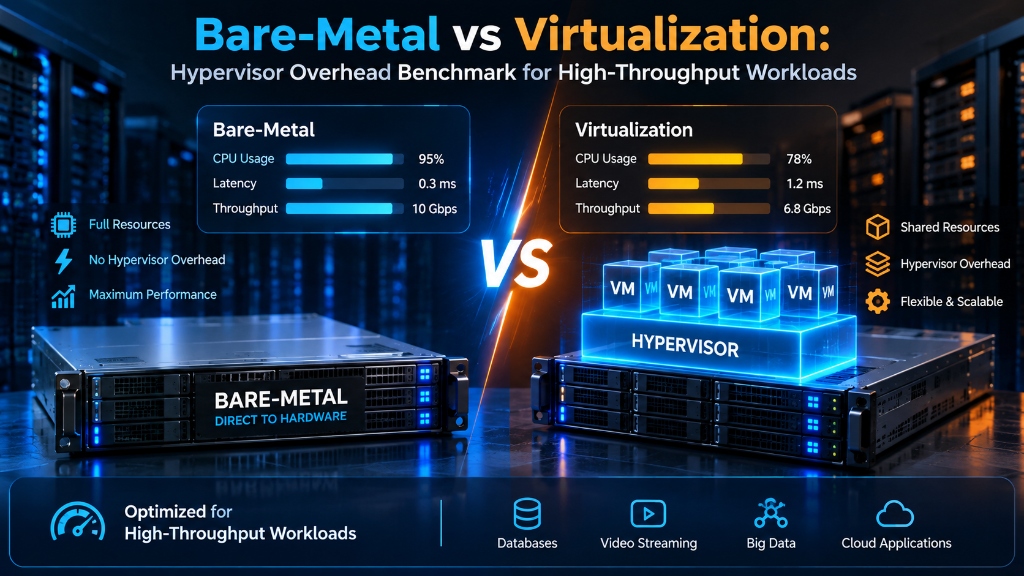
Bare-metal dedicated servers eliminate the 5–12% hypervisor virtualization overhead found in multi-tenant cloud environments. Direct hardware access delivers consistent CPU clock cycles, deterministic NVMe IOPS, and zero noisy-neighbor resource contention.
Yes, virtualization can introduce slight CPU, memory, storage, and networking overhead. However, modern KVM uses hardware-assisted virtualization (Intel VT-x / AMD-V) so ordinary guest instructions execute directly on the physical processor at near-native speeds. For production web, application, and database workloads, the practical performance difference depends far more on host resource contention, CPU scheduling, and storage configuration than on the hypervisor layer alone.
What Is Virtualization Overhead?
Virtualization overhead is the additional processing, memory, I/O, or scheduling latency introduced when an operating system runs inside a hypervisor rather than directly on dedicated physical hardware.
Modern processors include virtualization extensions such as Intel VT-x and AMD-V. These technologies allow the guest operating system to execute CPU instructions directly on the physical cores without software emulation, significantly narrowing the historic performance gap.
The remaining overhead usually appears around operations that require hypervisor coordination: CPU privilege transitions (VM-Exits), two-dimensional page table walks for memory translation, software-mediated storage queues, and virtual network bridge traversals.
Virtualization overhead is not a fixed percentage. It changes according to whether a workload is CPU-bound, memory-bound, network-intensive, or dependent on continuous random disk I/O.
How KVM Virtualization Works
KVM is integrated into the Linux kernel and uses hardware virtualization extensions to run virtual machines as regular Linux processes. Rather than emulating an entire system in software, KVM relies on CPU hardware flags to separate guest execution from host management.
Guest Application
Web applications, production databases, microservices, and container runtimes.
Guest Operating System
Linux distribution or Windows Server kernel managing internal memory and process threads.
KVM Hypervisor & QEMU
Hardware-assisted execution, vCPU thread scheduling, and paravirtualized VirtIO device coordination.
Physical Server Hardware
Bare-metal processor cores, DDR4/DDR5 ECC memory buses, PCIe NVMe storage controllers, and physical NICs.
CPU Execution and VM-Exit Overhead
Most ordinary guest CPU instructions can run directly on the physical processor at native speeds. This means compute-bound algorithms, image processing routines, and data transformations often show negligible performance differences between bare metal and KVM.
One important mechanism is the VM-Exit. When a guest operation requires privileged host intervention—such as handling certain hardware interrupts, modifying core control registers, or accessing emulated memory ranges—the physical processor pauses guest execution and switches context back to the host hypervisor. Each transition incurs a minor cycle penalty.
A small number of VM-Exits may have little practical impact. A latency-sensitive workload that triggers frequent privilege changes, however, may experience jitter or tail-latency spikes that would not occur on dedicated hardware.
Host · Monitor VM-Exit Events via Perf
# Record hypervisor context switches and VM-Exit reasons
perf kvm --host stat record -a sleep 10
perf kvm --host stat report --vcpu 0Memory Virtualization: EPT, NPT and TLB Behaviour
A bare-metal operating system maps virtual memory addresses directly toward physical RAM through the processor’s memory-management hardware. A virtual machine introduces another translation layer.
Single Translation Path
→
Physical RAM
Direct address mapping handled natively by the processor MMU page tables.
Two-Level Translation (EPT/NPT)
→
Guest Physical
→
Host Physical
Hardware-assisted nested page tables maintain translation efficiency while preserving memory isolation.
Intel processors use Extended Page Tables (EPT), while AMD systems use Nested Page Tables (NPT). These hardware features reduce the amount of software intervention required during memory translation.
Large memory pages (HugePages) can also reduce translation overhead in workloads that benefit from fewer page-table entries. The appropriate HugePages configuration depends on the workload and operating-system setup.
Storage I/O: VirtIO vs Direct NVMe Access
Storage is one of the areas where virtualization configuration can have a measurable impact. Dedicated bare-metal servers interact directly with the local NVMe storage controller over dedicated PCIe lanes, enabling massive parallel queue depths.
In a virtual machine, storage requests pass through virtual storage drivers such as VirtIO-SCSI or VirtIO-Blk. These paravirtualized drivers minimize overhead by bypassing traditional hardware emulation, coordinating directly with the host storage stack.
Engineers can use FIO to measure random I/O behaviour instead of assuming throughput based solely on advertised drive specifications.
FIO · Random 4K I/O Storage Benchmark
fio --name=iops_benchmark \
  --rw=randrw --rwmixread=70 --bs=4k \
  --ioengine=libaio --iodepth=64 --numjobs=4 \
--size=20G --direct=1 --runtime=60 --group_reportingNetwork Performance: VirtIO-Net vs SR-IOV
Network virtualization adds another processing layer between the guest operating system and the physical network interface card (NIC). In standard configurations, VirtIO-Net delivers high performance for typical web, application, and API traffic by avoiding software emulation.
Workloads that process very large packet volumes or require tightly controlled packet latency may benefit from Single Root I/O Virtualization (SR-IOV) or direct PCIe passthrough. These options allow a virtual machine to interact directly with physical NIC hardware channels, approaching bare-metal latency.
NUMA Awareness and CPU Pinning
Multi-socket servers divide CPU cores and memory into NUMA (Non-Uniform Memory Access) nodes. Accessing memory attached to the same NUMA node is faster than accessing memory attached to another physical socket across inter-socket interconnects.
Poor vCPU and memory placement can increase memory-access latency. For latency-sensitive workloads, administrators can use CPU pinning and NUMA-aware VM configuration to keep compute resources pinned closely to the memory channels they use.
Libvirt · NUMA Memory & vCPU Pinning XML Snippet
<numatune>
  <memory mode='strict' nodeset='0'/>
</numatune>

<cputune>
  <vcpupin vcpu='0' cpuset='0'/>
  <vcpupin vcpu='1' cpuset='2'/>
  <vcpupin vcpu='2' cpuset='4'/>
  <vcpupin vcpu='3' cpuset='6'/>
</cputune>Why Tail Latency Matters More Than Average Speed
Average performance metrics do not always reflect real-world user experience. A server may show an average response time of 5 milliseconds while the 99th percentile (p99) latency spikes to 200 milliseconds during transient resource contention.
Standard Requests (~2ms)
Peak Concurrency (~12ms)
Tail Latency Outliers (~45ms)
On a busy virtualization host, scheduling delays or shared I/O contention can affect tail latency even when average CPU utilisation appears acceptable. Production testing should examine response time distributions rather than relying solely on average throughput.
How to Benchmark KVM vs Bare Metal
There is no single benchmark that describes virtualization overhead comprehensively. A reliable comparison should isolate and test the specific subsystem resources required by your application stack.
| Workload Subsystem | What to Measure | Recommended Tool |
|---|---|---|
| CPU Execution | Single-core instruction throughput, multi-thread scaling, VM-Exit frequency | sysbench / stress-ng |
| Memory Latency | L1/L2/L3 cache misses, EPT nested translation overhead, NUMA bandwidth | STREAM / sysbench memory |
| Disk I/O | Random 4K read/write IOPS, queued tail latency, direct vs buffered bandwidth | FIO |
| Network Transit | Packet-per-second processing, TCP window throughput, inter-node round-trip time | iperf3 / sockperf |
| Database Engine | ACID transaction commit throughput, lock contention, sub-millisecond query execution | pgbench / sysbench oltp |
Benchmark results are highly environment-specific. Hardware generation, memory bus configuration, storage controllers, hypervisor versions, and host oversubscription all influence measurements. Always benchmark under realistic production traffic profiles.
When Should You Use KVM VPS or Bare Metal?
KVM VPS
Ideal when you need dedicated resource partitions, rapid deployment, template provisioning, snapshot backups, and the flexibility to resize allocations on demand.
- Production web applications & APIs
- SaaS application tiers
- Development & staging clusters
- Mid-tier database instances
- Containerized microservices
Bare Metal
Crucial when workloads demand zero hypervisor translation, deterministic sub-millisecond tail latency, continuous maximum compute utilisation, or direct PCIe hardware passthrough.
- High-frequency financial & transactional systems
- Massive multi-terabyte database clusters
- Real-time telemetry & streaming ingestion
- Hardware-level virtualization hosts
- Specialized PCIe acceleration cards
How to Reduce Virtualization Overhead
Verify Intel VT-x or AMD-V is enabled with EPT/NPT active in the host BIOS.
Always utilize VirtIO-SCSI and VirtIO-Net drivers to bypass slow hardware emulation.
Avoid excessive vCPU overcommitment to eliminate thread scheduling pauses.
Pin vCPU threads and allocate RAM within the same physical processor socket.
Match guest queue depths to underlying PCIe controller capabilities for low latency.
Continuously track p95 and p99 response times rather than relying on average usage.
Virtualization overhead depends on the workload, not just the hypervisor.
KVM virtualization adds an abstraction layer, but hardware-assisted CPU execution, efficient virtual I/O, appropriate memory management, NUMA awareness, and careful resource allocation can keep the impact low for many workloads.
Bare metal remains useful when an application needs direct hardware access or highly predictable performance. For other production environments, a properly configured KVM VPS can provide a practical balance between performance, isolation, and infrastructure flexibility.
Frequently Asked Questions
Does KVM introduce significant performance overhead? +
KVM can introduce minor virtualization overhead, but hardware virtualization extensions allow guest operating systems to execute most instructions directly on the physical CPU. For many standard workloads, the real-world overhead remains under 5% when the host is properly sized and configured.
What causes the most virtualization overhead in virtual machines? +
Common sources include VM-Exits (privilege transitions between guest and host), two-dimensional nested memory address translation, and virtual device I/O queuing. In busy hosting environments, CPU core oversubscription and shared disk contention often create greater latency than the hypervisor itself.
Can a KVM VPS run high-performance database workloads? +
Yes. A KVM VPS can comfortably support demanding database workloads when allocated dedicated processor cores, fast NVMe-backed storage, and adequate memory buffers. However, ultra-high-throughput enterprise databases requiring hundreds of thousands of sustained IOPS generally benefit from dedicated bare-metal servers.
Does CPU pinning improve KVM performance? +
CPU pinning can improve predictability for latency-sensitive workloads by binding specific virtual CPUs to dedicated physical cores and keeping them local to their assigned NUMA node. This eliminates cross-socket memory latency and prevents hypervisor thread migration.
When is bare metal preferable to a KVM VPS? +
Bare metal is preferable when an application demands direct physical hardware access, maximum deterministic I/O throughput, zero noisy-neighbor interference, or custom PCI-e hardware integration that cannot be easily virtualized.
How should I measure virtualization overhead on my own servers? +
Test CPU, memory, storage, and network performance separately using dedicated benchmarking utilities such as sysbench, STREAM, FIO, and iperf3. Then execute application-level stress tests (e.g. pgbench or ApacheBench) to observe real-world throughput and tail-latency percentiles.
Hardware vs Hypervisor Sizing
Conclusion: Strategic Architecture & Performance Summary
Implementing these technical optimizations for bare-metal vs virtualization: hypervisor overhead benchmark for high-throughput workloads ensures robust throughput, predictable latency, and maximum system reliability across production environments. Rigorous benchmarking and proactive parameter tuning eliminate latent resource bottlenecks before they impact end users.
Pairing disciplined operating system administration with reliable compute foundations is essential for mission-critical operations. Deploying workloads on enterprise dedicated server hosting provides the dedicated resources, network resilience, and hardware acceleration necessary to sustain high availability under heavy production load.
Match your infrastructure to the workload.
Choose the server architecture according to your application’s CPU, memory, storage, network and latency requirements.
