

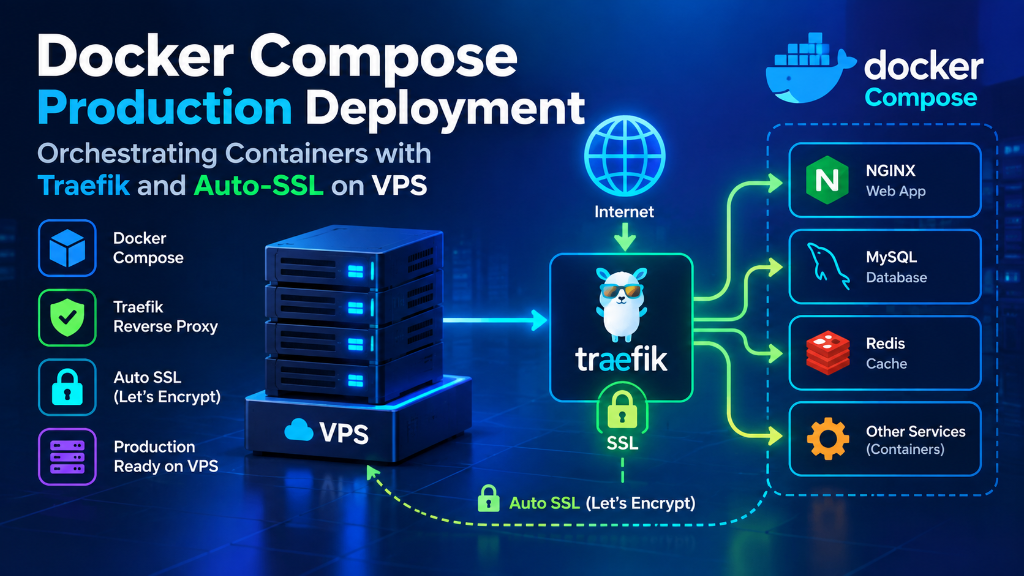
Deploying Docker Compose in production on a Linux VPS requires pairing Compose v2 with Traefik v3 as an edge reverse proxy connected over an isolated external bridge network (proxy-tier). Access to the Docker daemon socket is secured by mediating it through a read-only socket proxy (tecnativa/docker-socket-proxy) rather than mounting the raw socket directly into the public ingress. Automated Let’s Encrypt SSL certificates are managed dynamically through container labels, while zero-downtime rolling updates are achieved via Docker health checks and GitHub Actions CI/CD automation over SSH.
Deploying containerized microservices in production does not always require the cognitive overhead and infrastructure expense of a multi-node Kubernetes cluster. For thousands of fast-growing SaaS startups, digital agencies, and engineering teams, running Docker Compose on a dedicated, high-performance Linux VPS provides an exceptionally fast, deterministic, and cost-effective deployment target. When paired with Traefik as a cloud-native dynamic reverse proxy and Let’s Encrypt for zero-touch SSL automation, Docker Compose transforms a standalone virtual server into a resilient, self-healing production platform.
Dynamic Layer-7 reverse proxying with automatic container discovery via Docker labels, routing HTTPS traffic without manual reload scripts or configuration downtime.
Restricts daemon API access through a read-only socket proxy container, completely mitigating privilege escalation and root compromises from exposed microservices.
Single-commit GitHub Actions deployment over SSH combined with Docker health checks to guarantee deterministic, zero-downtime rolling updates in production.
Technical Index & Implementation Runbook
- Production Architecture: Edge Routing & Isolation
- Host Preparation: VPS Hardening, Docker & UFW
- Securing the Docker Socket with Read-Only Proxy
- Core Ingress Stack: Traefik v3 & Let’s Encrypt
- Application Workload Deployment & Traefik Labels
- Zero-Downtime Rolling Deployments & Health Checks
- Continuous Delivery: GitHub Actions CI/CD over SSH
- Verification, Monitoring & VPS Sizing
- Production Docker Compose FAQs
- Architectural Summary & Next Steps
1. Production Architecture: Edge Routing & Container Isolation Topology
A robust containerized production environment relies on strict separation between public ingress traffic and private internal communication channels. Rather than exposing container ports directly to the host network interface (which bypasses standard host firewall rules), our production topology implements a multi-tier network architecture:
- Public Edge Ingress (Traefik v3): Binds exclusively to host ports 80 (HTTP) and 443 (HTTPS). It inspects incoming host headers, terminates TLS encryption, and routes traffic over an isolated Docker bridge network.
- Dedicated Ingress Network (
proxy-tier): An externally defined Docker bridge network that connects Traefik to public-facing web containers. Backend services (such as databases and caching layers) never join this network. - Isolated Application Networks (
app-internal): Private internal networks dedicated to individual application stacks. Databases, Redis instances, and internal microservices communicate exclusively within their private bridge, completely hidden from Traefik and the public Internet. - Daemon Security Boundary: The Docker daemon socket (
/var/run/docker.sock) is never mounted directly into the public-facing Traefik container. Instead, access is mediated through a restricted, read-only socket proxy.
For organizations managing multi-tier hosting architectures, combining container network boundaries with high-performance cheap VPS compute instances ensures enterprise-grade isolation without enterprise licensing costs.
2. Host Preparation: Linux VPS Hardening, Docker Engine 26+ & UFW Firewall
Before launching container stacks, the underlying Linux VPS host must be properly hardened. Start with a fresh installation of Ubuntu 24.04 LTS or Debian 12 running on high-speed NVMe storage.
Step 1: Deploy Official Docker Engine & Compose v2
Avoid outdated distribution packages. Install the official Docker Engine repository according to the official Docker Compose documentation:
# Update repositories and install dependencies
sudo apt update && sudo apt install -y ca-certificates curl gnupg ufw

# Add Docker's official GPG key
sudo install -m 0755 -d /etc/apt/keyrings
curl -fsSL https://download.docker.com/linux/ubuntu/gpg | sudo gpg --dearmor -o /etc/apt/keyrings/docker.gpg
sudo chmod a+r /etc/apt/keyrings/docker.gpg

# Set up official Docker repository
echo "deb [arch=$(dpkg --print-architecture) signed-by=/etc/apt/keyrings/docker.gpg] https://download.docker.com/linux/ubuntu $(. /etc/os-release && echo "$VERSION_CODENAME") stable" | sudo tee /etc/apt/sources.list.d/docker.list > /dev/null

# Install Docker Engine and Compose plugin
sudo apt update
sudo apt install -y docker-ce docker-ce-cli containerd.io docker-buildx-plugin docker-compose-plugin
Step 2: Configure Production Daemon Defaults
Create /etc/docker/daemon.json to enforce automated log rotation and prevent disk exhaustion from unconstrained container stdout logs:
{
  "log-driver": "json-file",
  "log-opts": {
    "max-size": "10m",
    "max-file": "3"
  },
  "live-restore": true,
  "userland-proxy": false
}
Restart the Docker service to apply the configuration:
sudo systemctl restart docker
sudo systemctl enable docker
Step 3: Configure UFW Firewall & Mitigate Docker Port Exposure
By default, Docker manipulates Linux iptables directly, which can accidentally expose published container ports. In our architecture, services never bind to host ports directly; only Traefik binds to ports 80 and 443. Configure UFW accordingly:
sudo ufw default deny incoming
sudo ufw default allow outgoing
sudo ufw allow 22/tcp comment 'SSH Management'
sudo ufw allow 80/tcp comment 'Traefik HTTP'
sudo ufw allow 443/tcp comment 'Traefik HTTPS'
sudo ufw enable
3. Securing the Docker Socket: Deploying the Read-Only Socket Proxy
Traefik relies on the Docker API to detect container launch events and read routing labels dynamically. However, mounting /var/run/docker.sock directly into Traefik grants the container root-equivalent privileges over the host VPS. If an attacker exploits an edge reverse proxy vulnerability, they can compromise the entire host.
To eliminate this vulnerability, we deploy tecnativa/docker-socket-proxy. This lightweight security service sits between Traefik and the Docker socket, granting read-only access strictly to container and network metadata while blocking all write, execution, and volume manipulation API calls.
POST=0, BUILD=0, and EXEC=0 in the socket proxy, no container connected to the proxy can execute commands or spawn new containers on the host, adhering strictly to the principle of least privilege.
Directory Structure & Network Initialization
Create the core production infrastructure directory and the external Docker bridge networks:
sudo mkdir -p /srv/traefik/acme
sudo touch /srv/traefik/acme/acme.json
sudo chmod 600 /srv/traefik/acme/acme.json
sudo docker network create proxy-tier
sudo docker network create socket-tier --internal
4. Core Ingress Stack: Traefik v3 Docker Compose with Let’s Encrypt ACME
Now deploy the central reverse proxy stack. In accordance with the official Traefik v3 documentation and Let’s Encrypt ACME standards, create /srv/traefik/docker-compose.yml:
services:
  # Security Barrier: Read-Only Docker Socket Proxy
  docker-socket-proxy:
    image: tecnativa/docker-socket-proxy:latest
    container_name: docker-socket-proxy
    restart: unless-stopped
    environment:
      - CONTAINERS=1
      - NETWORKS=1
      - SERVICES=1
      - POST=0
      - BUILD=0
      - COMMIT=0
      - CONFIGS=0
      - DISTRIBUTION=0
      - EXEC=0
      - IMAGES=0
      - INFO=0
      - NODES=0
      - PLUGINS=0
      - SECRETS=0
      - SESSION=0
      - SWARM=0
      - SYSTEM=0
      - TASKS=0
      - VOLUMES=0
    volumes:
      - /var/run/docker.sock:/var/run/docker.sock:ro
    networks:
      - socket-tier

  # Edge Reverse Proxy & Automatic SSL Termination
  traefik:
    image: traefik:v3.1
    container_name: traefik
    restart: unless-stopped
    depends_on:
      - docker-socket-proxy
    security_opt:
      - no-new-privileges:true
    command:
      # API & Dashboard
      - "--api.dashboard=true"
      # Logging
      - "--log.level=INFO"
      - "--accesslog=true"
      # Providers: Connect to Socket Proxy instead of raw docker.sock
      - "--providers.docker=true"
      - "--providers.docker.endpoint=tcp://docker-socket-proxy:2375"
      - "--providers.docker.exposedbydefault=false"
      - "--providers.docker.network=proxy-tier"
      # EntryPoints
      - "--entrypoints.web.address=:80"
      - "--entrypoints.web.http.redirections.entrypoint.to=websecure"
      - "--entrypoints.web.http.redirections.entrypoint.scheme=https"
      - "--entrypoints.websecure.address=:443"
      # SSL / Let's Encrypt ACME Configuration
      - "--certificatesresolvers.letsencrypt.acme.email=admin@yourdomain.com"
      - "--certificatesresolvers.letsencrypt.acme.storage=/etc/traefik/acme/acme.json"
      - "--certificatesresolvers.letsencrypt.acme.httpchallenge.entrypoint=web"
    ports:
      - "80:80"
      - "443:443"
    volumes:
      - /srv/traefik/acme/acme.json:/etc/traefik/acme/acme.json
    networks:
      - proxy-tier
      - socket-tier
    labels:
      - "traefik.enable=true"
      # Secure Traefik Dashboard access
      - "traefik.http.routers.traefik-dashboard.rule=Host(`traefik.yourdomain.com`)"
      - "traefik.http.routers.traefik-dashboard.service=api@internal"
      - "traefik.http.routers.traefik-dashboard.entrypoints=websecure"
      - "traefik.http.routers.traefik-dashboard.tls=true"
      - "traefik.http.routers.traefik-dashboard.tls.certresolver=letsencrypt"
      - "traefik.http.routers.traefik-dashboard.middlewares=auth"
      # Basic Auth: generate with: htpasswd -nb admin yourpassword
      - "traefik.http.middlewares.auth.basicauth.users=admin:$$apr1$$xyz$$yourhashedpassword"

networks:
  proxy-tier:
    external: true
  socket-tier:
    external: true
Start the core ingress stack:
cd /srv/traefik
docker compose up -d
docker compose ps
5. Application Workload Deployment: Multi-Tier Microservice with Dynamic Traefik Labels
With the Traefik ingress stack running, any application deployed on the VPS can be automatically exposed to the web with an SSL certificate simply by declaring Docker labels in its local docker-compose.yml.
Here is a complete production microservice stack (Web API + PostgreSQL) located in /srv/apps/web-app/docker-compose.yml:
services:
  # Public Web Application Service
  web:
    image: yourregistry/production-web-app:latest
    container_name: web-app-production
    restart: unless-stopped
    env_file:
      - .env.production
    depends_on:
      db:
        condition: service_healthy
    networks:
      - proxy-tier
      - app-internal
    healthcheck:
      test: ["CMD-SHELL", "curl -f http://localhost:3000/health || exit 1"]
      interval: 15s
      timeout: 5s
      retries: 3
      start_period: 20s
    labels:
      - "traefik.enable=true"
      # Routing Rule
      - "traefik.http.routers.webapp.rule=Host(`app.yourdomain.com`)"
      - "traefik.http.routers.webapp.entrypoints=websecure"
      - "traefik.http.routers.webapp.tls=true"
      - "traefik.http.routers.webapp.tls.certresolver=letsencrypt"
      # Internal Port Discovery
      - "traefik.http.services.webapp.loadbalancer.server.port=3000"
      # Security Middlewares
      - "traefik.http.routers.webapp.middlewares=security-headers"
      - "traefik.http.middlewares.security-headers.headers.sslredirect=true"
      - "traefik.http.middlewares.security-headers.headers.stsSeconds=315360000"
      - "traefik.http.middlewares.security-headers.headers.browserXssFilter=true"
      - "traefik.http.middlewares.security-headers.headers.contentTypeNosniff=true"

  # Private Database Service (Never Exposed to Traefik or Public Internet)
  db:
    image: postgres:16-alpine
    container_name: web-app-db
    restart: unless-stopped
    environment:
      POSTGRES_DB: app_production
      POSTGRES_USER: app_user
      POSTGRES_PASSWORD_FILE: /run/secrets/db_password
    secrets:
      - db_password
    volumes:
      - postgres_data:/var/lib/postgresql/data
    networks:
      - app-internal
    healthcheck:
      test: ["CMD-SHELL", "pg_isready -U app_user -d app_production"]
      interval: 10s
      timeout: 5s
      retries: 5

networks:
  proxy-tier:
    external: true
  app-internal:
    driver: bridge

volumes:
  postgres_data:
    driver: local

secrets:
  db_password:
    file: ./secrets/db_password.txt
Deploy the application stack:
cd /srv/apps/web-app
docker compose up -d
Traefik instantly discovers the new container via the socket proxy, negotiates an SSL certificate with Let’s Encrypt within seconds, and begins routing traffic to internal port 3000.
6. Zero-Downtime Rolling Deployments & Healthcheck Automation
In production environments, deploying application updates must never drop HTTP connections or interrupt active user sessions. Docker Compose supports atomic rolling updates when combined with Traefik health checks.
How Traefik Handles Zero-Downtime Swaps:
- When Docker Compose begins updating a service, Traefik continues routing traffic to the currently active, healthy container.
- Compose starts the new container image in parallel and initiates the declared
healthcheck. - Traefik monitors the health status. Once the new container passes its health checks, Traefik seamlessly shifts incoming traffic to the new container.
- Compose gracefully stops and removes the obsolete container (
SIGTERMfollowed bySIGKILLafter 10 seconds).
The Production Deployment Command Runbook:
#!/usr/bin/env bash
set -e

APP_DIR="/srv/apps/web-app"
cd "$APP_DIR"

echo "Pulling latest production image..."
docker compose pull web

echo "Executing zero-downtime rolling update..."
docker compose up -d --no-deps --build web

echo "Pruning dangling images..."
docker image prune -f

echo "Deployment completed successfully!"
7. Continuous Delivery: Automated GitHub Actions CI/CD over SSH
Automating production deployments eliminates manual error and ensures consistent version control. In our dedicated guide to CI/CD deployment on VPS with GitHub Actions, we explore advanced runners. Below is the complete workflow (.github/workflows/deploy.yml) utilizing the official GitHub Actions documentation standards:
name: Production CI/CD Deployment

on:
  push:
    branches:
      - main

jobs:
  build-and-deploy:
    runs-on: ubuntu-latest
    steps:
      - name: Checkout Source Code
        uses: actions/checkout@v4

      - name: Log in to GitHub Container Registry
        uses: docker/login-action@v3
        with:
          registry: ghcr.io
          username: ${{ github.actor }}
          password: ${{ secrets.GITHUB_TOKEN }}

      - name: Build and Push Docker Image
        uses: docker/build-push-action@v5
        with:
          context: .
          push: true
          tags: ghcr.io/${{ github.repository }}/web-app:latest
          cache-from: type=gha
          cache-to: type=gha,mode=max

      - name: Deploy to Linux VPS via SSH
        uses: appleboy/[email protected]
        with:
          host: ${{ secrets.VPS_HOST }}
          username: ${{ secrets.VPS_USERNAME }}
          key: ${{ secrets.VPS_SSH_KEY }}
          port: ${{ secrets.VPS_SSH_PORT }}
          script: |
            cd /srv/apps/web-app
            docker compose pull web
            docker compose up -d --remove-orphans web
            docker image prune -f
            docker compose ps
8. Production Verification, Monitoring & VPS Sizing
Once deployed, maintain operational resilience with standard sysadmin verification and backup runbooks. For server administrators who prefer visual monitoring alongside SSH, deploying Cockpit Linux Web Console on VPS offers real-time CPU, RAM, and storage analytics.
Verification Checklist:
- SSL Validation: Verify certificate status and TLS 1.3 negotiation:
curl -Iv https://app.yourdomain.com - Real-Time Log Aggregation: Stream application and ingress logs cleanly:
docker compose -f /srv/traefik/docker-compose.yml logs -f --tail=100 traefik - Persistent Volume Backups: Store offsite backups using S3-compatible storage such as self-hosted MinIO object storage on VPS:
docker exec -t web-app-db pg_dumpall -c -U app_user | gzip > /srv/backups/db_$(date +%F).sql.gz - Snapshot Disaster Recovery: Implement structured disaster recovery as detailed in our guide on server snapshots vs backups for disaster recovery.
VPS Hardware Sizing Matrix for Container Fleets:
When provisioning infrastructure for production containers, match your workload scale to the appropriate compute tier:
| Workload Scale | Active Containers | Recommended Hosting Tier | RAM Allocation | Storage Tier |
|---|---|---|---|---|
| Entry / Starter | 1–4 Microservices | Linux VPS (2 vCPU / 4 GB) | 1 GB Traefik, 2 GB App | 50 GB NVMe |
| Growth / Mid-Tier | 5–15 Microservices | High-RAM VPS (4 vCPU / 8–16 GB) | 2 GB Traefik, 10 GB Apps + DB | 100–200 GB NVMe |
| Enterprise Fleet | 15–30+ Microservices | Dedicated Server Hosting | 4 GB Traefik, 24 GB Multi-Apps | 400 GB+ Enterprise NVMe |
9. Frequently Asked Questions: Production Docker Compose & Traefik
Why should I use a Docker Socket Proxy instead of mounting /var/run/docker.sock directly into Traefik?
CONTAINERS=1), blocking container creation and execution.How does Traefik handle Let’s Encrypt rate limits during staging and testing?
acme.caserver=https://acme-v02.api.letsencrypt.org/directory. During initial testing and debugging, you should switch to Let’s Encrypt Staging (https://acme-staging-v02.api.letsencrypt.org/directory) to avoid exhausting rate limits while testing DNS and ACME challenges.How do I achieve zero-downtime rolling updates with Docker Compose on a single VPS?
docker compose up -d --no-deps --scale web=2 --no-recreate web or healthcheck-driven staggered recreation. Traefik’s dynamic Docker provider continuously monitors container health; as soon as the new container passes its HTTP health check, Traefik routes traffic to it before the old container is stopped.What is the purpose of the traefik-public bridge network?
traefik-public network is an external Docker bridge network dedicated to ingress traffic. Only the Traefik proxy, the socket proxy, and public-facing web applications attach to it. Backend microservices, databases, and caches reside in isolated internal networks, preventing direct access from the public router.Where are SSL certificates stored and how are their file permissions secured?
/letsencrypt/acme.json. Linux requires this file to have strict POSIX permissions of chmod 600 (readable and writable only by the root owner). Traefik will refuse to start or generate certificates if acme.json has loose permissions.Can I run this Docker Compose + Traefik architecture on a budget Linux VPS?
10. Architectural Summary & Production Deployment Runbook
Orchestrating production microservices with Docker Compose, Traefik v3, and Let’s Encrypt delivers an exceptionally resilient, automated, and cost-effective hosting environment. By enforcing strict network boundaries, isolating the Docker daemon with a read-only socket proxy, and automating deployments through GitHub Actions, engineering teams achieve enterprise-level reliability without Kubernetes overhead.
1. Hardened Ingress
Traefik terminates TLS at the edge with automated Let’s Encrypt HTTP-01 challenges, isolating public web traffic from private database bridges.
2. Zero-Trust Socket
The read-only Tecnativa Socket Proxy eliminates root container escape vulnerabilities, granting Traefik only necessary container metadata.
3. Continuous Delivery
GitHub Actions CI/CD automates image building, registry pushes, and zero-downtime rolling updates over secure SSH connections.
