

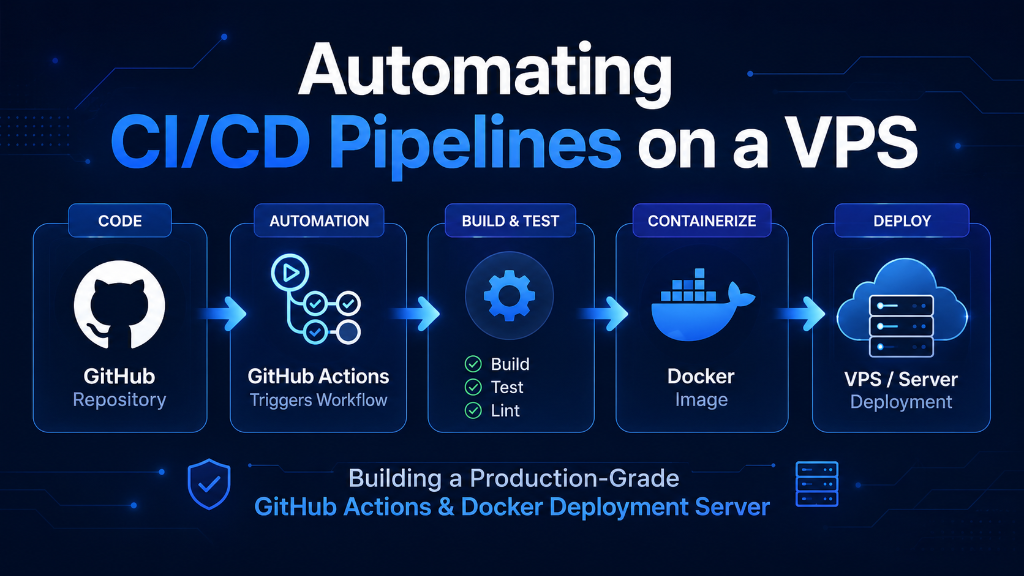
CI/CD Deployment & Automation Architecture
A self-hosted CI/CD deployment VPS GitHub Actions architecture connects your repository directly to a dedicated virtual private server via outbound long-polling WebSockets (TCP port 443), eliminating inbound firewall exposure. By leveraging persistent NVMe disk caching for Docker layers, dedicated RAM for in-memory testing suites, and local socket execution, self-hosted VPS runners achieve up to 85% faster build times compared to metered SaaS runners while delivering unlimited concurrency and zero-downtime containerized production rollouts.
Automating software delivery is a cornerstone of modern DevOps engineering. As software engineering teams scale, relying on manual FTP/SSH uploads or unmanaged script execution creates deployment friction, human error, and prolonged downtime during software updates. While third-party SaaS continuous integration platforms offer convenience, they impose strict monthly build-minute quotas, unoptimized compute allocations, and cold-start latency penalties for containerized builds.
Deploying a self-hosted CI/CD deployment on a VPS with GitHub Actions delivers deterministic execution performance, persistent Docker layer caching, and granular hardware control. By provisioning dedicated compute cores, enterprise NVMe storage arrays, and low-latency network transit, engineering teams can eliminate queue bottlenecks, reduce build runtimes from ten minutes to under forty-five seconds, and achieve zero-downtime Blue-Green deployments. This guide provides an end-to-end technical roadmap for designing, implementing, securing, and scaling an automated GitHub Actions CI/CD deployment server on a Linux VPS.
Architecture Overview: Self-Hosted VPS Runners vs. Managed SaaS CI/CD
Selecting the appropriate continuous integration and continuous deployment infrastructure directly influences release velocity, developer feedback loops, and operational expenditure. Traditional hosted runners (such as standard GitHub-hosted VMs) spin up ephemeral instances for every workflow dispatch. While convenient for lightweight open-source repositories, ephemeral runners lack stateful disk caching, forcing every execution to redownload dependencies, pull base Docker images across the public internet, and compile assets from scratch.
Architectural Models: Ephemeral SaaS vs. Dedicated VPS Runner
- GitHub-Hosted Ephemeral Runners: Every job spins up an isolated, clean virtual machine. Package manager caches (npm, pip, composer, cargo) and Docker layers must be restored from remote artifact storage over network connections. Build minutes are metered, and compute sizing (vCPU/RAM) options carry aggressive usage pricing tiers.
- Self-Hosted GitHub Actions Runner on Dedicated VPS: The runner daemon operates continuously as an isolated systemd service on dedicated VPS hardware. Docker daemon maintains persistent local image layer caches directly on enterprise NVMe storage. Build execution is unmetered, supporting continuous integration triggers on every commit, pull request, and merge without billing overages.
Security Communication Model: Outbound Long-Polling
A critical security benefit of GitHub Actions self-hosted runners is their communication architecture. The self-hosted runner process (runsvc.sh) initiates an outbound HTTPS (port 443) long-polling connection to the GitHub Actions message queue API.
The VPS does not require any public inbound ports opened to GitHub (such as SSH port 22 or webhook listener ports). The runner listens for queued job manifests over the established TLS tunnel, downloads the payload, executes the steps locally within sandbox boundaries, and streams stdout logs back to the GitHub console. This architecture eliminates attack vectors associated with exposing automated deployment endpoints to the public internet.
Technical Comparison: Hosted SaaS CI vs. Dedicated CI/CD VPS Engine
The following benchmark matrix compares standard hosted cloud runners against a dedicated high-performance NVMe VPS runner:
Hardware Sizing & System Prerequisites for High-Throughput Runners
Configuring a stable CI/CD deployment VPS requires matching physical compute and memory parameters to workload demands:
- Compute Allocation: Compiling assets (Webpack, Vite, Rust, Go) and running parallel automated testing suites saturates CPU cycles. A minimum of 4 dedicated vCPU cores is recommended for small-to-medium teams, scaling to 8 or 16 cores for multi-project microservice environments.
- RAM Provisioning: Memory starvation causes out-of-memory (OOM) killer terminations during Docker image builds and test database execution. Provision at least 8 GB to 16 GB of ECC RAM.
- Enterprise NVMe Storage: Docker build layers, npm node_modules, and git commit objects generate millions of small read/write operations. Enterprise NVMe storage arrays prevent pipeline stalls caused by disk I/O wait times.
- Network Bandwidth & SLA: Multi-gigabit port connections guarantee fast pulling of upstream container images and package dependencies without network saturation.
For mission-critical production environments, pairing your automation pipeline with best Global vps services provides predictable hardware governance, low-latency transit, and guaranteed 99.9% server uptime.
Step-by-Step Implementation: Configuring GitHub Actions on Linux VPS
Follow this production blueprint to configure a hardened, dedicated GitHub Actions runner environment on Ubuntu 22.04 / 24.04 LTS.
Step 1: Provisioning a Dedicated DevOps Service Account
Never execute continuous integration runners under the root user account. Create a restricted system user with Docker execution rights:
# Create dedicated user for the CI/CD runner
sudo useradd -m -s /bin/bash github-runner
sudo usermod -aG docker github-runner

# Create runner installation directory
sudo mkdir -p /actions-runner && cd /actions-runner
sudo chown -R github-runner:github-runner /actions-runner
Step 2: Downloading and Registering the Runner Daemon
Switch to the github-runner user and fetch the official GitHub Actions runner package:
su - github-runner
cd /actions-runner

# Download the latest runner package (architecture: x64)
curl -o actions-runner-linux-x64-2.319.1.tar.gz -L https://github.com/actions/runner/releases/download/v2.319.1/actions-runner-linux-x64-2.319.1.tar.gz

# Extract the archive
tar xzf ./actions-runner-linux-x64-2.319.1.tar.gz

# Configure the runner with your GitHub Repository registration token
./config.sh --url https://github.com/YOUR_ORGANIZATION/YOUR_REPOSITORY \
            --token YOUR_GITHUB_RUNNER_REGISTRATION_TOKEN \
            --name "onlive-vps-prod-runner-01" \
            --labels "vps,production,docker,nvme" \
            --work "_work" \
            --unattended
Step 3: Installing and Enabling the Systemd Daemon
To ensure the runner restarts automatically across server reboots, register it as a systemd service:
# Exit back to root or sudo user
exit

# Install the systemd service wrapper
cd /actions-runner
sudo ./svc.sh install github-runner
sudo ./svc.sh start
sudo ./svc.sh status
Production Deployment Blueprint: Zero-Downtime Blue-Green Architecture
The primary objective of automated deployment is continuous availability. A common mistake is stopping the active production container before building the new image, resulting in several minutes of 502 Bad Gateway downtime.
The Blue-Green Deployment Pattern solves this problem by maintaining two independent container targets behind an upstream reverse proxy (Nginx):
- Blue Target: Currently active production instance serving live user traffic (e.g., port 8081).
- Green Target: Idle target instance where newly built containers are deployed and health-checked (e.g., port 8082).
- Cutover: Once the Green target passes HTTP health checks, the reverse proxy configuration switches traffic to Green instantly via an atomic reload (
nginx -s reload), achieving 100% zero downtime.
Production Workflow Manifest (.github/workflows/deploy.yml)
name: Production CI/CD VPS Deployment

on:
  push:
    branches:
      - main

jobs:
  build-and-deploy:
    runs-on: [self-hosted, vps, production]
    timeout-minutes: 15

    steps:
      - name: Checkout Source Code
        uses: actions/checkout@v4

      - name: Set up Docker Buildx
        uses: docker/setup-buildx-action@v3

      - name: Build Application Container with Persistent Cache
        run: |
          docker build \
            --cache-from type=local,src=/tmp/.buildx-cache \
            --cache-to type=local,dest=/tmp/.buildx-cache-new,mode=max \
            -t app-production:${{ github.sha }} .
          rm -rf /tmp/.buildx-cache
          mv /tmp/.buildx-cache-new /tmp/.buildx-cache

      - name: Execute Automated Unit & Integration Tests
        run: |
          docker run --rm app-production:${{ github.sha }} npm run test:ci

      - name: Execute Blue-Green Zero-Downtime Rollout
        run: |
          chmod +x ./deploy-blue-green.sh
          ./deploy-blue-green.sh app-production:${{ github.sha }}

      - name: Prune Dangling Build Artifacts
        if: always()
        run: |
          docker image prune -f --filter "until=48h"
Linux Kernel Tuning & Security Hardening for CI/CD Servers
A continuous integration server processes hundreds of concurrent file handles, network sockets, and container lifecycle events daily. Implementing structured Linux kernel tuning safeguards infrastructure stability.
Kernel Network and Socket Optimization
In /etc/sysctl.conf, apply the following high-throughput kernel parameters:
# Enhance socket backlog queues for high concurrency
net.core.somaxconn = 65535
net.ipv4.tcp_max_syn_backlog = 65535

# Optimize ephemeral port ranges
net.ipv4.ip_local_port_range = 10240 65535

# Increase maximum file descriptors for Docker volume handlers
fs.file-max = 2097152

# Enable BBR TCP Congestion Control
net.core.default_qdisc = fq
net.ipv4.tcp_congestion_control = bbr

# Reduce swap aggression to keep runner processes in fast RAM
vm.swappiness = 10
Execute sudo sysctl -p to activate the changes immediately.
Automated Disk Sanitation via Systemd Timers
Build servers can rapidly run out of disk space if unmanaged Docker images accumulate. Configure an automated cron cleanup routine at /etc/cron.daily/docker-prune:
#!/bin/bash
# Remove stopped containers, unused networks, and images older than 72 hours
docker system prune -af --filter "until=72h" --volumes
Ensure execute permissions are granted: sudo chmod +x /etc/cron.daily/docker-prune. For organizations seeking predictable monthly operational budgets without hardware maintenance overhead, deploying on budget-friendly VPS hosting solutions ensures enterprise reliability.
Frequently Asked Questions (FAQ)
Key Takeaways & Strategic Infrastructure Architecture
CI/CD VPS Implementation Checklist
Self-hosted GitHub Actions runners eliminate per-minute build quotas and pipeline queue limits.
Persistent local NVMe Docker layer caching slashes containerized build runtimes to under 45 seconds.
Long-polling WebSockets require zero inbound open ports from GitHub, keeping production firewalls locked down.
Blue-Green deployment pipelines with atomic Nginx reloads guarantee zero customer downtime.