

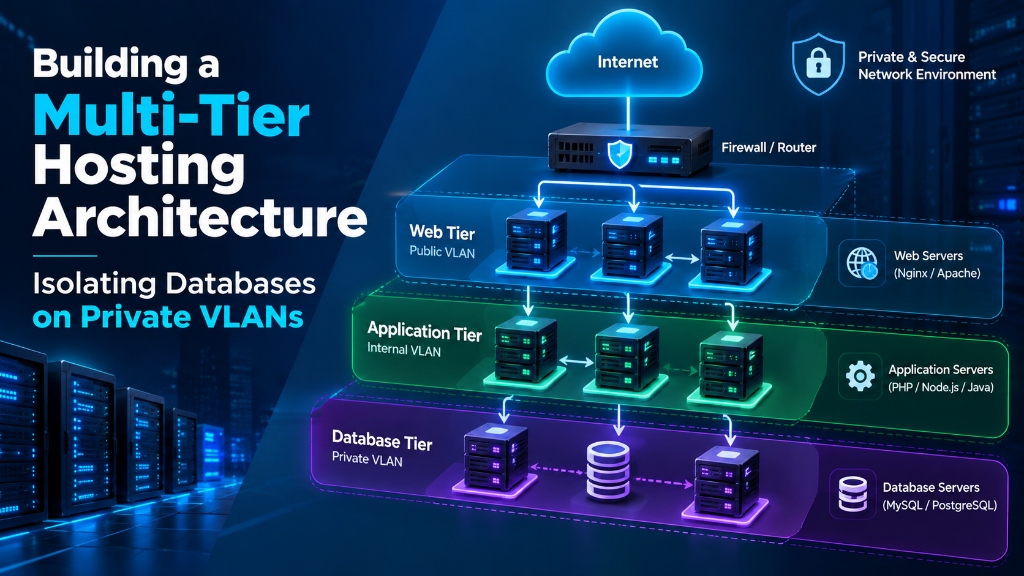
Web / Ingress
Public-facing services such as reverse proxies and load balancers handle external HTTP and HTTPS traffic.
Application
Application runtimes communicate with backend services through controlled private network paths.
Database
MySQL, PostgreSQL and other data services remain on private interfaces rather than public addresses.
A multi-tier hosting architecture separates public web services from application and database systems. A private VLAN can be used to carry internal traffic between these tiers while database access is restricted to approved application servers. This reduces the public attack surface and gives administrators more control over internal network communication.
Building a multi-tier hosting architecture isolates frontend web instances from backend database tiers across private VLANs. This eliminates public Internet exposure for sensitive SQL data, mitigates lateral network traversal, and optimizes throughput over unmetered local uplinks.
Why Use a Multi-Tier Hosting Architecture?
A small website can often run its web server and database on the same machine. As an application grows, however, separating workloads can make network access, resource allocation and security controls easier to manage.
In a multi-tier hosting architecture, the public web tier, application tier and database tier have different roles. The database does not need to accept connections directly from the public internet. Instead, application servers can communicate with it over a private network.
Private VLANs are one way to create that separation when the hosting environment supports isolated network segments. Host-level firewalls should still be used because VLAN isolation alone does not replace access control.
What Is the Problem With a Flat Server Network?
In a flat network, multiple services may communicate through the same network segment. This can make infrastructure simpler, but it also means that network access between services may be broader than necessary.
Flat Network
Web, application and database systems share the same general network environment.
- Broader internal connectivity
- More firewall rules to manage
- Larger lateral-movement surface
- Less separation between workloads
Segmented Network
Backend services communicate through controlled private network segments.
- Database traffic stays on private interfaces
- Access can be limited by source IP
- Public and internal traffic are separated
- Network policy becomes easier to document
How Private VLANs Separate Hosting Tiers
A VLAN creates a separate logical network segment on compatible switching infrastructure. IEEE 802.1Q provides the tagging mechanism used to identify VLAN traffic across a network.
In a multi-tier server environment, the public interface can handle internet-facing traffic while a second interface is assigned to a private subnet for internal communication.
| Interface | Typical Purpose | Addressing | Access |
|---|---|---|---|
| Public Interface | Web and external service traffic | Public IP | Internet-facing |
| Private Interface | Application, database and internal traffic | Private RFC 1918 address | Internal network |
A private RFC 1918 address is not automatically a complete security boundary. Use firewall rules, service-level authentication and appropriate routing controls to define which systems can communicate.
How to Configure a Private VLAN Interface on Linux
On Linux systems using Netplan, the private interface can be configured with an internal address and no default gateway. The exact interface name and VLAN configuration depend on the hosting provider’s network design.
Example Netplan Configuration
The following example shows a server with a public interface and a separate private interface. The IP addresses are documentation values and should be replaced with addresses from your own network.
network:
  version: 2
  renderer: networkd

  ethernets:

    eth0:
      addresses:
        - 198.51.100.25/24
      routes:
        - to: default
          via: 198.51.100.1
      nameservers:
        addresses:
          - 1.1.1.1
          - 8.8.8.8

    eth1:
      addresses:
        - 10.50.10.15/24
      # No default gateway on the private interface
      mtu: 9000
A private interface should not normally receive the server’s default route. This keeps normal internet-bound traffic on the intended public interface.
Apply and Verify the Configuration
sudo netplan generate
sudo netplan apply

ip addr show eth1
ip routeDo not enable an MTU of 9000 unless the complete network path supports Jumbo Frames. The server interface, virtual switch, physical switch and other endpoints must use compatible MTU settings.
How to Keep Database Servers Off the Public Internet
A database server generally does not need to accept connections from arbitrary internet clients. In a three-tier architecture, application servers can connect to the database over its private address.
The database service should be configured to listen only on interfaces and addresses that are required by the application. Firewall rules should then restrict connections to known application servers.
Example MySQL Private Bind Configuration
[mysqld]

# Listen on the private database address
bind-address = 10.50.10.20

# Optional: require encrypted transport
require_secure_transport = ON

# Example packet settings
max_allowed_packet = 128M
net_buffer_length = 32KEnable TLS only after configuring valid MySQL certificates and verifying client compatibility. Do not copy certificate paths from an example directly into production.
How Do Administrators Access Private Database Servers?
Removing public access from a database server also means administrators need another way to reach it. A hardened bastion host or VPN can provide that administrative path.
1. Connect to the Bastion
Administrators connect to a controlled public entry point using SSH keys and the security controls required by the organization.
2. Traverse the Private Network
The bastion has access to the internal network and can reach approved backend addresses.
3. Reach the Database Host
SSH ProxyJump or a VPN tunnel allows administrators to manage the database without assigning it a public IP.
Example SSH ProxyJump Configuration
Host bastion
    HostName 198.51.100.20
    User sysadmin
    Port 2222
    IdentityFile ~/.ssh/id_ed25519

Host db-private-01
    HostName 10.50.10.20
    User sysadmin
    ProxyJump bastion
    IdentityFile ~/.ssh/id_ed25519
The example uses documentation IP addresses. Replace them with the actual addresses and authentication settings in your environment.
Restrict Database Access With UFW
VLAN separation should be combined with host-level firewall rules. On a database server, the firewall can allow MySQL or PostgreSQL traffic only from the application servers that need access.
For example, a MySQL database can allow TCP port 3306 from specific private addresses instead of opening the port to the entire network.
# Default policies
sudo ufw default deny incoming
sudo ufw default deny outgoing

# Allow MySQL from approved application servers
sudo ufw allow in on eth1 from 10.50.10.11 to any port 3306 proto tcp
sudo ufw allow in on eth1 from 10.50.10.12 to any port 3306 proto tcp

# Allow SSH only from the administration host
sudo ufw allow in on eth1 from 10.50.10.5 to any port 22 proto tcp

# Enable firewall
sudo ufw enableVerify your SSH access path and required outbound services. An incorrect default-deny policy can lock administrators out of a server or break package updates, DNS, monitoring and other required services.
Using Keepalived for a Private Database Virtual IP
In a high-availability setup, application servers can connect to a private virtual IP rather than storing the address of one database node in their configuration.
Keepalived can use VRRP to move a virtual IP between eligible nodes. The database replication and failover design itself must be configured separately; Keepalived does not replicate database data.
Example Keepalived Configuration
vrrp_script check_mysql {
    script "/usr/bin/mysqladmin ping"
    interval 2
    weight 2
}

vrrp_instance VI_DB {
    state MASTER
    interface eth1

    virtual_router_id 51
    priority 101
    advert_int 1

    authentication {
        auth_type PASS
        auth_pass CHANGE_THIS
    }

    virtual_ipaddress {
        10.50.10.100/24 dev eth1
    }

    track_script {
        check_mysql
    }
}The authentication value above is a placeholder. Use a strong environment-specific value and protect configuration files with appropriate filesystem permissions.
Before using a floating database IP in production, test node failure, application reconnect behavior, database replication state and split-brain prevention.
Should Private VLAN Traffic Also Be Monitored?
Yes. A private network should not automatically be treated as trusted. If an application server is compromised, an attacker may attempt to discover and access other internal services.
Network monitoring tools such as Suricata can be deployed where the network architecture provides an appropriate monitoring interface or traffic mirror.
Example Suricata Interface Configuration
af-packet:
  - interface: eth1
    cluster-id: 99
    cluster-type: cluster_flow
    defrag: yes
    use-mmap: yes
    tpacket-v3: yes

rule-files:
  - emerging-threats.rules
  - emerging-sql.rules
  - emerging-lateral-movement.rules
The exact Suricata configuration depends on how traffic is presented to the monitoring host. A monitoring interface that cannot see the relevant traffic will not provide useful inspection, so the switch or virtualization layer must be configured accordingly.
How to Test Private VLAN MTU and Throughput
After configuring a private network, verify that the endpoints can communicate correctly before relying on it for database replication, backups or application traffic.
Test Jumbo Frame Support
For an Ethernet MTU of 9000, an IPv4 ICMP payload of 8972 bytes plus the IP and ICMP headers reaches 9000 bytes. The entire path must support that frame size.
ping -M do -s 8972 -c 4 10.50.10.20If this test fails, check the MTU configured on both endpoints, VLAN interfaces, bridges, virtual switches and physical network devices before increasing the MTU in production.
Measure Internal Throughput With iperf3
`iperf3` can measure available network throughput between two systems. Run the server on one private address and connect from the application node.
# Database node
iperf3 -s -B 10.50.10.20

# Application node
iperf3 -c 10.50.10.20 -P 4 -t 30 -i 5Actual throughput depends on NIC speed, CPU processing, virtualization, switch configuration, MTU, traffic policy and other factors. Use your own `iperf3` results rather than assuming a particular line-rate result.
Flat Network vs Private VLAN Multi-Tier Architecture
The following comparison shows how network segmentation changes the exposure and administration model.
| Architecture | Database Network | Traffic Control | Administration |
|---|---|---|---|
| Single-Tier | Web and database may share one host or interface. | Mainly host-level controls. | Direct server access. |
| Flat Multi-Server | Backend nodes share a broader network segment. | Firewall rules provide service-level restrictions. | Public or semi-public management paths may exist. |
| Private VLAN Multi-Tier | Database services use private network addresses. | VLAN segmentation plus host firewall rules. | Bastion or VPN-based administrative access. |
Multi-Tier Private VLAN Security Checklist
Keep database services on private addresses when public database access is not required.
Allow database ports only from approved application server addresses.
Use SSH keys and a controlled administrative path for backend server access.
Test VLAN routing, firewall rules and MTU settings before moving production traffic.
Monitor private network traffic and backend services rather than assuming internal traffic is trusted.
Test backups, database recovery and high-availability failover separately from network segmentation.
Example Multi-Tier Hosting Layout
Consider an ecommerce application with separate web, application and database workloads.
Web Tier
Receives HTTPS traffic and forwards application requests to the internal application tier.
Application Tier
Runs PHP, Node.js or another application runtime and communicates with backend services through private addresses.
Database Tier
Runs MySQL or PostgreSQL and accepts database connections only from approved application servers.
Administration
Administrators reach backend systems through a bastion host or private VPN rather than exposing database SSH access publicly.
This arrangement keeps the public entry point separate from the systems that store application data. It also makes network policies easier to document and review as the infrastructure grows.
Multi-Tier Hosting and Private VLAN FAQs
These questions cover the most common design and configuration considerations when isolating database servers on private networks.
What is a multi-tier hosting architecture?
A multi-tier hosting architecture separates an application into different infrastructure layers, such as web, application and database tiers. Each tier can have its own network access and security policies.
Why put a database server on a private VLAN?
A private VLAN can keep database communication on an internal network instead of exposing the database service directly to the public internet. Firewall rules should still restrict which internal systems can connect.
Should a database server have a public IP address?
A database server does not need a public IP when all required application and administration traffic can be handled through private networking. The appropriate design depends on the application’s actual requirements.
How do application servers connect to a private database?
Application servers can connect to the database using its private IP address. The database firewall should allow the database port only from the private addresses of authorized application servers.
Can private VLANs replace a firewall?
No. VLAN segmentation and firewalls provide different controls. A private VLAN separates network segments, while firewall rules determine which connections are allowed between hosts and services.
How can administrators access a database without a public IP?
Administrators can use a hardened bastion host, SSH ProxyJump or a private VPN such as WireGuard. This provides an administrative path without exposing the database host directly to the internet.
What is the purpose of Keepalived in a database network?
Keepalived can provide a floating virtual IP using VRRP so that applications can connect to a stable private address. Database replication, health checks and failover coordination must also be designed separately.
Should Jumbo Frames be enabled on a private VLAN?
Jumbo Frames can be useful for some high-throughput internal workloads, but they should only be enabled when every relevant network component supports the selected MTU. Test the complete path before deployment.
How do I test a private VLAN between Linux servers?
Start by checking interface addresses and routes, then test connectivity with ping. For MTU validation, use a non-fragmenting ping test. For throughput, `iperf3` can measure traffic between the private interfaces.
Conclusion: Building Network Separation Around Your Applications
A multi-tier hosting architecture gives web, application, and database workloads clearly defined operational roles. Using private VLANs for internal communication eliminates public exposure for sensitive SQL endpoints, mitigates lateral network traversal, and provides host firewalls with granular control over backend access.
When processing intensive multi-threaded database transactions or mission-critical enterprise workloads, combining network segmentation with reliable compute foundations is essential. Deploying on enterprise dedicated server hosting provides bare-metal hardware performance, custom RAID arrays, and dedicated unmetered internal bandwidth.
