

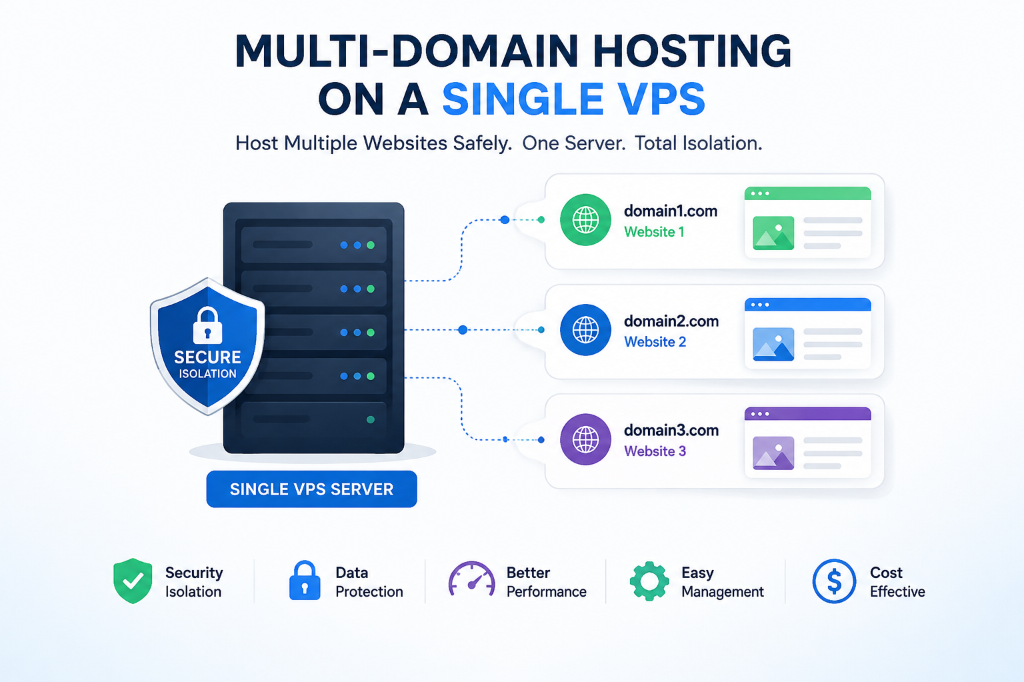
To prevent cross-site contamination when hosting multiple websites on a single VPS, run each website under an isolated Linux system user with dedicated PHP-FPM pools and chroot jail restrictions. Enforce strict file permissions (chmod 755 for directories, 644 for files, owned by the unique user), configure distinct MySQL databases with separate user grants, and deploy Fail2ban and ModSecurity WAF to block lateral movement if one site is compromised.
SEC
- The Cross-Site Contagion Danger: Hosting multiple websites under a single shared system user (such as
www-data) allows malware on one compromised WordPress site to infect every other domain on the server via PHP filesystem traversal. - Strict Multi-Tenant Isolation: Robust multi-site hosting requires dedicated Linux system users, independent PHP-FPM pools over isolated Unix domain sockets, and restricted
open_basedirdirectives. - Resource Quotas & Sandboxing: Assigning dedicated worker pools and independent MySQL user privileges prevents a single runaway client site from exhausting server memory and crashing neighboring domains.
- High-Density Deployment: Provisioning a multi-site USA VPS environment provides the compute power and NVMe I/O required to safely host 30+ client sites with 100% security isolation.
- The High-Margin Multi-Domain VPS Model
- Monolithic Shared Risk vs. Hardened Multi-Tenant VPS
- The 6 Core Pillars of Multi-Domain VPS Security
- Hardware Sizing Matrix for Multi-Domain VPS Hosting
- Real-World Applications: Maximizing Agency ROI and Security
- Control Panel Isolation Mechanisms Compared
- Hands-On Implementation: Setting Up Isolated Virtual Hosts
- Frequently Asked Questions (FAQ)
Introduction: The High-Margin Multi-Domain VPS Model
For digital marketing agencies, freelance developers, and multi-brand enterprises, hosting multiple websites on a single virtual private server represents one of the most profitable infrastructure strategies available. Rather than purchasing individual shared hosting accounts or separate cloud instances for every client project, consolidating 10, 20, or 50 websites onto a high-performance VPS dramatically reduces recurring infrastructure expenses while giving administrators complete operational autonomy.
However, multi-domain hosting carries severe operational and cybersecurity risks when architected incorrectly. In naive server setups, all virtual hosts run under a single default web server user (such as www-data or nobody) and share a common PHP execution runtime. In this vulnerable state, if a single outdated plugin on an experimental client site is compromised with a webshell or ransomware script, the attacker gains read and write access to the document roots, configuration files, and database passwords of every other website hosted on that server.
Achieving true enterprise-grade multi-tenancy requires engineering strict isolation boundaries across the filesystem, process memory, database access, and SSL certificate layers. When properly sandboxed, a security breach on one domain remains completely confined to its own containerized jail, protecting your broader client portfolio and business reputation.
Architectural Models: Monolithic Shared Risk vs. Hardened Multi-Tenant VPS
Comparing a vulnerable shared-user configuration against a hardened multi-tenant architecture illustrates how proper isolation prevents catastrophic security breaches:
Single-User Shared Setup
All websites run under www-data with shared PHP pools. A malware infection on Site A reads wp-config.php files across Sites B, C, and D, compromising all databases.
Isolated Linux System Users
Each domain runs under an isolated POSIX user, dedicated PHP-FPM socket, restricted open_basedir, and separate MySQL credentials with zero cross-access.
The 6 Core Pillars of Multi-Domain VPS Security
To safely host multiple client websites on a single server, you must implement six distinct layers of operational sandboxing. Administrators seeking cost-effective domain management interfaces can deploy one of the top free cPanel alternatives for multi-site server control to manage independent user accounts and quota partitions.
POSIX Filesystem Permissions and System User Isolation
Never place multiple client websites inside a single home directory. Create an independent Linux system user for each domain (e.g., user_sitea, user_siteb) without interactive SSH shell access (/usr/sbin/nologin). Set home directory permissions to 750 and assign the web server group (www-data) read access. Additionally, enforcing umask 027 ensures that newly created files inherit restrictive permissions, preventing neighboring users from inspecting sensitive source code or credentials.
Dedicated PHP-FPM Pools and open_basedir Restrictions
Standard PHP installations run all virtual hosts through a single global pool (www.conf). In a hardened environment, define a dedicated pool file for each website (e.g., sitea.conf). Configure each pool to execute as the site’s specific system user over its own Unix domain socket. Inject the php_admin_value[open_basedir] directive to lock the PHP engine strictly to the site’s document root and /tmp, blocking directory traversal attacks.
Sandboxed Database Privileges
Never connect multiple applications using the MySQL root administrative user or a shared database account. Provision an isolated database and an exclusive MySQL user for each website. Restrict grants strictly to the target database: GRANT ALL ON sitea_db.* TO 'sitea_user'@'localhost'. Even if an attacker extracts database credentials from one site, adjacent client tables remain completely inaccessible.
Independent Server Blocks and Automated SSL Lifecycle
Maintain separate configuration files for each domain within /etc/nginx/sites-available/. Avoid combining multiple virtual hosts into a single monolithic file. Use Certbot with dedicated Let’s Encrypt certificates per domain rather than multi-domain SAN certificates; this prevents SSL renewal errors on one expired domain from breaking certificates across your entire portfolio.
Tenant-Specific Rate Limiting and Fail2ban Jails
When hosting dozens of websites, brute-force attacks targeting wp-login.php or XML-RPC endpoints on a single client site can consume substantial CPU cycles. Configure Nginx request rate limiting zones (e.g., limit_req_zone) and deploy tenant-specific Fail2ban filters to automatically drop malicious IP addresses at the Linux kernel firewall level.
Granular Access & Error Log Isolation
Never funnel all web server traffic into a single global log file. Direct each virtual host to write logs to its dedicated path (e.g., /var/log/nginx/clientalpha_access.log). This enables streamlined debugging during 500 internal server errors, simplifies Logrotate retention policies, and ensures client data confidentiality.
Hardware Sizing Matrix for Multi-Domain VPS Hosting
The table below provides recommended hardware specifications based on the number of hosted client domains and active traffic profiles:
| Client Density | Workload Profile | PHP Pool Allocation | Optimal VPS Plan |
|---|---|---|---|
| 3 – 8 Domains | Corporate Blogs / Portfolios | 5 Workers / Site (On-Demand) | 2 vCPU / 4 GB RAM / NVMe |
| 10 – 20 Domains | SMB Sites & Lead Gen Stores | 10 Workers / Site (Dynamic) | 4 vCPU / 8 GB RAM / NVMe |
| 25 – 40 Domains | Agency Multi-Client Hosting | 15 Workers / Site (Dynamic) | 8 vCPU / 16 GB RAM / NVMe |
| 50+ Domains | Enterprise Reseller Fleet | 25 Workers / Site + Redis | 16 vCPU / 32 GB RAM / NVMe |
Real-World Applications: Maximizing Agency ROI and Security
Multi-domain VPS architectures provide unmatched efficiency across various commercial use cases:
🏢 Full-Service Digital Agencies
Agencies bundle website maintenance packages with ultra-fast hosting, charging clients $50–$150/month while consolidating 30 sites on a single 16GB VPS for massive profit margins.
💼 Freelance Web Developers
Freelancers host client production and staging sites side-by-side with complete credential isolation, preventing staging test scripts from accessing live client databases.
🌐 Multi-Brand Corporate Holdings
Corporations manage regional brand portals and subsidiary sites on a unified server cluster, streamlining OS updates and centralized disaster recovery snapshots.
📈 High-Volume Affiliate Marketers
Affiliate publishers launch dozens of niche landing page funnels, using Nginx FastCGI microcaching to handle millions of ad clicks without buying separate hosting plans.
Control Panel Isolation Mechanisms Compared
Whether using command-line administration or control panel interfaces, isolation mechanisms differ across management tools:
| Platform / Method | User Sandboxing | PHP-FPM Pool Isolation | Licensing Overhead |
|---|---|---|---|
| Manual Nginx + Linux CLI | Native POSIX Users | Custom Socket per Pool | 100% Free / Open Source |
| cPanel & WHM | Automated per Account | Multi-PHP Manager Pools | High (Per-Account Fee) |
| DirectAdmin | Automated per User | CustomBuild PHP-FPM | Affordable Fixed License |
| Virtualmin / Webmin | Isolated Virtual Servers | Native FPM Unix Sockets | 100% Free / Open Source |
Hands-On Implementation: Setting Up Isolated Virtual Hosts
Execute these production commands directly in your terminal to create an isolated Linux system user, configure a dedicated PHP-FPM pool, and deploy a secure Nginx virtual host. Implementing POSIX permission boundaries and systemd sandboxing forms an essential part of preventing cyber attacks and securing Linux servers in shared multi-tenant environments.
Create an Isolated POSIX System User and Directory Tree
Create a dedicated unprivileged user and restrict directory permissions to 750:
Configure Dedicated PHP-FPM Pool in /etc/php/8.3/fpm/pool.d/clientalpha.conf
Define an isolated worker pool with open_basedir restrictions and an exclusive Unix socket:
Provision Isolated Nginx Server Block in /etc/nginx/sites-available/clientalpha.conf
Route incoming traffic directly to the client’s dedicated PHP-FPM socket:
Issue Dedicated Let’s Encrypt SSL Certificate
Enable site configuration and issue an isolated SSL certificate with automatic HTTPS redirection:
Provision Sandboxed MySQL Database and Exclusive User
Create an isolated database container and restrict user permissions strictly to the domain’s schema:
When hosting 20+ websites on a single server, set pm = ondemand in your PHP-FPM pool files rather than pm = dynamic. On-demand pools spawn worker processes only when incoming requests arrive and terminate them after 10 seconds of inactivity, saving gigabytes of idle RAM.
Never configure multiple WordPress sites with a shared MySQL username. If an SQL injection or webshell exploit compromises a single application, an attacker can dump every database on the host, triggering catastrophic data breaches and regulatory penalties.
📌 Frequently Asked Questions (FAQ)
Q1 How many websites can I safely host on an 8GB RAM VPS?
Q2 What happens if one client website receives a massive traffic spike?
pm.max_children limits, the high-traffic site will only consume its allocated worker pool. Neighboring websites continue operating at full speed without resource starvation.
Q3 Can I assign different PHP versions to different websites on the same VPS?
Q4 Do all hosted websites share the same public IP address?
Q5 How do I prevent one client from reading another client’s database?
Conclusion: Strategic Architecture Roadmap for Growing Agencies
Hosting multiple websites on a single virtual private server doesn’t mean sacrificing security, performance, or client confidentiality. By replacing the naive shared-user model with hardened POSIX user sandboxing, dedicated PHP-FPM pools, and database privilege isolation, you establish a resilient multi-tenant platform capable of delivering 99.99% uptime.
Scale your client portfolio with confidence on Onlive Server’s USA VPS hosting platform, equipped with enterprise PCIe NVMe storage arrays, dedicated KVM compute cores, and 24/7 technical infrastructure support.
