

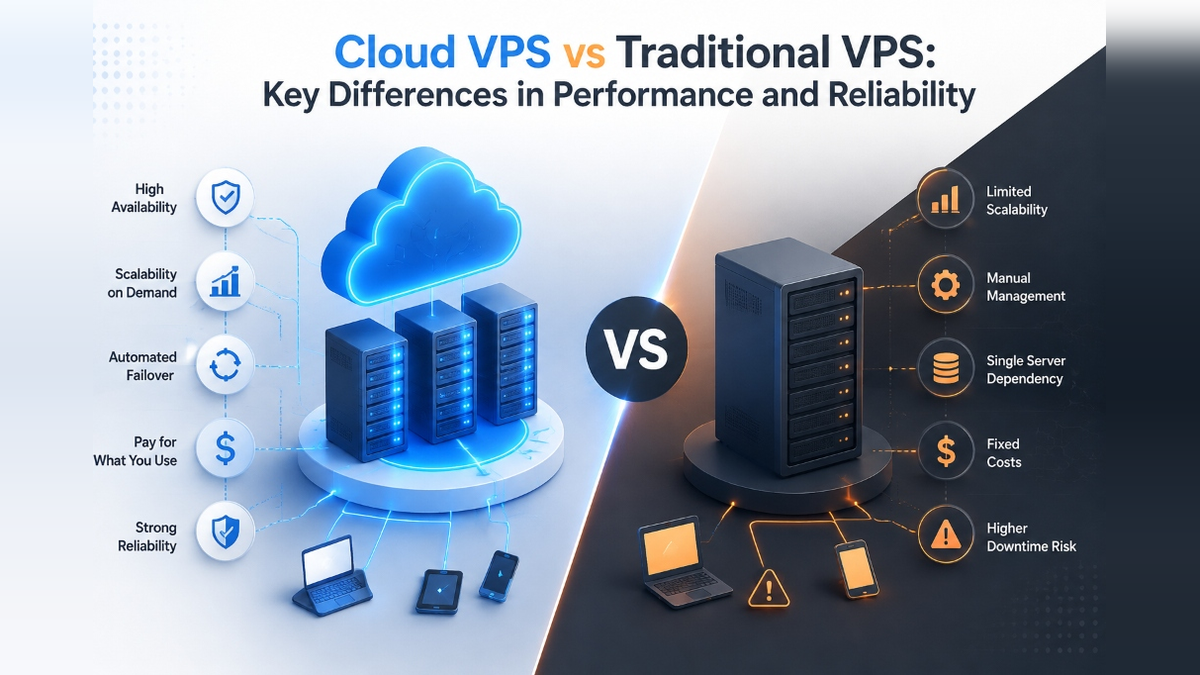
Cloud VPS uses distributed multi-node cluster infrastructure with decoupled SAN/Ceph storage and automated hardware failover. If a physical hypervisor fails, virtual instances migrate and reboot on healthy nodes in seconds with zero data loss. Traditional VPS runs on a single physical host server — a motherboard, power supply, or RAID failure takes every VM on that node offline until manual hardware repair is completed.
When selecting virtual hosting for web applications, SaaS platforms, or business portals, infrastructure architects frequently weigh Cloud VPS against Traditional VPS solutions.
While both hosting models present isolated virtual environments running Linux or Windows operating systems, their underlying engineering designs differ fundamentally in resilience, scalability, and disaster recovery mechanics.
Deploying business workloads on a resilient high-availability cloud VPS hosting cluster protects mission-critical platforms from physical hardware single-point-of-failure events.
Traditional VPS Architecture: The Single Server Paradigm
A Traditional VPS relies on a single high-capacity bare-metal server divided into multiple virtual instances using a hypervisor such as KVM or VMware. Storage drives, memory modules, and network cards are all contained within that single chassis.
Because storage is physically direct-attached, Traditional VPS instances often deliver exceptional raw disk throughput at budget-friendly price points. However, this architecture creates a critical single point of failure for all hosted virtual machines.
If the physical host server suffers a power supply failure, memory parity fault, or motherboard damage, every virtual server hosted on that machine suffers downtime until datacenter technicians physically repair the hardware.
For applications requiring dedicated physical resources without any hypervisor layer, upgrading to bare-metal dedicated servers provides absolute control and unshared compute capacity.
Architectural Comparison: Cloud VPS vs. Traditional VPS
| Feature | Traditional VPS | Cloud VPS |
|---|---|---|
| Infrastructure Design | Single physical server node | Distributed multi-node cloud cluster |
| Hardware Failover | None (Manual technician repair required) | Automatic instance migration & reboot |
| Storage Redundancy | Local hardware RAID controller | Triple-replicated Ceph / SAN storage |
| Resource Scalability | Bounded by physical host limits | Instant on-demand scale without reboots |
| Cost vs. Reliability | Maximum compute per dollar | Enterprise 99.99% uptime guarantee |
Cloud VPS Architecture: Distributed Clustering and High Availability
Cloud VPS hosting decouples compute resources from physical storage. Virtual CPU and RAM run on clustered hypervisor nodes, while data blocks reside on an independent, network-distributed storage fabric.
Technologies like Ceph maintain triple-replication across independent storage nodes. Every write operation is committed synchronously across three distinct physical drives in the datacenter, ensuring zero data loss even during concurrent drive failures.
Distributed Block Storage: In a Cloud VPS environment, virtual hard disks are divided into 4MB binary objects distributed across dozens of physical storage nodes. Even multiple simultaneous drive failures cause zero data loss or application downtime.
Instant Vertical Scaling: Cloud VPS platforms let administrators dynamically allocate additional CPU cores and RAM during traffic peaks without migrating files or rebuilding server configurations.
Private Networking Overlays: Cloud VPS instances communicate across isolated virtual private networks (VPCs), enabling secure multi-tier architectures where public web servers interface with private database clusters over encrypted internal backbones.
For organizations managing multi-terabyte data stores, pairing cloud instances with distributed storage server infrastructure delivers massive archiving capacity alongside low operational expense.
Cloud VPS vs Traditional VPS — Architecture & Performance Explained
Watch this detailed walkthrough covering core architectural differences, distributed storage, automated failover, scalability, and real-world performance benchmarks.
Storage Architecture: Distributed SAN/Ceph vs. Local RAID Arrays
The primary architectural distinction between cloud VPS and traditional VPS lies in their underlying disk storage topologies. Understanding how storage fabrics operate clarifies why performance characteristics diverge under intense production workloads.
Traditional VPS instances rely on direct-attached storage across local hardware RAID arrays inside a single chassis. Cloud VPS platforms instead use distributed software-defined storage fabrics such as Ceph or NVMe-over-Fabrics across clustered nodes.
Analyzing Latency and IOPS Trade-Offs
Local RAID setups provide ultra-low access latencies because read/write operations avoid traversing datacenter network switches. Distributed cloud storage replicates data blocks across three discrete physical hosts simultaneously, providing unmatched fault tolerance at a small latency trade-off.
- Single Point of Failure: If a traditional host node suffers a backplane or motherboard failure, the virtual server remains offline until technicians complete hardware repair.
- Automated Cloud Failover: Clustered cloud hypervisors detect failed compute nodes instantly, rebooting your virtual server on healthy nodes within seconds.
- Snapshot Elasticity: Distributed storage allows instantaneous point-in-time snapshots without consuming local disk performance or exhausting array capacity.
- I/O QoS Controls: Modern cloud fabrics enforce strict Quality of Service ceilings, preventing noisy-neighbor instances from monopolizing underlying storage channels.
Elastic Scaling and Business Continuity Planning
Scaling resources on a traditional VPS generally requires server reboots and manual partition resizing when crossing physical hardware limits. Memory, CPU cores, or storage expansion requires verifying that the physical host has available headroom.
Cloud VPS environments decouple compute from physical hardware boundaries, enabling vertical and horizontal scaling with negligible interruption. Businesses running seasonal campaigns can expand compute capacity dynamically to absorb traffic spikes without service disruption.
Evaluating Total Cost of Ownership
While traditional VPS solutions often deliver higher raw single-core performance per dollar, cloud environments reduce overhead associated with downtime and manual disaster recovery. Comparing long-term operational resilience reveals substantial financial protection for revenue-critical applications.
- Predictable Budgeting: Traditional VPS packages feature fixed monthly pricing regardless of fluctuating storage access patterns.
- Dynamic Resource Adaptation: Cloud VPS billing accommodates real-time resource adjustments, allowing lean scaling during off-peak periods.
- Disaster Recovery RPO/RTO: Distributed cloud backups reduce Recovery Point Objectives and Recovery Time Objectives to minutes during major incidents.
- High-Availability SLAs: Cloud clusters typically offer 99.99% uptime backed by redundant power, multi-homed uplinks, and automated node failovers.
Security Isolation and Hypervisor Multi-Tenancy Defense
Virtualization security demands strict physical isolation to prevent malicious guest instances from accessing neighboring hypervisor memory spaces. Both cloud and traditional VPS implement kernel-based virtualization safeguards, but their defense-in-depth topologies differ significantly.
Traditional VPS servers house multiple client instances on a single shared physical machine. A severe zero-day hypervisor breakout could expose local disk partitions. Cloud architectures isolate compute nodes behind virtual private clouds (VPCs), micro-segmented firewalls, and hardware-accelerated encryption layers.
Security Architecture Safeguards
Evaluating multi-tenant defenses ensures sensitive business databases and customer records remain strictly compartmentalized across all infrastructure layers.
- Hardware-Enforced Memory Encryption: Modern cloud hypervisors leverage AMD SEV and Intel SGX to encrypt virtual machine RAM against host-level inspection.
- Network Micro-Segmentation: Cloud VPS networks isolate internal traffic via VXLAN overlays, blocking rogue ARP requests and local packet sniffing.
- Hypervisor Kernel Hardening: Regular live-patching protects virtual hosts against Meltdown, Spectre, and speculative execution vulnerabilities without downtime.
- Granular Role-Based Access Control: Cloud dashboards provide multi-user IAM permissions, audit logging, and hardware token authentication.
Bandwidth Allocation and Egress Traffic Optimization
Network transfer architectures differ fundamentally between traditional single-node VPS hosting and distributed cloud platforms. Understanding how bandwidth is allocated and billed prevents budget overruns as your web audience grows globally.
Traditional VPS packages bundle fixed monthly data transfer allowances on unmetered or semi-metered 1Gbps ports. Cloud VPS environments leverage multi-cloud transit networks with granular egress pricing that requires vigilant traffic monitoring.
- Predictable Monthly Bandwidth: Traditional VPS hosts include generous quotas without penalty fees for sudden viral traffic spikes.
- Cloud Global Anycast Routing: Cloud environments distribute ingress requests across multiple global POPs for lowest-latency delivery.
- Egress Traffic Auditing: Implement NetFlow analytics to identify data-heavy API endpoints and prevent unbudgeted cloud egress costs.
- Internal Network Backplanes: Cloud instances communicate over private 10Gbps VLANs with zero external bandwidth consumption.
Conclusion: Matching Infrastructure to Workload Profiles
Choosing between cloud VPS and traditional VPS depends entirely on your application’s uptime tolerance, architectural requirements, and growth projections. Traditional VPS excels at predictable workloads where maximum local disk I/O and budget efficiency dominate operational priorities.
Cloud VPS is the definitive choice for mission-critical web applications, enterprise databases, and fast-scaling digital platforms where hardware failures cannot compromise business continuity. Aligning your workload needs with the right virtualization model ensures superior long-term performance and reliability.
Start Your Cloud VPS or Traditional VPS Today
Get KVM-isolated infrastructure with NVMe SSD storage, full root access, automated failover, and 24/7 technical support. Plans start from $9/month with instant provisioning.
Frequently Asked Questions
In terms of raw CPU and single-disk write latency, a Traditional VPS with direct NVMe storage can be slightly faster. However, Cloud VPS provides vastly superior reliability, zero-downtime scaling, and cluster resilience that protect production workloads from hardware failures.
High-availability continuously monitors cluster hypervisors in real time. If a physical node crashes, the cluster automatically restarts your virtual server on an operational node within 30 to 60 seconds with zero data loss.
Scaling a Traditional VPS typically requires a system reboot to reconfigure assigned RAM and CPU core quotas. Scaling is also capped by the remaining physical capacity of the host server, unlike Cloud VPS which scales on-demand.
Cloud storage systems like Ceph replicate block data across multiple physical storage servers over a high-speed 40Gbps/100Gbps network fabric. This triple-replication ensures drive failures cause zero data loss or application downtime.
Cloud VPS is strongly recommended for eCommerce stores. A hardware failure on a Traditional VPS can take your checkout offline for hours, directly causing revenue loss. Cloud VPS auto-failover keeps your store running even during underlying hardware failures.
