

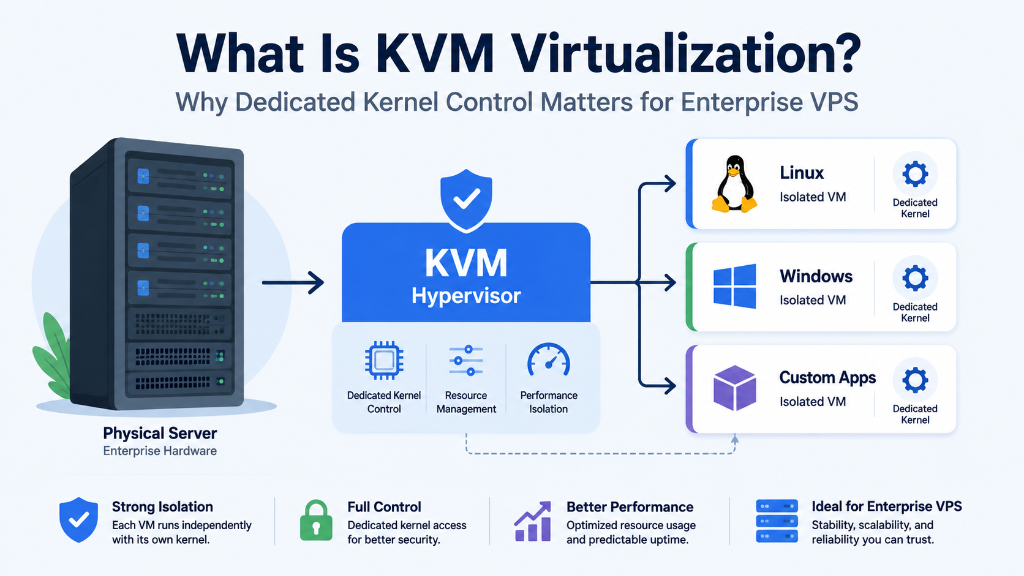
KVM (Kernel-based Virtual Machine) is a hardware-assisted type-1 hypervisor technology that turns the Linux host kernel into a true virtualization platform, providing each guest VPS with its own completely isolated kernel, dedicated RAM, and private virtualized hardware. Unlike container-based virtualization (OpenVZ/LXC), KVM allows custom kernel modules, native Docker execution, proprietary OS installation (Windows/FreeBSD), and complete immunity from adjacent noisy-neighbor memory exhaustion.
KVM VPS Virtualization Explained: How It Works and Why Kernel Control Matters
Understand how KVM virtualization creates isolated virtual machines, how hardware-assisted virtualization works, and why independent kernel control matters for modern VPS workloads. For verified technical specifications and deployment parameters, consult the official Docker Documentation.
KVM at a Glance
Each virtual machine runs its own guest operating-system kernel.
Intel VT-x and AMD-V help processors execute virtual machines efficiently.
Paravirtualized storage and networking reduce unnecessary device-emulation overhead.
Kernel parameters, networking, firewall rules and system services can be managed inside the guest OS.
What Is KVM Virtualization?
KVM stands for Kernel-based Virtual Machine. It is a Linux kernel virtualization technology that uses processor hardware virtualization extensions to run virtual machines.
KVM works together with the Linux kernel and userspace virtualization components such as QEMU. Hardware features from modern Intel and AMD processors allow guest operating systems to run inside isolated virtual machines while the host manages access to CPU, memory, storage and networking resources.
The important distinction is that a KVM VPS is a full virtual machine, rather than simply an isolated process or container inside the host operating system.
How KVM Virtualization Works
A KVM environment separates the physical server from individual guest machines through a virtualization layer. Each VM receives virtual hardware that the guest operating system can use independently.
Each virtual machine can have its own operating-system kernel, virtual CPU configuration, allocated memory, virtual disk, network interface, firewall rules and system services.
Intel VT-x and AMD-V Hardware Virtualization
Modern processors provide hardware virtualization extensions that allow virtualization software to execute guest workloads efficiently.
Hardware virtualization extensions used by supported Intel CPUs.
Hardware virtualization extensions available on supported AMD CPUs.
Allows virtualization software to handle operations requiring hypervisor intervention.
EPT and NPT: Hardware-Assisted Address Translation
Virtual machines introduce another layer of memory translation because guest operating systems manage virtual memory that ultimately maps to physical memory on the host.
Hardware-assisted second-level address translation reduces the overhead associated with managing guest-to-host memory mappings.
How VirtIO Improves Virtual Network and Storage I/O
A virtual machine needs virtual devices for networking and storage. KVM environments commonly use VirtIO, a paravirtualized device framework designed specifically for virtual machines.
virtio_net
Virtual Network
Efficient guest network I/O
virtio_scsi
Virtual Storage
Virtual SCSI storage access
virtio_pci
PCI Interface
Virtual device communication
virtio_ring
Data Queues
Communication mechanism
Actual storage and network performance still depends on the underlying hardware, VM configuration, host workload, network interface, storage subsystem and application workload.
Why Independent Kernel Access Matters
TCP Configuration
Configure supported congestion-control algorithms such as BBR.
Container Runtime
Configure the Linux environment required by Docker or Podman.
Private Networking
Configure firewall rules, VPN software and custom network services.
Memory Management
Configure swap and Linux virtual-memory parameters according to the workload.
Configure TCP BBR on a Linux KVM VPS
If the guest kernel supports BBR, administrators can select it as the TCP congestion-control algorithm. First check which algorithms are available.
sysctl net.ipv4.tcp_available_congestion_control

sysctl net.ipv4.tcp_congestion_control
A configuration can then be tested using the appropriate sysctl settings:
net.core.default_qdisc=fq
net.ipv4.tcp_congestion_control=bbrRunning Docker and Podman on KVM
Because a KVM virtual machine has its own guest operating system, administrators can configure the Linux environment required by container runtimes.
Container workloads may use Linux namespaces, cgroups, overlay filesystems and firewall/networking features. Exact requirements depend on the operating system and container runtime.
WireGuard and Custom Network Infrastructure
A KVM VPS can be used for VPN gateways, private networking, application connectivity and site-to-site tunnels.
Where KVM VPS Architecture Fits
Custom Linux Environments
Deploy supported Linux distributions with control over the guest operating system.
Windows VPS
Run supported Windows environments where the hosting platform provides compatible images and drivers.
CI/CD Infrastructure
Build isolated environments for testing, deployment automation and development workloads.
VPN Infrastructure
Configure VPN gateways, private networking and specialized network services.
What KVM Isolation Does — and Does Not — Guarantee
KVM provides a full virtual-machine isolation boundary and an independent guest kernel. This can be useful for multi-tenant infrastructure and workloads requiring stronger separation from the host operating system.
However, virtualization alone does not make an environment PCI DSS, HIPAA or GDPR compliant. Compliance depends on the complete technical and organizational security environment.
Does KVM Have Performance Overhead?
Modern KVM virtualization is designed to keep virtualization overhead low through hardware-assisted virtualization and efficient virtual devices such as VirtIO.
There is no single performance percentage that applies to every KVM workload. Results depend on processor architecture, memory allocation, storage, networking, VM configuration and application behavior.
How to Check Whether Your VPS Uses KVM
Linux provides several commands that can help identify the virtualization environment.
systemd-detect-virtlscpu | grep -i hypervisorlsmod | grep virtioKVM vs Container-Based Virtualization
| Feature | KVM VPS | Container-Based VPS |
|---|---|---|
| Guest Kernel | Independent | Shared with host |
| Operating System | Broad OS support | Usually host-kernel dependent |
| Kernel Configuration | Guest administrator control | Limited by host |
| Virtual Hardware | Yes | OS-level isolation |
| Docker Workloads | Guest environment can be configured | Depends on platform |
| Administration | Greater control | Often simpler |
KVM VPS Optimization Checklist
Frequently Asked Questions About KVM VPS
Can I install a custom Linux distribution on a KVM VPS?
Usually, yes, when the hosting platform provides custom ISO installation or supports the required operating-system image. Available operating systems depend on the hosting platform.
Can I run Docker on a KVM VPS?
Yes. A KVM VPS provides a complete guest operating system, allowing administrators to configure the Linux environment required by Docker.
How can I check if my VPS uses KVM?
Run systemd-detect-virt from a Linux terminal. A KVM guest
may report kvm.
Does KVM have the same performance as a dedicated server?
KVM should not be assumed to have identical performance to bare metal. Modern KVM can provide low virtualization overhead, but actual results depend on hardware, VM configuration and workload.
Can I use BBR on a KVM VPS?
If the guest Linux kernel supports BBR, administrators can select it as a TCP congestion-control algorithm and measure its effect on the workload.
Is KVM more secure than container virtualization?
KVM and container virtualization use different isolation models. KVM provides a full virtual-machine boundary with an independent guest kernel, while containers share the host kernel. Overall security still depends on configuration, patching, access controls and infrastructure security.
Conclusion: Strategic Architecture & Performance Summary
Implementing these technical optimizations for what is kvm virtualization? why dedicated kernel control matters for enterprise vps ensures robust throughput, predictable latency, and maximum system reliability across production environments. Rigorous benchmarking and proactive parameter tuning eliminate latent resource bottlenecks before they impact end users.
Pairing disciplined operating system administration with reliable compute foundations is essential for mission-critical operations. Deploying workloads on enterprise dedicated server hosting provides the dedicated resources, network resilience, and hardware acceleration necessary to sustain high availability under heavy production load.
