

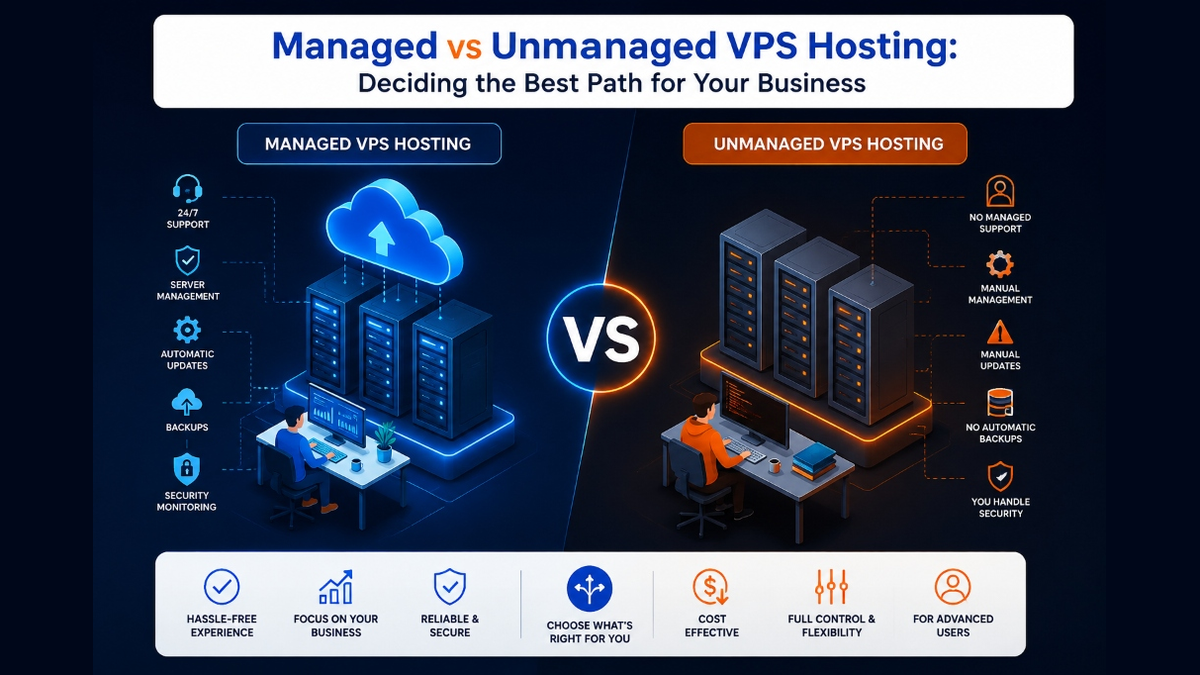
The fundamental distinction between Managed and Unmanaged VPS hosting lies in administrative responsibility. With Unmanaged VPS, you receive raw root access and must handle OS installation, kernel updates, security hardening, firewall rules, and backups yourself. With Managed VPS, the hosting provider’s certified systems engineering team handles round-the-clock server maintenance, proactive security patching, monitoring, and technical support, allowing your business to focus entirely on software development and revenue.
Upgrading from entry-level web hosting to a virtual private server marks an essential transition in technical capability. However, businesses frequently encounter a critical fork in the road: choosing between managed and unmanaged hosting tiers.
While unmanaged hosting offers the lowest monthly sticker price, it shifts 100% of operational risk, command-line maintenance, and security monitoring onto your internal team. For non-technical businesses, self-managing servers quickly turns into costly distraction.
Deploying projects on a reliable Linux VPS hosting platform gives organizations the flexibility to select the precise level of administrative support their operational workflow requires.
Unmanaged VPS: Maximum Control for Technical Specialists
In an unmanaged hosting environment, the hosting provider is solely responsible for physical datacenter uptime, power, network connectivity, and the virtualization hypervisor layer.
Everything inside the guest virtual machine—including Linux distribution selection, web server configuration (Nginx/Apache), database setup, PHP runtimes, firewall rules, and automated backup routines—is completely managed by you.
This model is ideal for experienced Linux system administrators, DevOps engineers, and custom software developers who require full root access to install proprietary software packages and customize kernel parameters.
However, when a service fails at 2:00 AM or a zero-day Linux vulnerability is discovered, you are entirely responsible for troubleshooting and resolving the incident without host intervention.
Managed vs. Unmanaged Responsibility Matrix
| Operational Task | Unmanaged VPS | Managed VPS |
|---|---|---|
| OS Updates & Kernel Patches | Customer Responsibility | Managed by Provider Sysadmins |
| Firewall & Security Hardening | Customer Responsibility | Pre-configured & Hardened |
| Automated Backups & Restores | Manual Setup by Customer | Automated Snapshot Archiving |
| 24/7 Service Monitoring | Self-Monitored | Proactive NOC Team Monitoring |
| Root Shell Access | 100% Unrestricted | Full Root + Assisted Support |
Managed VPS: Enterprise Peace of Mind and High Availability
Managed hosting bridges the gap between hardware infrastructure and business applications. Your provider’s engineering team handles the complex server administration tasks that typically require full-time internal systems staff.
Partnering with managed Linux server administration specialists provides continuous uptime monitoring, rapid disaster recovery, web server performance tuning, and immediate incident mitigation.
Zero-Day Vulnerability Remediation: When critical security vulnerabilities (like OpenSSL or Linux kernel CVEs) are published, managed hosting engineering teams patch the operating system immediately, protecting your digital assets before automated exploit bots scan your server.
Database Performance Tuning: Managed systems engineers analyze slow query logs and optimize database buffer pools, query caches, and connection limits, ensuring relational databases deliver sub-second response times under peak customer traffic.
Proactive Uptime Monitoring: Managed hosting includes round-the-clock synthetic monitoring that probes HTTP response codes and server load every 60 seconds, allowing certified technicians to resolve emerging bottlenecks before end users notice service degradation.
For growing enterprises running mission-critical workloads, scaling to fully managed dedicated server hosting combines physical bare-metal hardware with hands-on systems engineering support.
Managed vs Unmanaged VPS Hosting — Complete Guide
Watch this detailed walkthrough to understand the real differences between managed and unmanaged VPS hosting, including server setup, support tiers, and cost comparison.
Security Governance and Proactive Patch Management
Operating a publicly accessible virtual server requires continuous vigilance against emerging cybersecurity vulnerabilities and brute-force intrusion attempts. The division of operational responsibility between managed and unmanaged hosting directly determines your organizational exposure.
On an unmanaged VPS, the system administrator assumes full accountability for patching the Linux kernel, configuring firewall tables, and updating core web daemon packages. Missing a zero-day exploit release by just a few hours can leave sensitive business data vulnerable to unauthorized exfiltration.
Managed Security Protocols in Action
Managed hosting providers deploy 24/7 Security Operations Center (SOC) engineers who actively monitor intrusion prevention systems and network anomaly alerts. Automated patch staging ensures security fixes apply cleanly without breaking live application dependencies.
- Automated Kernel Live-Patching: Systems receive critical kernel security patches without requiring disruptive server reboots or planned maintenance windows.
- Web Application Firewall (WAF) Rulesets: Enterprise managed fleets leverage curated WAF rules that block SQL injection, cross-site scripting, and credential stuffing attacks at the network edge.
- Real-Time Threat Quarantine: Malicious script uploads and backdoors are automatically isolated before compromised processes can infect lateral filesystem directories.
- DDoS Mitigation Safeguards: Managed infrastructures scrub volumetric Layer 4 and Layer 7 attacks, maintaining seamless availability during targeted DDoS floods.
Operational Overhead vs. Total Technical Freedom
Unmanaged VPS hosting grants complete root access, empowering developers to install custom hypervisor modules, experiment with exotic database engines, and configure proprietary network stacks. This environment suits seasoned DevOps professionals who demand total control over every configuration file.
However, calculating the true operational cost requires factoring in engineering hours spent resolving software conflicts, troubleshooting server crashes, and managing routine backup verifications. Provider-managed infrastructure frees your internal technical team to focus exclusively on product development and revenue generation.
Comparative Resource Allocation
Examining operational commitments reveals how support tiers impact internal business workflows and technical productivity over time.
- Routine Database Optimization: Managed hosting teams tune MySQL buffer pools, query caches, and slow-query logs to maintain peak database responsiveness automatically.
- Disaster Recovery Testing: Managed environments conduct regular snapshot validation drills to ensure restore points remain clean, complete, and readily bootable.
- Performance Profiling: Dedicated support specialists diagnose memory leaks, zombie processes, and CPU bottlenecks before end users encounter degraded browsing experiences.
- Stack Customization Flexibility: Unmanaged servers provide complete liberty to compile bleeding-edge software packages directly from source repositories without restriction.
Calculating True Total Cost of Ownership (TCO) and Opportunity Costs
When evaluating the financial investment of managed versus unmanaged hosting, analyzing raw subscription invoices provides an incomplete perspective. The seemingly lower baseline fee of unmanaged hosting quickly balloons when skilled engineering hours are diverted to routine system maintenance.
A single production outage occurring over a holiday weekend can cost thousands of dollars in lost eCommerce revenue, customer trust degradation, and emergency consultant fees. Fully administered VPS hosting transforms unpredictable emergency maintenance costs into a predictable, budgetable operational expense.
Strategic ROI Factors to Consider
Weighing these financial variables ensures technical leaders make fiscally sound hosting investments that support sustainable organizational growth.
- Developer Opportunity Cost: High-value software engineers deliver maximum ROI building user-facing features rather than debugging web server memory faults.
- 24/7 Rapid Incident Response: Provider support teams guarantee contractual 15-minute response SLAs, eliminating the need to maintain an expensive on-call overnight staff.
- Bundled Enterprise Tooling: Premium management tiers include commercial cPanel/Plesk licenses, automated backup vaults, and enterprise malware scanners at no extra charge.
- Scalable Technical Expertise: Hosted server solutions provide instant access to senior Linux systems engineers without the recruiting overhead of hiring in-house sysadmins.
Automated Disaster Recovery Drills and Snapshot Verification
Having a backup strategy is meaningless unless your organization routinely validates that backup archives can be restored into fully operational systems. The difference in disaster recovery workflows between managed and unmanaged hosting is substantial.
In an unmanaged environment, engineers must manually script, execute, and verify backup restoration drills on separate test instances. VPS providers with full administration automate regular spin-up tests, verifying that database tables mount cleanly and web daemons start without manual intervention.
- Automated Sandbox Restores: Spin up temporary staging clones to verify snapshot image integrity without impacting production traffic.
- Zero-Knowledge Backup Targets: Encrypt snapshot archives client-side before replicating data to geographically distributed off-site cloud storage.
- RTO and RPO Verification: Measure exact recovery times during scheduled simulation drills to guarantee contractual business continuity compliance.
- Immutable Storage Locks: Enable write-once-read-many (WORM) storage policies to prevent ransomware from encrypting historical server snapshots.
Conclusion: Selecting the Optimal Hosting Path
Selecting between managed and unmanaged VPS hosting hinges on your organization’s internal technical capabilities, budget structures, and strategic focus. Unmanaged hosting remains an unbeatable solution for seasoned technical teams seeking absolute architectural liberty at minimal infrastructure costs.
For growing businesses, digital agencies, and eCommerce operators, a fully administered VPS delivers invaluable peace of mind through professional administration, guaranteed response SLAs, and hardened cybersecurity. Choosing the tier that matches your operational strengths ensures your web presence remains fast, resilient, and secure.
Frequently Asked Questions
Do I get root access on a managed VPS server?
Yes! High-quality managed VPS hosting provides full root access alongside managed support, allowing technical teams to install custom software while relying on host engineers for server maintenance and security.
Is an unmanaged VPS cheaper than a managed VPS?
Yes, the direct monthly hosting fee is lower because support overhead is excluded. However, if your team lacks Linux skills, the time spent troubleshooting errors often costs far more than the price difference of managed hosting.
What is included in managed VPS server support?
Managed support includes operating system setup, security patches, firewall configuration, automated backups, web server optimization (Apache/Nginx/LiteSpeed), database tuning, and 24/7 uptime monitoring.
Can an unmanaged VPS be upgraded to a managed plan later?
Yes. Most hosting providers allow customers to add managed administration services to their existing VPS instances at any time without migrating data or changing IP addresses.
Which hosting type is better for WordPress websites?
Provider-managed VPS hosting is generally better for WordPress because host engineers pre-configure server caching, PHP OPcache, MySQL buffer pools, and automated backups, ensuring maximum site speed and security.
