

⚡ TCP BBR Congestion Control: Executive Summary
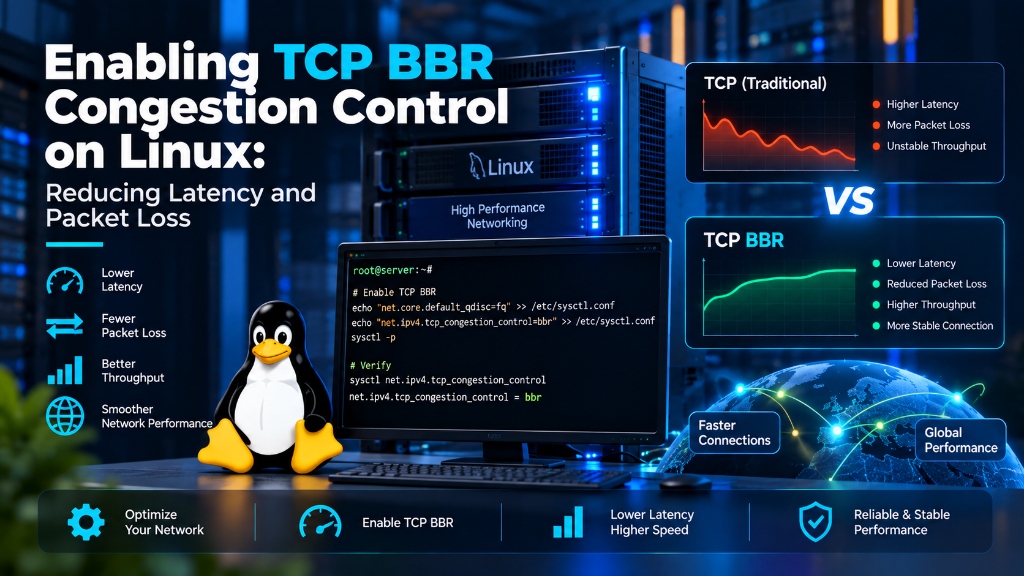
- CUBIC vs. BBR: Legacy TCP CUBIC relies on packet loss to detect congestion, often leading to bufferbloat. Google’s BBR (Bottleneck Bandwidth and Round-trip propagation time) analyzes actual bandwidth and latency, dramatically improving speeds on lossy networks.
- Higher Throughput: BBR can improve network throughput by over 10x on high-latency international connections and significantly reduce lag for real-time applications.
- Kernel Level Tuning: Enabling BBR requires Linux Kernel 4.9+ and involves simple adjustments to
sysctl.conf. It is a drop-in replacement that instantly optimizes outbound traffic. - VPS Performance: When combined with premium UK VPS hosting, TCP BBR ensures your server can handle sudden traffic spikes without dropping packets.
Table of Contents
1. Introduction: The Problem with TCP CUBIC
For decades, the internet has relied on loss-based congestion control algorithms like TCP Reno and CUBIC. These algorithms operate under a simple assumption: if a packet is lost, the network must be congested, so the server should drastically slow down its transmission rate.
In modern high-speed networks with deep router buffers, this assumption is flawed. Router buffers can hold packets for long periods (a phenomenon known as “bufferbloat”), causing massive latency spikes before a packet is finally dropped. By the time CUBIC reacts to the loss, the network connection has already suffered severe lag, ruining the experience for streaming, gaming, and fast API responses.
2. How TCP BBR Congestion Control Works
Developed by Google, TCP BBR Congestion Control (Bottleneck Bandwidth and Round-trip propagation time) takes a completely different approach. Instead of waiting for packet loss, BBR actively measures the exact bottleneck bandwidth and round-trip time (RTT) of the connection.
By building an explicit model of the network path, BBR sends traffic exactly as fast as the network can handle it. It prevents buffers from filling up, eliminating bufferbloat and ensuring that packet loss (which can happen naturally on WiFi or mobile networks) does not unnecessarily throttle your server’s throughput.
3. Prerequisites: Checking Your Linux Kernel
TCP BBR is built directly into the Linux networking stack, but it requires Kernel version 4.9 or higher. Most modern distributions (Ubuntu 20.04+, Debian 10+, CentOS 8+) support it out of the box.
If you are running an outdated kernel, you should perform a system upgrade before proceeding.
4. Step-by-Step: Enabling TCP BBR on Linux
Activating BBR is a straightforward process that does not require installing any third-party software. You only need to modify your system’s sysctl parameters.
You must set the queuing discipline to fq (Fair Queuing) rather than the default pfifo_fast. The FQ pacing mechanism works in tandem with BBR to accurately space out packets and prevent micro-bursts that overwhelm routers.
5. Verifying BBR Activation & Benchmarking
After applying the settings, you should verify that the Linux kernel has successfully loaded the BBR module and assigned it to your network interfaces.
Once verified, you will immediately notice improved performance. Visitors accessing your dedicated servers from high-latency regions (such as international mobile networks) will experience significantly faster load times and fewer dropped connections.
6. Conclusion & FAQ
Switching from legacy CUBIC to TCP BBR Congestion Control is one of the most effective, zero-cost network optimizations you can perform on a Linux server. By directly addressing the root cause of bufferbloat, BBR ensures your applications deliver maximum throughput regardless of network conditions.
Frequently Asked Questions
Q1: Is TCP BBR safe for production servers?
Yes. BBR has been rigorously tested and powers the majority of Google’s global traffic (including YouTube and Google Cloud). It is highly stable for production environments.
Q2: Does BBR help with UDP traffic?
No. BBR is specifically a Transmission Control Protocol (TCP) congestion algorithm. It optimizes HTTP/HTTPS, SSH, and FTP traffic, but does not affect connectionless UDP traffic like DNS or traditional VoIP.
Q3: Do clients (visitors) need to enable BBR as well?
No! TCP congestion control primarily manages outbound traffic. By enabling BBR solely on your Linux server, you dictate the pacing of data sent to clients, resulting in universal download speed improvements for all visitors.
