

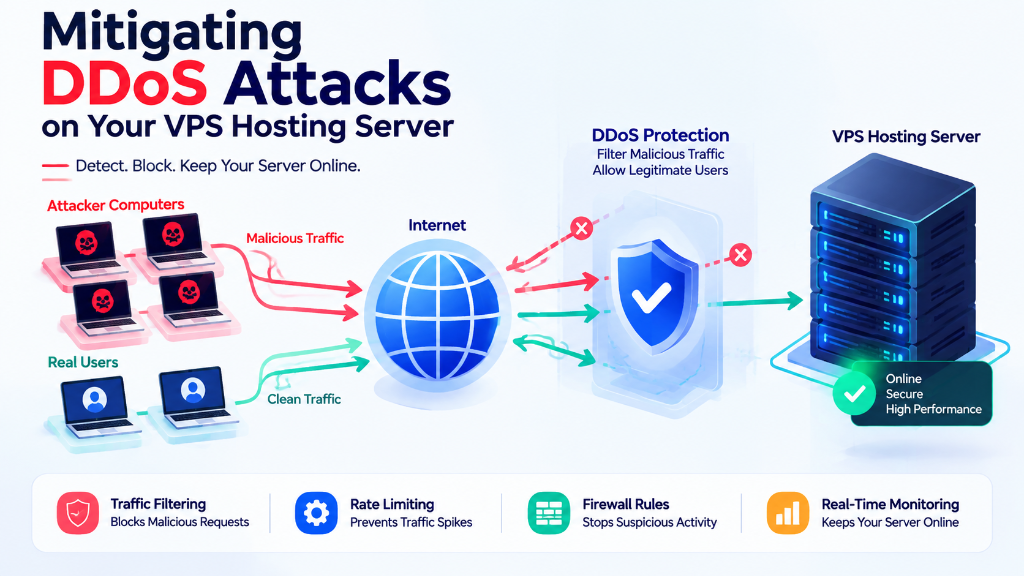
Mitigating DDoS attacks on a VPS requires a multi-layered defense strategy: route incoming traffic through an Anycast network with volumetric scrubbing (such as Cloudflare or hardware edge firewalls) to absorb Layer 3/4 SYN and UDP floods, configure local kernel protection using sysctl SYN cookies (net.ipv4.tcp_syncookies = 1), and deploy Fail2ban with NGINX rate-limiting (limit_req_zone) to block Layer 7 HTTP flood attacks before they exhaust server thread pools.
DDoS Protection at a Glance
DDoS attacks can disrupt VPS-hosted websites and applications by overwhelming network bandwidth, TCP connections, or application resources with excessive traffic. Effective protection requires a layered security approach rather than relying on a single firewall rule. For verified technical specifications and deployment parameters, consult the official Linux Kernel Documentation.
Filter Large Attacks
Use upstream DDoS protection to filter large volumetric attacks before they consume VPS network capacity.
Protect Web Traffic
Use a CDN or reverse proxy to filter excessive HTTP/HTTPS traffic and reduce direct exposure of the origin server.
Control Server Traffic
Apply firewall and rate-limiting controls to manage excessive connections and requests reaching the VPS.
Monitor Resources
Monitor CPU, memory, bandwidth, connections, and server logs for unusual traffic and resource exhaustion.
Filter large attacks before they reach the VPS, control abusive traffic at the firewall and application layers, and continuously monitor the server for signs of resource exhaustion.
Mitigating DDoS Attacks on Your VPS Hosting Server
A Distributed Denial-of-Service (DDoS) attack can make a VPS-hosted website, application, or online service slow or completely unavailable by sending a large volume of unwanted traffic to the server.
Effective protection requires multiple layers, including network-level filtering, firewalls, rate limiting, reverse proxies, and proper server configuration.
What Is a DDoS Attack?
A DDoS attack attempts to consume the resources required to keep a server or application available. Depending on the attack method, the target may be:
When these resources become exhausted, legitimate users may experience slow loading, connection timeouts, or complete service disruption.
Common DDoS Attacks Against VPS Servers
DDoS attacks can target different layers of the network and application stack.
Layer 3/4 Network Floods
Network and transport-layer attacks generate large numbers of packets or connection attempts. UDP floods and TCP SYN floods can consume network capacity or place additional pressure on connection-tracking and TCP resources.
Layer 7 Application Attacks
Application-layer attacks target services such as HTTP and HTTPS. Attackers may generate large numbers of requests to searches, login pages, APIs, or database-driven pages to consume application resources.
Use Multiple Layers of DDoS Protection
A reliable DDoS mitigation strategy should not depend on a single security control.
Datacenter-level or upstream DDoS protection can filter malicious traffic before it consumes the VPS network capacity. This is especially important for large volumetric attacks.
A CDN or reverse proxy places an additional layer between visitors and the VPS. It can provide traffic filtering, caching, rate limiting, and protection against many HTTP-based attacks.
A Linux firewall can limit excessive connection attempts and drop traffic matching defined rules. It provides an additional layer of protection but does not replace upstream DDoS mitigation.
Use Firewall Rules to Limit Suspicious Traffic
Host-level firewall rules can reduce excessive connection attempts and provide an additional protection layer for VPS workloads.
# Limit incoming SYN connection attempts
sudo iptables -A INPUT -p tcp --syn -m limit --limit 25/s --limit-burst 50 -j ACCEPT

# Limit excessive web connections from one IP
sudo iptables -A INPUT -p tcp -m multiport --dports 80,443 -m connlimit --connlimit-above 50 -j DROPApply Rate Limiting
Rate limiting controls how frequently a client can send requests or establish connections. It is especially useful for web applications exposed to repeated HTTP or HTTPS requests.
Limit how frequently clients can access resource-intensive pages and APIs.
Reduce the number of simultaneous requests reaching application processes.
Prevent excessive application requests from creating unnecessary database connections.
Nginx and other reverse proxies can apply request-rate controls before traffic reaches the application. Limits should match normal traffic patterns so legitimate users are not blocked unnecessarily.
Protect the TCP Connection Layer
TCP SYN floods attempt to consume server resources by generating large numbers of connection requests. Linux provides mechanisms such as SYN cookies that can help reduce the impact of certain SYN-flood conditions.
# Enable SYN cookies
net.ipv4.tcp_syncookies = 1

# Increase the queue for pending TCP connections
net.ipv4.tcp_max_syn_backlog = 4096Kernel parameters should be changed carefully because settings suitable for one workload may not be appropriate for another.
Monitor VPS Resources During an Attack
Monitoring helps identify which server resource is being exhausted and prevents administrators from making unnecessary configuration changes.
Check incoming and outgoing traffic levels.
Identify unusual resource consumption.
Review active connections and connection states.
Review web, application, and system logs.
Keep the Origin Server Secure
When a website uses a CDN or reverse proxy, the VPS origin address should be protected whenever possible.
Public DNS records, old subdomains, application configurations, or other infrastructure details can sometimes expose the origin address. Review these sources and restrict unnecessary services and ports.
Can a VPS Firewall Stop a Large DDoS Attack?
A local firewall can block unwanted packets after they reach the VPS network interface. However, it cannot prevent an attack from consuming the upstream connection before the traffic reaches the firewall.
This is why large volumetric attacks require upstream filtering or dedicated DDoS mitigation infrastructure. Local firewall rules remain useful for smaller attacks, connection abuse, and access control.
Best Practices for VPS DDoS Mitigation
Use upstream DDoS protection when available.
Place public web applications behind a suitable CDN or reverse proxy.
Keep the VPS origin IP protected where possible.
Use firewall rules to restrict unnecessary traffic.
Apply sensible connection and request rate limits.
Keep the operating system and server software updated.
Disable services and ports that are not required.
Monitor network, CPU, memory, and connection usage.
Review access and application logs during unusual traffic events.
Test mitigation rules before deploying them to production workloads.
Frequently Asked Questions
Can a VPS firewall stop a large DDoS attack? +
Why should the VPS origin IP be protected? +
Can a CDN help mitigate DDoS attacks? +
How does rate limiting help against HTTP floods? +
Conclusion: Developing a Multi-Layered DDoS Defense Strategy
Protecting cloud VPS infrastructure against sophisticated cyber attacks requires a combined defense strategy of upstream edge traffic scrubbing, properly configured Linux kernel network parameters, and automated brute-force protection tools like Fail2ban.
Maintaining continuous service availability depends on stopping malicious traffic before it exhausts server compute or network uplinks. Deploying applications on Onlive Server anti-DDoS protected VPS hosting safeguards your web services against volumetric and application-layer disruptions.
To ensure round-the-clock infrastructure availability, proactive security hardening, and rapid vulnerability patching, partnering with proactive server management and security support safeguards servers against unauthorized access and operational downtime.
Build DDoS Protection in Layers
DDoS mitigation on a VPS works best as a layered security strategy rather than a single firewall rule. Upstream filtering helps handle large network floods, while CDNs and reverse proxies can protect web applications from many HTTP-based attacks.
Host-level firewalls, rate limiting, monitoring, and careful server configuration provide additional protection at the VPS level. Understanding which resource is being exhausted helps administrators choose the appropriate mitigation approach and reduce service disruption for legitimate users.
For optimal speed and reliable uptime, deploy your projects on Onlive Server high-performance Linux VPS powered by NVMe Gen4 storage and KVM virtualization.
