

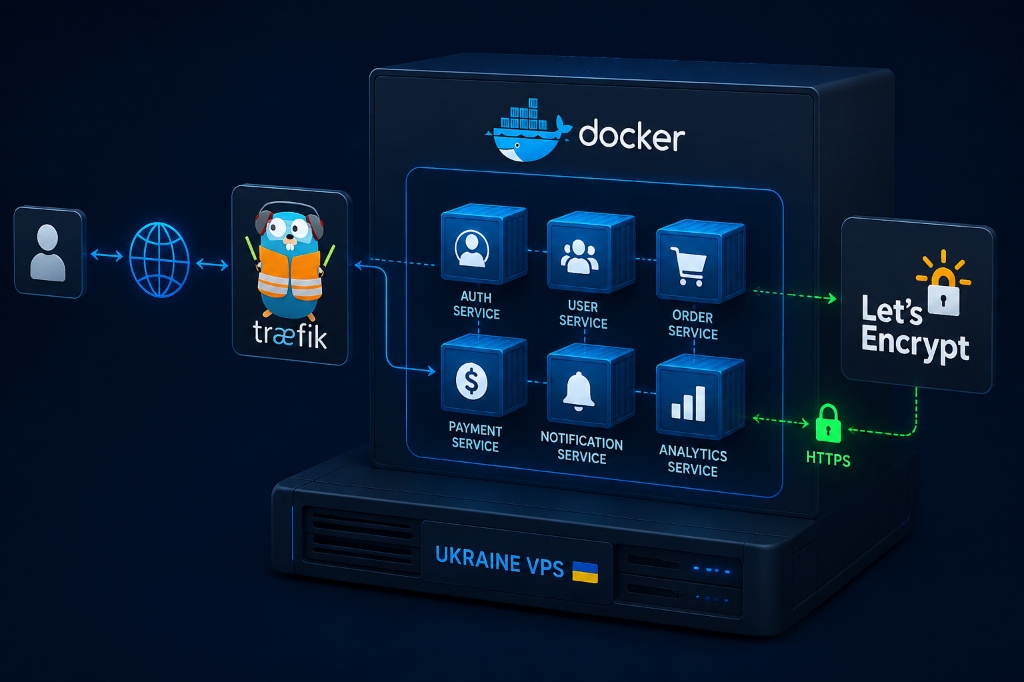
To build a containerized web architecture using Docker containerization on VPS, install Docker CE and Docker Compose, then deploy Traefik v2/v3 as an edge reverse proxy listening on ports 80 and 443. Configure Traefik dynamic labels within your docker-compose.yml files to automatically discover backend application containers, manage routing, and generate Let’s Encrypt TLS certificates dynamically — eliminating all manual Nginx configuration overhead.
Docker Containerization on VPS: Introduction — The Evolution to Containerized Microservices
Modern microservices development relies heavily on Docker containers to decouple application services, simplify dependencies, and standardize deployments across diverse infrastructure environments. However, managing container routing, reverse proxy configurations, and SSL certificates manually on a Linux VPS can quickly become an administrative bottleneck that slows engineering velocity and introduces human error into production systems. The battle-tested solution is combining Docker Compose with Traefik v3 — an open-source, edge-routing reverse proxy engineered specifically for containerized ecosystems that queries the Docker daemon API directly, automatically reading container labels to configure routes, load balancers, and Let’s Encrypt certificates in real time without downtime.
Deploying this stack on a high-compute virtual private server in Kyiv combines cutting-edge DevOps agility with ultra-fast regional network connectivity across Eastern Europe — making it an ideal platform for latency-sensitive, globally distributed microservice workloads. To support containerized microservice clusters at scale, evaluate our best cloud hosting services and enterprise cloud server hosting infrastructure.
Manual Proxy Configuration Friction
Writing static Nginx configurations and executing manual reload scripts for every new container creates deployment delays and increases operational overhead.
Dynamic Container Auto-Discovery
Traefik monitors the Docker daemon socket and automatically provisions routing rules as containers start up — zero manual configuration required per deployment.
Automated Zero-Touch SSL
Integrated ACME certificate resolvers issue and renew Let’s Encrypt SSL certificates dynamically using container labels, eliminating manual certbot scheduling.
Docker Containerization on VPS: Architectural Blueprint — The Cloud-Native Container Topology
A production microservices architecture pairs declarative container definitions with dynamic edge routing to form a resilient, self-healing service mesh. The three foundational pillars of this cloud-native topology are Declarative Docker Compose Stacks that define isolated application networks and persistent volume mounts in clean YAML files, a Traefik Dynamic Edge Router that auto-discovers backend container services via Docker socket labels for routing and TLS termination, and Read-Only Socket Hardening that restricts Docker daemon socket access to prevent compromised containers from escalating host-level privileges. For multi-container orchestration and bridge networking definitions, explore the official Docker Compose documentation.
| Component | Service Technology | Docker Network | Exposed Ports / Visibility |
|---|---|---|---|
| Ingress Controller | Traefik v3.x | web_gateway (Bridge) | Public: 80 (HTTP), 443 (HTTPS) |
| Frontend Web Client | Next.js / Nginx Container | web_gateway | Internal 3000 (Routed via Traefik Host SNI) |
| Backend API Service | Node.js / Python FastAPI | web_gateway + internal_backend | Internal 8000 (Routed via Traefik PathPrefix) |
| Database Engine | PostgreSQL 16 Alpine | internal_backend only | Zero public exposure; internal 5432 only |
| Cache & Session Store | Redis 7 Alpine | internal_backend only | Zero public exposure; internal 6379 only |
Step-by-Step Production Configuration Runbook on Ubuntu VPS
Implement this production configuration on an Ubuntu 24.04 LTS server in Kyiv to deploy Traefik and containerized microservices in under 30 minutes. The runbook progresses logically from Docker Engine installation through shared network creation, Traefik proxy configuration, static YAML routing rules, and finally microservice deployment with fully automated Let’s Encrypt TLS — each step building precisely on the last to create a production-grade, self-healing container platform.
Install Docker Engine & Docker Compose Plugin
Add the official Docker CE apt repository, import the GPG key, and install docker-ce, docker-ce-cli, containerd.io, docker-buildx-plugin, and docker-compose-plugin in a single command chain.
Configure Traefik docker-compose.yml
Create /opt/traefik/docker-compose.yml to initialize Traefik v3 with the Docker socket mounted read-only, ACME storage volume, and connection to the shared web_gateway network.
Write Traefik Static Configuration (traefik.yml)
Define entrypoints (web on :80 with HTTP→HTTPS redirect, websecure on :443), Docker provider with exposedByDefault: false, and the letsencrypt ACME resolver targeting httpChallenge.
Deploy Microservices with Dynamic Traefik Labels
Create per-service docker-compose.yml files with Traefik labels specifying routers, TLS cert resolvers, and load balancer ports. Traefik instantly discovers each new service without a restart.
Step 1: Installing Docker Engine & Docker Compose Plugin
Step 2: Configuring the Traefik docker-compose.yml
Create /opt/traefik/docker-compose.yml to initialize Traefik with automated Let’s Encrypt TLS:
Step 3: Traefik Static Configuration (traefik.yml)
Step 4: Deploying a Microservice with Dynamic Traefik Labels
Create /opt/apps/api-service/docker-compose.yml to run an API service automatically routed by Traefik:
Enterprise Industry Use Cases for Containerized Microservices
Adopting Docker Compose and Traefik on a dedicated virtual server delivers immense productivity gains across multiple industries. Whether you’re managing multi-tenant SaaS platforms, continuous delivery pipelines, or mission-critical fintech infrastructure, the container-native approach eliminates environment inconsistency, reduces deployment friction, and enables teams to iterate with engineering confidence at every scale.
SaaS Multi-Tenant Platforms
Launch isolated customer instances on unique subdomains (e.g., tenant1.saas.com) where Traefik provisions wildcard or individual SSL certificates automatically upon container startup.
Digital Marketing & Web Agencies
Host 20–50 distinct client web applications on a single Ukraine VPS instance without port conflicts, dependency collisions, or inter-client resource interference.
Continuous Delivery (CD) Pipelines
Automated GitHub Actions or GitLab CI runners build and push Docker images, pulling and restarting containers via SSH with zero downtime on every production release.
Fintech Microservice Ecosystems
Decouple payment gateways, user authentication services, and analytics logging into independently scalable container processes with strict network isolation between sensitive services.
Operational Advantages and Strategic Boundaries
While Docker Compose and Traefik unlock remarkable engineering agility, production deployments must account for two critical operational boundaries that directly impact system security and long-term storage stability. Understanding these constraints upfront prevents costly remediation efforts once infrastructure has scaled to dozens of active containers across multiple application stacks.
Docker Socket Security
Exposing /var/run/docker.sock to containers can grant root access if compromised. Traefik must be secured with security_opt: no-new-privileges and preferably fronted by a read-only socket proxy such as Tecnativa docker-socket-proxy to prevent container escape vectors.
Disk Space Hygiene
Unused Docker images and build caches accumulate rapidly across active deployments. Configure automated cron jobs executing docker system prune -af on a weekly schedule to prevent filesystem exhaustion on the host VPS storage volume.
Docker Container Security Hardening & Rootless Execution
By default, Docker daemons execute processes with root privileges on the host system — a significant attack surface in shared-infrastructure environments. If a malicious attacker discovers a remote code execution vulnerability inside an unhardened web application container, they can potentially escape the container namespace and compromise the host hypervisor. To enforce enterprise defense-in-depth, production Docker Compose configurations must implement strict security constraints: dropping unnecessary Linux capabilities (cap_drop: - ALL), mounting container root filesystems as read-only (read_only: true), and defining unprivileged user IDs (user: "1001:1001"). Additionally, utilizing Docker socket proxies prevents Traefik from having direct write access to the host Docker daemon socket, mitigating container escape vectors at the infrastructure boundary.
These security best practices ensure compliance with enterprise cybersecurity guidelines, satisfy SOC 2 and ISO 27001 audit requirements, and safeguard corporate data assets against lateral movement attacks within containerized environments.
Automated Container Monitoring & Log Aggregation
As the number of containerized microservices grows, centralized logging becomes essential for rapid incident triage and root-cause analysis. When containers write logs to standard output (stdout/stderr), Docker’s JSON log driver stores logs locally on disk — and without log rotation policies, unbounded log growth can consume host disk storage, leading to filesystem lockups that take down all active services simultaneously. Configuring default Docker log rotation inside /etc/docker/daemon.json (limiting log files to 10MB with 3 rotations) guarantees storage stability across all container lifecycle events.
Deploying lightweight telemetry agents like Portainer for visual container management and Promtail/Loki for real-time log querying allows DevOps engineers to diagnose application exceptions within seconds across all running containers. This modern containerized workflow empowers technical teams to innovate rapidly, maintain impeccable service availability, and extract maximum ROI from their cloud hosting investments.
Portainer CE
Visual container management dashboard for starting, stopping, inspecting logs, and managing container health across all Docker stacks on your Ukraine VPS.
Promtail + Loki
Lightweight log aggregation pipeline — Promtail tails container stdout, ships to Loki for indexing, and Grafana provides real-time log querying with label-based filtering.
Prometheus + cAdvisor
cAdvisor exposes per-container CPU, memory, and network metrics; Prometheus scrapes and stores time-series data for alerting rules and Grafana visualization dashboards.
Traefik Middleware Pipeline: Rate-Limiting & Security Headers
One of Traefik’s most compelling architectural capabilities is its modular middleware system, which intercepts and transforms every HTTP request before it reaches a backend application container. This eliminates the need to implement repetitive security logic inside individual application codebases and allows central policy enforcement across all services simultaneously. System administrators can enforce strict rate limiting (e.g. 100 requests per minute per client IP) to mitigate brute-force and scraping attacks, inject enterprise security headers (HSTS, Content-Security-Policy, X-Frame-Options), and enforce HTTP Basic Authentication over sensitive endpoints — all configured declaratively through container labels without touching application code.
Automated Zero-Downtime Rolling Upgrades with Docker Compose
Deploying application updates in production must never result in dropped user connections or 502 Bad Gateway error screens — yet achieving this without a full Kubernetes orchestrator was historically complex. Traefik coordinates with Docker container health checks to deliver zero-downtime rolling updates natively, without requiring external tooling or complex deployment orchestration scripts. When deploying a new container release, Docker spins up the new container instance while keeping the existing container running; Traefik inspects the container’s health status via HEALTHCHECK and only when the new container returns HTTP 200 on its internal health endpoint does Traefik dynamically shift incoming traffic and gracefully drain existing connections on the retired instance. This continuous deployment capability allows software engineering teams to ship updates multiple times daily with total operational confidence.
New Container Spin-Up
Docker pulls the new image version and launches a fresh container instance while the original service container continues handling live production traffic.
Traefik Health Verification
Traefik monitors the new container’s HEALTHCHECK endpoint — only registering it as a valid backend when it responds HTTP 200 consistently for the configured threshold period.
Traffic Shift & Connection Drain
Traefik atomically shifts all new incoming requests to the healthy updated container while gracefully draining in-flight connections on the old instance — no user-visible interruption.
Old Container Retirement
Once all existing connections have completed, Docker stops and removes the old container instance. The new version is now fully live with zero downtime achieved across the entire upgrade cycle.
Automated Docker Volume Snapshots & Offsite Replication
While Docker containers are designed to be ephemeral and stateless, persistent state resides in Docker named volumes — PostgreSQL data directories, uploaded media assets, and application configuration stores. Without an automated backup strategy, host filesystem failure can result in unrecoverable data loss that cannot be remediated by simply spinning up a new container. Implementing automated containerized volume backups using utilities like restic or borgbackup running as scheduled cron sidecars ensures reliable disaster recovery SLAs. The backup container briefly executes database-level dumps (such as pg_dump), snapshots Docker volume directories, applies client-side encryption, and deduplicates data before replicating archives to offsite S3-compatible cloud storage — ensuring that in the event of hardware replacement, the entire containerized microservices fleet can be restored onto a new Ukraine VPS instance within minutes.
Database-Level pg_dump
Execute pg_dump inside the PostgreSQL container via docker exec to create consistent, transaction-safe SQL archives that capture database state without locking production tables.
Restic Deduplicated Snapshots
Restic snapshots Docker volume directories, applies client-side AES-256 encryption, deduplicates data blocks across all backup generations, and maintains a full restore history.
S3-Compatible Offsite Storage
Encrypted archives replicate to S3-compatible object storage (AWS S3, Backblaze B2, or MinIO) ensuring geographic redundancy and sub-minute recovery point objectives for critical workloads.
Resource Quotas & OOM Protection
To prevent a single misbehaving microservice from consuming all host RAM and triggering the Linux Out-Of-Memory (OOM) killer against critical system daemons, Docker Compose supports explicit resource reservations and hard limits via the deploy.resources.limits directive. Enforcing deploy.resources.limits.memory prevents memory leaks from cascading across other containers, ensuring predictable performance across your entire microservices fleet — a critical discipline when running 10+ services on a shared VPS host. By pairing disciplined resource budgeting with high-speed PCIe Gen4 NVMe storage in Kyiv, DevOps engineers achieve unmatched application stability, deterministic container execution, and long-term infrastructure cost predictability across all enterprise deployments.
| Service Type | CPU Limit | Memory Limit | Memory Reservation |
|---|---|---|---|
| Traefik Proxy | 0.5 cores | 128M | 64M |
| Node.js API Service | 1.0 cores | 512M | 256M |
| PostgreSQL Database | 2.0 cores | 1G | 512M |
| Redis Cache | 0.25 cores | 256M | 128M |
| Monitoring Sidecar | 0.1 cores | 64M | 32M |
