

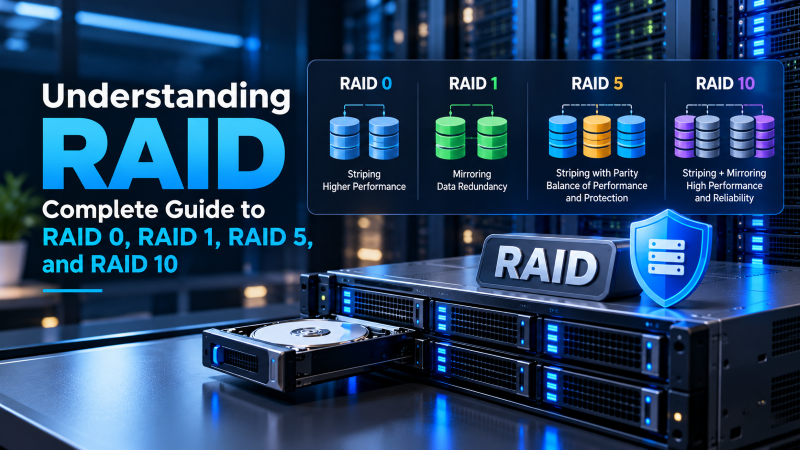
RAID (Redundant Array of Independent Disks) combines multiple physical hard drives or NVMe SSDs into a single logical storage pool to achieve data redundancy, increased read/write performance, or both. Choose RAID 0 (Striping) strictly for temporary scratch storage requiring maximum speed with zero fault tolerance. Select RAID 1 (Mirroring) for two-drive operating system boot volumes where complete drive duplication is required. Deploy RAID 5 (Striping with Distributed Parity) for cost-effective read-heavy storage with single-drive failure protection. For mission-critical production databases and enterprise virtualized servers, RAID 10 (Striped Mirrors) is the industry gold standard, delivering blazing random I/O throughput and multi-drive failure survivability.
Storage reliability is the bedrock of server infrastructure. Whether you are running high-concurrency relational databases, hosting e-commerce platforms, or archiving terabytes of enterprise customer records, a single physical disk failure must never result in catastrophic data loss or unplanned business downtime. For verified technical specifications and deployment parameters, consult the official Linux Kernel Documentation.
Physical storage media suffer from wear and mechanical failure over time. RAID technology resolves these hardware risks by delivering three critical operational capabilities: To eliminate multi-tenant noisy neighbor contention and resource bottlenecks, deploying workloads on enterprise dedicated servers equipped with hardware RAID controllers guarantees dedicated physical CPU cores and non-throttled NVMe disk I/O.
- 1. High-Availability Fault Tolerance: Mirrors or calculates parity data across disks, allowing servers to maintain 100% uptime even if a physical drive fails.
- 2. Aggregated Read/Write Throughput: Stripes data blocks across multiple disks to multiply input/output operations per second (IOPS) for databases.
- 3. Seamless Online Rebuilds: Enables hot-swapping defective storage units without taking web servers or database daemons offline.
This comprehensive engineering guide breaks down the mathematical mechanics of RAID storage, compares the four most critical RAID topologies (RAID 0, RAID 1, RAID 5, and RAID 10), evaluates hardware vs. software RAID implementations, and provides concrete server sizing recommendations for production workloads.
Core Mechanics: Striping, Mirroring, and Parity Explained
Every RAID level is constructed using three fundamental mathematical and data-distribution techniques:
- Striping (Data Partitioning): Striping breaks incoming data blocks into chunks (typically 64KB or 128KB) and writes them concurrently across multiple physical disks. Because read and write requests execute across multiple drive controllers simultaneously, total throughput scales linearly with the number of drives. However, striping alone provides zero redundancy: if one drive fails, the entire volume is lost.
- Mirroring (Exact Duplication): Mirroring writes identical copies of data simultaneously to two or more independent disks. If Drive A suffers a mechanical motor failure or circuit short, Drive B continues serving data without interruption. Read throughput doubles because the controller can read from both drives concurrently, but usable storage capacity is halved (50% storage efficiency).
- Parity (Mathematical Error Correction): Parity uses XOR logic gates to calculate redundant parity checksum blocks across multiple disks. If any single drive in the array fails, the missing data can be reconstructed mathematically by XORing the remaining surviving data and parity blocks. Parity maximizes usable capacity but introduces a write penalty due to parity calculations.
When provisioning bare-metal compute, choosing enterprise dedicated servers equipped with hardware RAID controllers with hardware RAID controllers ensures that storage parity calculations are processed by dedicated hardware memory without consuming host CPU cycles.
Comprehensive RAID Comparison Matrix
Selecting the optimal RAID topology requires balancing read speed, write latency, storage capacity efficiency, and fault tolerance. Below is an engineering comparison matrix:
| RAID Level | Min Disks | Storage Efficiency | Fault Tolerance | Ideal Workload |
|---|---|---|---|---|
| RAID 0 (Striped) | 2 Disks | 100% (No overhead) | 0 Disks (Any failure destroys array) | Video rendering caches, transient HPC scratch data |
| RAID 1 (Mirrored) | 2 Disks | 50% (Half capacity) | 1 Disk per mirrored pair | OS boot drives, entry web servers, critical config logs |
| RAID 5 (Distributed Parity) | 3 Disks | (N – 1) / N (e.g., 75% on 4 disks) | 1 Disk failure | Read-heavy file storage, media servers, document archives |
| RAID 10 (1+0 Striped Mirrors) | 4 Disks | 50% (Half capacity) | Up to 1 disk per mirror span (2 total) | Transactional databases (MySQL, PostgreSQL), hypervisors |
If your infrastructure relies on virtualized cloud partitions rather than physical disk arrays, provisioning comparing hardware RAID vs software RAID on dedicated servers provides software-defined storage replication (Ceph/SAN) that protects your virtual machine disks at the cloud hypervisor layer.
Deep-Dive: Why RAID 10 Dominates Production Databases
While RAID 5 appears attractive due to its high storage capacity efficiency, senior database administrators strictly avoid RAID 5 for high-concurrency transactional databases (such as MySQL, PostgreSQL, and Oracle). The reason is the RAID 5 Write Penalty: For comprehensive implementation details and operational workflows, review our guide on comparing hardware RAID vs software RAID on dedicated servers.
Every single random write operation in a RAID 5 array requires four distinct physical disk I/O operations:
- 1. Read Old Data: The controller reads the existing data block from disk.
- 2. Read Old Parity: The controller reads the existing parity block associated with that strip.
- 3. Calculate New Parity: The controller computes the new parity block using XOR arithmetic:
New Parity = (Old Data XOR New Data) XOR Old Parity. - 4. Write New Data & Parity: The controller writes the new data and updated parity block to physical disk.
This 4:1 I/O write amplification creates massive disk latency bottlenecks during database commit surges. Furthermore, when a multi-terabyte drive fails in a RAID 5 array, the rebuild process requires reading every single bit from all surviving drives. During this intense 24-hour rebuild window, a second drive failure will completely destroy the entire array.
RAID 10 completely eliminates parity calculations. It mirrors drives first, then stripes across the mirrored sets. Writes require only two simple I/O operations (one to each mirror), and rebuilds simply copy sequential blocks from the surviving mirror partner, completing in a fraction of the time with minimal rebuild stress.
Hardware RAID vs. Software RAID (ZFS / mdadm)
Modern Linux servers can deploy RAID either through dedicated physical PCIe RAID controller cards (Hardware RAID) or directly through the Linux operating system kernel (Software RAID):
- Hardware RAID (Broadcom / MegaRAID / Dell PERC): Uses a dedicated processor and onboard battery-backed write cache (BBU/NVCACHE). Safe write-back caching accelerates random write performance without risk of data loss during power outages. However, if the proprietary controller card fails, you must find an identical replacement card to access the array.
- Software RAID (Linux mdadm / OpenZFS): Software RAID processes array logic directly on host CPU cores. Modern CPUs are so powerful that software RAID overhead is negligible (<1% CPU). OpenZFS is especially favored in modern cloud architectures because it combines software RAID (RAIDZ-2, mirrored pools), volume management, instant snapshots, and cryptographic data checksumming into a unified filesystem.
To learn how to implement ZFS storage pools on bare-metal hardware, explore our guide on deploying unmanaged bare metal servers for database workloads.
Enterprise Storage Tuning: Hardware Cache Policies & NVMe Scaling
When deploying RAID arrays in enterprise dedicated servers, configuring the physical controller’s caching policy directly dictates write throughput. Hardware RAID controllers feature high-speed DDR4 onboard cache memory backed by a battery backup unit (BBU) or supercapacitor. Administrators must choose between two write policies: To strengthen overall system reliability and security, explore our technical tutorial on deploying unmanaged bare metal servers for database workloads.
- Write-Back Caching: Incoming write operations are committed directly to the controller’s ultra-fast RAM cache, acknowledging completion to the operating system immediately before data is physically flushed to disks. If server power is lost, the battery backup preserves cached data until power restores. This mode delivers maximum transactional IOPS.
- Write-Through Caching: The controller writes data directly to physical disk platters before sending a write acknowledgement. While inherently immune to power loss data corruption, write latency is constrained by physical disk write speeds.
In modern NVMe SSD environments, software RAID solutions like OpenZFS utilize enterprise flash storage queues effectively, delivering millions of random IOPS across striped NVMe mirrors with zero controller-bus bottlenecks.
Conclusion: Selecting the Optimal RAID Architecture for Workloads
Choosing the correct RAID level is one of the most critical decisions in storage architecture engineering. While RAID 0 maximizes raw speed at the cost of zero fault tolerance and RAID 1 prioritizes safety, RAID 10 strikes the ultimate balance by delivering high-throughput striping alongside hardware mirroring.
Frequently Asked Questions
Is RAID a replacement for automated backups?
No! RAID is not a backup. RAID protects exclusively against hardware disk failures to maintain operational uptime. If a user accidentally deletes a database table, ransomware encrypts your filesystem, or a software bug corrupts data, RAID immediately duplicates that corruption across all mirrored disks. Always maintain automated off-site backups.
Can I mix SSDs and HDDs in the same RAID array?
Technically possible, but strongly discouraged. A RAID array operates at the speed of its slowest physical drive. Mixing a spinning HDD with an NVMe SSD will force the SSD to wait for mechanical HDD seek times, negating the speed benefits of flash storage.
What is a “Hot Spare” in a RAID configuration?
A hot spare is an idle physical drive installed in the server chassis that remains on standby. The moment the RAID controller detects a drive failure in the active array, it automatically spins up the hot spare and initiates the array rebuild without requiring manual technician intervention.
What is RAID 6 and how does it compare to RAID 5?
RAID 6 utilizes dual distributed parity blocks across a minimum of four disks. This allows the array to survive two simultaneous physical disk failures without data loss, making it ideal for massive archive storage pools built with high-capacity 16TB+ mechanical hard drives.
Can RAID be converted from one level to another without wiping data?
Certain enterprise hardware RAID controllers support Online Capacity Expansion (OCE) and RAID Level Migration (RLM), allowing transitions like RAID 1 to RAID 5 by adding drives. However, converting to RAID 10 generally requires backing up data, re-creating the virtual disk array, and restoring data.