

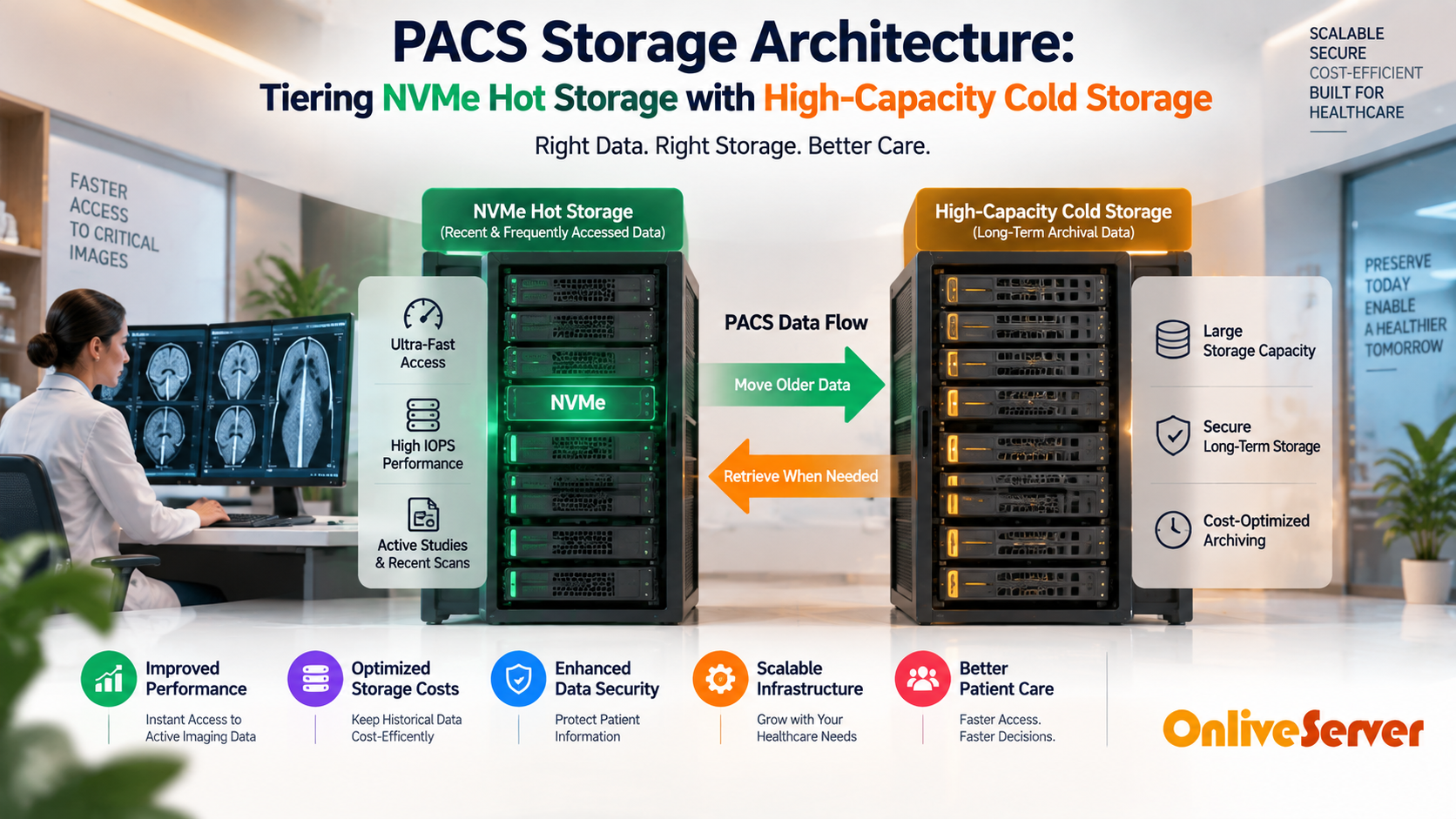
A modern Picture Archiving and Communication System (PACS) tiering architecture stores active 30-to-90-day clinical DICOM studies on ultra-fast PCIe NVMe SSDs for sub-second radiologist workstation retrieval, while automatically migrating aged historical studies to high-capacity, cost-effective cold object or SAS/SATA storage pools to comply with multi-year medical retention mandates.
Modern healthcare systems generate massive volumes of high-resolution diagnostic imaging data. Advanced modalities such as 3D mammography, multi-slice CT scans, and high-definition MRI sequences produce multi-gigabyte studies for individual patient examinations. For verified technical specifications and deployment parameters, consult the official Linux Kernel Documentation.
Picture Archiving and Communication Systems (PACS) face a difficult technical trade-off. Radiologists demand immediate, sub-second image loading across clinical diagnostic workstations, yet regulatory mandates enforce 7-to-25-year retention schedules on petabytes of medical archives.
Attempting to host all medical archives on high-cost NVMe drives is financially unfeasible, while placing active studies on slow spinning disks creates severe clinical workflow bottlenecks. Building a robust solution on enterprise storage dedicated servers provides the hybrid density needed to balance speed with long-term cost efficiency.
The Two-Tier PACS Storage Hierarchy
An optimized PACS storage architecture decouples active clinical workflows from long-term compliance storage. This is accomplished using automated lifecycle tiering policies driven by DICOM study metadata.
The Hot Tier consists of high-end enterprise NVMe arrays configured in RAID 10. Studies captured within the past 30 to 90 days reside here, ensuring high concurrent throughput during peak emergency room and outpatient reading hours.
The Cold Tier consists of high-density enterprise SAS or SATA storage arrays configured with erasure coding or RAID 60. Once a patient study ages beyond the active clinical window, automated background services migrate files to the cold pool without breaking DICOM study index pointers.
PACS Tiering Architecture Comparison Matrix
| Architectural Dimension | Hot Tier (Active Clinical Work) | Cold Tier (Long-Term Archive) |
|---|---|---|
| Storage Media | PCIe Gen4/Gen5 Enterprise NVMe (U.2/U.3) | High-Density SAS/SATA Enterprise Hard Drives (18TB+) |
| Retention Window | 30 to 90 Days post-ingestion | 7 Years to Indefinite (HIPAA Legal Requirement) |
| Study Retrieval Latency | Sub-second (< 500ms initial slice load) | 3 to 8 Seconds (Background prefetch queue) |
| Cost per Terabyte | Higher initial hardware investment | Lowest operational expense per petabyte |
Automated Prefetching and Metadata Tiering
The primary concern radiologists express regarding cold archiving is study retrieval latency when comparing past historical scans to present diagnostics. Intelligent prefetching algorithms solve this challenge cleanly.
When a patient is scheduled for an examination or arrives at the clinical reception desk, the PACS server intercepts the HL7 ADT message. It automatically recalls the patient prior historical imaging studies from the cold storage pool into the NVMe hot cache hours before the radiologist begins interpretation.
Maintaining strict compliance and clinical availability requires isolated physical server resources. Hosting healthcare imaging engines on dedicated HIPAA-ready bare-metal servers ensures dedicated network throughput, total data isolation, and verified regulatory compliance.
Data Encryption and Network Security in PACS
Under HIPAA and international privacy regulations, medical imaging files contain sensitive Protected Health Information (PHI). Encryption must be applied end-to-end across both storage tiers and transmission networks.
At-rest storage pools should implement hardware-accelerated AES-256 self-encrypting drive protocols. For data in transit between imaging modalities, PACS archives, and clinical viewing stations, securing DICOM-over-TLS connections with trusted enterprise SSL certificates prevents eavesdropping and man-in-the-middle interception.
DICOM Tiering Lifecycle Workflow
| Lifecycle Stage | Action Trigger | Target Storage Layer | Data Redundancy Mechanism |
|---|---|---|---|
| 1. Modality Ingestion | New CT/MRI scan completed | Hot NVMe RAID 10 Array | Synchronous mirror write |
| 2. Active Reporting | Radiologist reading window (0-60 days) | Hot NVMe Cache | In-memory prefetch caching |
| 3. Automated Migration | Age > 90 days; signed report complete | Cold SAS/Object Storage Pool | Dual-parity RAID 60 + offsite replicate |
| 4. On-Demand Recall | HL7 appointment notice or manual query | Promoted temporarily to Hot NVMe | Read-only cache copy created |
Lossless DICOM Compression and Bandwidth Optimization
Transferring raw, uncompressed DICOM image sets between hospital imaging modalities and PACS archive servers consumes massive network bandwidth. A single multi-slice computed tomography examination easily contains several gigabytes of image data across hundreds of individual slices.
Modern clinical PACS routers implement medical-grade lossless compression algorithms such as JPEG 2000 Lossless and High-Throughput JPEG (HTJ2K). These standards compress pixel matrices by 2.5x to 3x without discarding a single diagnostic bit of clinical radiological detail.
Enabling lossless compression on the PACS ingestion pipeline slashes cold storage capacity requirements in half while accelerating remote telereadiology downloads for physicians reviewing scans outside the hospital campus.
Summary and Architecture Recommendations
Modern healthcare IT cannot treat medical imaging storage as a single homogenous drive array. Balancing diagnostic speed with petabyte-scale compliance demands a deliberate two-tier storage hierarchy.
Leveraging high-IOPS NVMe storage for active 30-to-90-day clinical reading, combined with automated lifecycle archiving to high-density cold storage, guarantees clinical satisfaction while slashing storage ownership costs over decades of operation.
DICOM Ingestion Pipelines and Near-Line Cache Retention
Picture Archiving and Communication Systems (PACS) handle immense volumes of high-resolution medical imaging data, including MRI, CT, and digital radiography studies. Modern diagnostic equipment generates multi-gigabyte image series that emergency physicians and radiologists must view within seconds of acquisition.
Healthcare facilities deploy an active tiering architecture where incoming DICOM studies are ingested directly onto ultra-fast enterprise NVMe hot storage pools. Serving active emergency studies from NVMe media allows clinical workstations to load hundreds of high-resolution cross-sectional slices without buffering delays.
Studies remain in the hot NVMe cache for a defined clinical retention window (typically 30 to 60 days). Statistically, over 85% of clinical image retrievals occur within the first month of patient examination, making fast local flash storage essential for acute diagnostic speed.
Tiering Architectures: NVMe Flash, ZFS RAIDZ2, and Object Storage
Retaining decades of uncompressed medical imaging on premium NVMe solid-state storage is economically unsustainable for growing healthcare systems. Multi-tier storage architectures balance instant diagnostic access with low-cost long-term retention.
Modern hospital datacenters implement a three-tier hierarchy:
- Tier 1 (Hot NVMe Pool): Hosts active imaging studies from the past 30 days on hardware RAID NVMe arrays, delivering sub-millisecond retrieval times.
- Tier 2 (Warm Storage Pool): Utilizes dense ZFS RAIDZ2 spinning disk arrays with enterprise SSD read caches (L2ARC) to host studies from the past 12 months.
- Tier 3 (Cold Archival Pool): Automatically migrates historical imaging older than one year to private S3-compatible object storage clusters or immutable cloud vaults.
Lossless Medical Image Compression and Metadata Separation
Regulatory mandates require that diagnostic medical imaging retains pixel-perfect diagnostic fidelity throughout its lifecycle. Applying lossy compression algorithms to clinical DICOM files violates medical legal standards and compromises diagnostic accuracy.
PACS archiving engines employ lossless High-Throughput JPEG 2000 (HTJ2K) or lossless Deflate compression when migrating studies to secondary storage tiers. This reduces storage footprint by 40% to 60% without altering a single diagnostic image pixel.
Furthermore, PACS architectures decouple image binary files from searchable patient metadata. Relational database instances store DICOM header tags (patient IDs, study dates, modalities) on high-speed flash, allowing radiologist queries to complete instantly while the underlying binary images stream asynchronously from warm storage.
Production Checklist for Hospital PACS Storage Tiering
Implementing resilient medical imaging storage requires rigorous engineering safeguards across hardware, networking, and data governance:
- Deploy redundant 25GbE optical network interfaces between PACS application servers and hot NVMe storage pools to prevent network transfer bottlenecks.
- Enforce strict HIPAA-compliant AES-256 encryption at rest across all storage tiers and TLS 1.3 encryption in transit.
- Configure automated background scrub schedules across secondary ZFS pools to detect and heal silent bit rot before data corruption occurs.
- Establish immutable WORM (Write Once, Read Many) retention locks on cold archives to satisfy federal seven-year medical record retention mandates.
- Implement automated daily checksum verification ensuring migrated studies match original ingested DICOM hashes perfectly.
Disaster Recovery and Geographic Archive Replication
A catastrophic hardware loss or regional natural disaster must never permanently destroy hospital patient imaging archives. Production healthcare networks implement asynchronous cross-datacenter archive replication over dedicated fiber circuits.
Cold storage archives mirror encrypted study blocks continuously to a geographically separated standby datacenter. If the primary hospital datacenter experiences complete network failure, secondary PACS gateways mount the standby archive within minutes.
Regular disaster recovery simulation drills verify that emergency clinicians can retrieve critical prior patient studies during facility failovers, ensuring uninterrupted clinical patient care.
Conclusion: Scalable, Compliant Medical Imaging Infrastructure
Designing a tiered PACS storage architecture resolves the tension between clinical performance expectations and hospital infrastructure budget constraints. Prioritizing hot NVMe storage for acute emergency studies delivers immediate diagnostic value to clinicians and patients.
By pairing high-speed flash tiers with automated ZFS warm storage and immutable cloud cold vaults, healthcare providers safeguard decades of patient records affordably and securely. Thoughtful storage engineering ensures medical imaging systems remain fast, compliant, and continuously available.
Frequently Asked Questions
Why is pure NVMe storage impractical for long-term PACS archives?
Medical imaging archives scale into petabytes because regulations require multi-year retention. Storing petabytes of rarely accessed historical data exclusively on NVMe drives results in unnecessary hardware and power expenses.
How does automated prefetching improve radiologist workflows?
When a patient arrives for an appointment, the PACS system recalls past imaging studies from cold storage to the hot NVMe tier in advance. When the radiologist opens the case, all comparison studies load instantly.
What is the typical retention period for PACS diagnostic images?
In the United States, HIPAA guidelines require adult medical records to be stored for at least 7 years, while pediatric studies must often be preserved until the patient reaches adulthood, frequently totaling 18 to 21 years.
How does PACS storage ensure data immutability against accidental deletion?
Cold tiers utilize Write-Once-Read-Many (WORM) storage locks and cryptographic hashes. Once written, DICOM records cannot be modified or deleted by anyone until the mandatory compliance retention timer expires.
Can cloud object storage be used as the cold storage tier for PACS?
Yes, many healthcare systems leverage S3-compatible on-premises or private cloud object storage. It provides scalable bucket capacities, lifecycle automation, and high data durability across multiple availability zones.
