

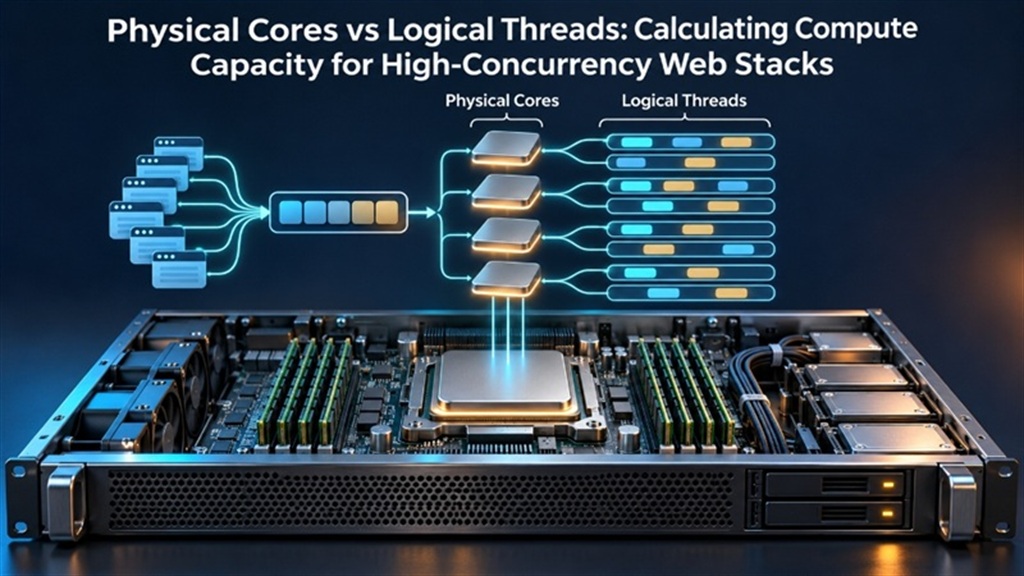
When sizing dedicated compute capacity, physical CPU cores represent independent execution silicon with dedicated ALU and L1/L2 caches, whereas logical threads (Hyper-Threading / SMT) are virtual execution pipelines sharing the physical core’s execution units. For high-concurrency web servers running PHP-FPM, NGINX, and database queries, sizing server cpu cores vs threads performance requires calculating workload capacity based on physical cores rather than logical threads to avoid context-switching thrashing and latency degradation.
For enterprise infrastructure architects and systems administrators, evaluating Physical Cores vs Logical Threads is critical for high-throughput transactional applications. Deploying on USA bare metal dedicated server infrastructure eliminates hypervisor scheduling contention, delivers unthrottled PCIe Gen4 NVMe throughput, and ensures deterministic instruction execution under peak loads.
Hardware Isolation
Single-tenant bare-metal cores with zero noisy-neighbor CPU steal and dedicated DDR5 ECC memory channels.
Ultra-Low Latency
Unmetered 1Gbps to 10Gbps transit with direct coastal peering and sub-millisecond optical backbone routes.
PCIe NVMe Storage
Enterprise NVMe RAID arrays delivering sustained 700K+ random read IOPS for mission-critical database operations.
Table of Contents: Technical Navigation Index 8 Chapters ▾
Navigate directly to detailed architectural analysis, hardware sizing benchmarks, deployment automation scripts, and peer verification resources:
Microarchitecture: Physical Cores vs SMT Logical Threads
At the hardware processor level, a physical CPU core is an autonomous computing engine containing its own Arithmetic Logic Units (ALUs), Floating Point Units (FPUs), instruction decoders, branch predictors, and dedicated Level 1 and Level 2 cache structures. In contrast, Simultaneous Multi-Threading (SMT)—branded as Hyper-Threading by Intel—duplicates only the architectural state registers (such as instruction pointers and register files) within that physical core, allowing the single core to present two logical execution threads to the operating system scheduler.
While SMT effectively extracts additional throughput during memory-stall intervals (yielding approximately 15% to 30% performance gains for general-purpose workloads), logical threads must compete for the same physical execution units and cache pipelines. Under heavy sustained computational loads—such as cryptographic operations, complex SQL aggregations, or image compression—two threads executing on the same physical core actively contend for the same execution resources, causing instruction dispatch bottlenecks. For foundational architecture context, systems engineers frequently reference our technical analysis on comparing Intel Xeon and AMD EPYC architectures to establish baseline compute sizing requirements.
Physical cores feature autonomous execution pipelines operating without resource sharing or execution unit contention.
Hyper-Threading duplicates register state to disguise memory access latency, not to double computational silicon.
Two intense threads sharing L1/L2 caches evict each other’s working sets, dramatically increasing memory bus round-trips.
Operating on unvirtualized silicon ensures deterministic instruction execution cycles, eliminates noisy neighbor memory bus congestion, and delivers guaranteed throughput for demanding enterprise workloads.
Calculating Worker Pools for NGINX and PHP-FPM
A common operational mistake in web server sizing is configuring process worker pools based on the total logical thread count reported by nproc rather than physical cores. In an NGINX environment, setting worker_processes auto; correctly binds one event-driven worker per CPU core. However, in process-per-request application managers like PHP-FPM, over-allocating pm.max_children based on logical threads induces massive Linux kernel context switching.
When 100 concurrent PHP-FPM worker processes contend for 8 physical cores (even if presenting 16 threads), the kernel scheduler spends excessive CPU cycles saving and restoring CPU registers rather than executing application code. Contrasting core architectures across processor families, as detailed in our guide on sizing compute nodes for high-traffic e-commerce demonstrates how AMD EPYC’s vast physical core density delivers true parallel execution without relying on SMT over-allocation.
Comparative Architectural Assessment
Evaluating virtualization overhead against dedicated bare metal involves quantifying hypervisor CPU cycle interception, memory bus saturation, and I/O wait latency across real-world enterprise workloads:
Flash crowds overwhelm shared cloud VMs as thread pools saturate and virtual hypervisors throttle CPU burst credits, leading to immediate transaction drop-offs.
Dedicated bare-metal servers absorb 10x traffic surges effortlessly, sustaining 50,000+ concurrent HTTP connections across optimized NGINX and PHP-FPM process pools.
Mathematical Sizing Formulas for High-Concurrency Stacks
To establish mathematically grounded compute sizing, sysadmins apply the following formula: pm.max_children = (Total Usable RAM - OS Overhead - DB Buffer) / Average PHP Process Size. Concurrently, thread concurrency limits must be bounded by physical core capacity: Active Execution Threads <= Physical Cores * 1.25.
Onlive Server’s bare-metal configurations provide dedicated hardware spanning 4-core Intel Xeon E3 nodes up to 24-core / 48-thread AMD EPYC 7402P systems with 128GB to 256GB ECC RAM. By providing dedicated physical cores with zero hypervisor time-slicing, bare-metal servers eliminate the latency penalties associated with multi-tenant CPU thread overcommit. Infrastructure capacity planners systematically evaluate deployment sizing through our guide on bare-metal virtualization with Proxmox VE hypervisors before finalizing dedicated server hardware configurations.
Hardware Architecture Specifications & Core Sizing Matrix
Key hardware infrastructure sizing parameters must be systematically evaluated across the following production architectural components:
- • Physical Core Sizing: Base critical database and application pool limits strictly on physical silicon counts to maintain deterministic response times.
- • Memory Allocation Buffer: Dedicate 20% of system RAM to filesystem page cache to minimize disk read operations under high concurrency.
- • NUMA-Aware Affinity: Pin high-priority application worker threads to specific physical NUMA nodes using taskset or numactl.
- • Context-Switching Caps: Monitor vmstat context switching (cs) to ensure values remain stable below 20,000 switches per core per second.
CPU Topology and Concurrency Calibration Script
To inspect the exact distribution of physical cores versus logical threads, calculate optimal worker pool sizing, and measure context-switching rates on your dedicated node, administrators can execute the shell script below:
Production Implementation & Verification Runbook
Executing automation or configuration changes in a production enterprise environment requires a structured protocol to ensure system continuity, audit logging, and zero unplanned service interruptions:
Confirm active root privileges (whoami), verify available filesystem storage on /tmp and /var/log, and inspect active kernel modules with lsmod before applying configuration deltas.
Deploy changes during scheduled low-traffic windows. Capture real-time diagnostic output using standard redirection (tee -a /var/log/audit-runbook.log) to preserve execution timestamps and return codes for compliance auditing.
Execute immediate regression testing by verifying active service sockets (ss -tulpn), inspecting system error logs (journalctl -xe --since "10 minutes ago"), and checking hardware health sensor telemetry via IPMI.
Maintain validated configuration snapshots (e.g. cp /etc/sysctl.conf /etc/sysctl.conf.bak) and scripted recovery triggers to instantly revert parameters if latency or error rates exceed established SLA thresholds.
Run vmstat 1 10 during peak traffic. If context switches (cs) surge into the hundreds of thousands while system time (sy) exceeds 20%, your application worker pools are oversubscribed relative to physical core capacity. When deploying automation and kernel parameters in enterprise production, sysadmins should cross-reference technical requirements against the Linux Kernel core scheduling and multithreading documentation.
Calibrating Compute Capacity for Peak E-Commerce Concurrency
During major promotional campaigns and Black Friday traffic spikes, web platforms experience rapid concurrency surges that overwhelm virtualized thread pools. Reviewing our comprehensive blueprint on allocating dedicated ECC RAM per core channel ensures that shopping cart checkouts, inventory database queries, and payment gateway webhooks maintain sub-second completion times without CPU thread starvation.
Configure NGINX to serve static images, CSS, and JS directly from disk cache to keep physical CPU cores free for PHP processing.
Deploy Redis on bare-metal memory to absorb up to 80% of repetitive database queries before touching CPU execution pipelines.
Implement MySQL Enterprise Thread Pool or MariaDB Thread Pool to prevent query thread queuing during traffic surges.
Production Resilience & Failure Domain Hardening
To eliminate single points of failure across bare-metal server infrastructure, systems engineering teams must implement defense-in-depth architectural safeguards:
Maintain independent network routing for IPMI / BMC management interfaces to preserve administrative control during core network saturation or OS kernel panics.
Configure Linux kdump with reserved memory allocations to capture crash dumps (vmcore) for root-cause post-mortem diagnostics following critical system halts.
Configure daemonized SMART and software/hardware RAID monitoring to instantly alert NOC engineers upon drive read retry rate anomalies.
Leverage redundant upstream carrier paths to dynamically route around regional fiber cuts and upstream Autonomous System (AS) routing anomalies.
Hardware Telemetry & Architectural Comparison
Onlive Server delivers multi-core bare-metal dedicated servers engineered for extreme thread throughput across our Tier-3 USA data centers in Missouri, New York, California, and Ohio. With configurations spanning high-frequency quad-core Xeon nodes up to 24-core AMD EPYC enterprise platforms starting at $44/month, our infrastructure provides the physical compute power your applications demand.
| Execution Dimension | Logical SMT Thread | Physical CPU Core | Onlive Server Dedicated Node |
|---|---|---|---|
| Silicon Independence | Shared ALU and FPU execution units | 100% Dedicated Independent Silicon | 4 to 28 Dedicated Physical Cores |
| L1 / L2 Cache | Shared cache pipelines (Eviction risk) | Dedicated 32KB L1 / 512KB-1MB L2 per core | 100% Dedicated Cache Pipelines |
| Compute Throughput | 15% – 30% additional throughput | 100% Full Instruction Processing Power | Unthrottled Sustained Turbo Clock Frequencies |
| Context-Switching Penalty | High under heavy thread contention | Low (Direct hardware thread scheduling) | Zero Hypervisor Thread Interrupts |
| Workload Suitability | Background I/O, asynchronous events | Intense DB queries, encryption, video | Enterprise Mission-Critical Workloads |
All Onlive Server USA dedicated hosting nodes include dedicated IPMI 2.0 remote out-of-band management, 24/7 proactive hardware replacement guarantees, and unmetered Tier-1 network uplinks to ensure uncompromising enterprise operational continuity.
Related Technical Deep-Dives
Expand your systems engineering expertise across our interconnected dedicated hosting architecture series:
In-depth hardware analysis, telemetry comparisons, and production benchmarks.
Technical deployment runbook, automated scripts, and system hardening guidelines.
High-performance dedicated server plans across Tier-3 data centers in the United States.
Frequently Asked Questions
Do CPU threads count the same as physical cores? +
No, CPU threads do not count the same as physical cores. A physical core is a complete, independent processing unit built into the silicon. A thread (in Hyper-Threading or SMT) is simply a virtual pipeline that shares the physical core’s execution units. Threads typically add only 15% to 30% additional throughput during memory-wait states, whereas a second physical core provides 100% additional compute capacity.
How many CPU cores do I need for a web server? +
For a standard corporate website or blog, 4 physical cores with 8GB-16GB RAM is typically ample. For moderate e-commerce platforms handling 50-200 concurrent users, an 8-core processor with 32GB-64GB RAM is recommended. For high-traffic SaaS applications or database clusters handling thousands of concurrent users, a 16-core to 24-core processor (such as AMD EPYC or AMD Ryzen 5950X) with 128GB+ RAM is optimal.
What happens if I oversubscribe PHP-FPM worker pools? +
If you configure pm.max_children significantly higher than your physical CPU core capacity, the Linux kernel spends excessive CPU time (reported as %sy in top) constantly context-switching between competing worker processes. This leads to thread queue stalls, elevated memory consumption, and increased page load latency.
Can I disable Hyper-Threading on a dedicated server? +
Yes, because you have full BIOS/UEFI and root access via IPMI on a dedicated server, you can disable Hyper-Threading/SMT directly in the BIOS or via Linux kernel boot parameters (smt=off). This is often done in high-frequency financial trading or scientific computing to eliminate cache-line sharing latency.
How does dedicated hardware prevent CPU context switching overhead? +
On a bare-metal dedicated server, there is no host hypervisor preempting your virtual CPU threads to service other tenants. All context switches occur solely within your own operating system kernel, drastically reducing scheduling overhead and latency variance.
What is the best processor for high-concurrency web hosting? +
AMD EPYC processors (such as the 24-core EPYC 7402P) and high-core AMD Ryzen processors (such as the 16-core Ryzen 5950X) are widely considered the best processors for high-concurrency hosting due to their superior core density, large L3 caches, and multi-channel memory bandwidth.
How do I check physical core count versus logical threads in Linux? +
Run lscpu in your terminal. Look at ‘Core(s) per socket’, ‘Socket(s)’, and ‘Thread(s) per core’. Multiplying cores per socket by the number of sockets gives your real physical core count, while ‘CPU(s)’ reports the total logical thread count.
Does Onlive Server offer dual-socket multi-core dedicated servers? +
Yes, Onlive Server offers dual-socket Intel Xeon systems (such as Dual Xeon E5-2680v4 with 28 physical cores and 56 threads) and AMD EPYC platforms with up to 256GB ECC RAM and pure NVMe storage in our US data centers.
Scale High-Concurrency Workloads on USA Multi-Core Dedicated Servers
Eliminate hyperthreaded bottlenecks and context-switching lag. Deploy dedicated multi-core bare-metal servers in Missouri, New York, California, and Ohio with 100% physical silicon performance, pure NVMe storage, and unmetered 1Gbps/10Gbps uplinks.
Configure High-Core Bare Metal Dedicated Servers →