

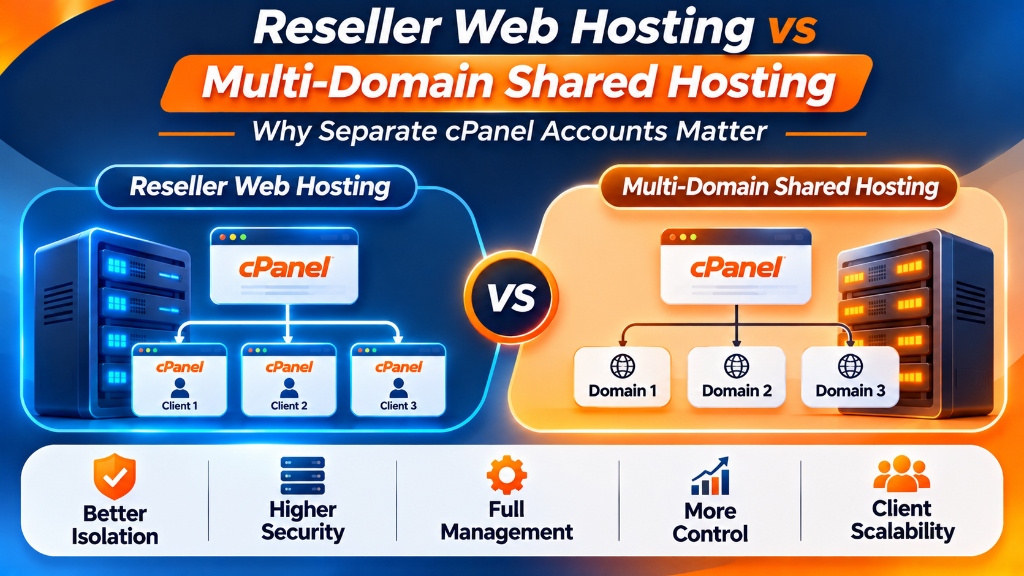
Reseller web hosting provisions each client website inside an isolated Linux user account with its own cPanel login, UID/GID file permissions, and CloudLinux LVE resource ceiling via WebHost Manager (WHM). Multi-domain shared hosting places all addon domains under one Linux user, sharing a single filesystem, database pool, and PHP process quota.
Freelance web designers and small digital agencies frequently start their hosting operations by purchasing a single multi-domain shared hosting plan and attaching client websites as addon domains. On the surface, the approach looks economical because one monthly invoice covers “unlimited” domains under a familiar cPanel dashboard. However, comparing reseller hosting vs multi domain shared hosting reveals a fundamental architectural divide at the Linux kernel and filesystem layers that directly affects client security, server stability, and agency liability.
When twenty client websites live inside subdirectories of the same /home/agencyuser/ directory, they share one Linux User ID (UID), one CloudLinux Lightweight Virtual Environment (LVE) resource cage, and one set of cPanel credentials. In contrast, provisioning accounts through WebHost Manager (WHM) creates true multi-tenant boundaries where every client receives an independent Unix user, isolated CageFS filesystem, and dedicated cPanel portal. Understanding these underlying mechanics explains why separate cPanel accounts are mandatory for professional client hosting.
Main Problem
Addon domains on shared hosting execute under one Linux UID, allowing malware in one outdated plugin to read and infect every other client site in the same account.
Technical Consideration
WHM reseller accounts enforce per-tenant CageFS chroot environments, separate MySQL database prefixes, and independent CloudLinux CPU, PMEM, and Entry Process limits.
Practical Implication
Separate cPanel accounts let agencies hand off branded logins, isolate traffic spikes, and package single-client migrations in minutes without manual database surgery.
1. The Agency Dilemma: Addon Domains on Shared Hosting vs True Multi-Tenant WHM
The core difference between reseller hosting and multi-domain shared hosting comes down to how the underlying Linux operating system maps domains to user accounts. In a standard shared hosting plan, your hosting provider creates exactly one cPanel account for your business. Whether you host one website or twenty-five websites via cPanel’s Domains interface (formerly Addon Domains), every domain resolves to a subdirectory inside that single account’s home folder.
In a reseller web hosting environment, you receive access to WebHost Manager (WHM) on port 2087. Instead of cramming domains into one folder tree, WHM acts as a control plane that provisions a brand-new, autonomous cPanel account for every client domain. Each client receives an isolated Linux username, an independent home directory under /home/<clientuser>/, a dedicated virtual host entry, and separate resource limits.
1.1 How Addon Domains Share a Single Linux User Account and Database Pool
To understand why addon domains create operational friction, examine the directory layout on a standard cPanel shared server. Suppose your primary shared account username is studio01 and you add three client sites: alpha-dental.com, beta-legal.com, and gamma-roofing.com. On disk, the server stores them inside the same user tree:
Because all addon domains belong to studio01, PHP-FPM or LiteSpeed PHP workers execute every client’s PHP scripts under that exact same UID. Furthermore, every MySQL/MariaDB database created in cPanel shares the studio01_ prefix and counts toward a single account-wide inode ceiling, email hourly relay cap, and cron job queue. There is no kernel boundary separating Client A’s code from Client B’s database credentials.
2. Security Architecture: File Ownership (UID/GID), CageFS, and Cross-Site Contamination
Security isolation is the single strongest technical argument for separate cPanel accounts. On modern Linux hosting servers running CloudLinux OS, tenant isolation relies on two complementary layers: POSIX user/group ownership (UID/GID) and CageFS virtualized filesystems.
When each client occupies a separate cPanel account created in WHM, CloudLinux CageFS places that user inside an isolated virtualized filesystem cage. A PHP process running as alphaden can only see binaries, temporary directories (/tmp), and files inside /home/alphaden/. Even if an attacker achieves remote code execution (RCE) through an unpatched WordPress plugin on alpha-dental.com, the Linux kernel blocks that process from listing /home/betalega/ or reading another client’s files.
2.1 Anatomy of a Cross-Directory Attack Across Addon Domains
In a multi-domain shared account, CageFS and UID permissions offer zero protection between your own clients because every website runs as the same user. Consider what happens during a routine WordPress compromise:
- Step 1 — Initial Foothold: Client A forgets to update a third-party form plugin on
alpha-dental.com. An automated bot uploads a PHP webshell into/home/studio01/alpha-dental.com/wp-content/uploads/. - Step 2 — Lateral Traversal: Because the webshell executes as UID
studio01, it runsscandir('/home/studio01/')and immediately discovers the document roots of Client B, Client C, and your agency’s own portfolio site. - Step 3 — Credential Harvesting: The script reads
/home/studio01/beta-legal.com/wp-config.php, extracts the MySQL host, database name, and password, and injects spam redirects or backdoor admin users across every database. - Step 4 — Account-Wide Blocklisting: When phishing files appear in one addon folder, the upstream host suspends the entire
studio01cPanel account or blocklists the shared IP, taking every innocent client offline simultaneously.
With separate cPanel accounts in WHM, the blast radius of a compromised plugin is strictly contained to that single client’s UID. Your other nineteen clients remain online, untouched, and clean.
3. Client Experience: Shared Credentials vs Individual Branded cPanel Logins
Beyond kernel security, multi-domain shared hosting creates an immediate boundary problem whenever a client asks for direct access to manage email accounts, inspect error logs, or upload a verification file. On a shared plan, there is only one cPanel login (https://server.host.com:2083). Giving that password to one client exposes every other client’s files, databases, and email inboxes. For technical verification, consult the official cPanel Domains isolation documentation.
Agencies often try to work around this by creating restricted FTP accounts pointed at a single addon directory. While FTP locks the client into one folder, it does not give them access to cPanel’s Email Accounts, AutoSSL status, phpMyAdmin, or JetBackup restores—forcing your agency to act as a manual ticket desk for every password reset or email alias request.
WHM reseller hosting solves this cleanly. Each client receives their own cPanel URL, username, and password. Using WHM » Packages » Feature Manager, you can even tailor which icons appear in their dashboard—for example, keeping Email Accounts and File Manager visible while hiding Terminal or raw Zone Editor tools. Combined with white-label reseller infrastructure and custom nameservers, your clients see your agency’s logo rather than an upstream hosting brand.
4. Resource Distribution: Single Account Throttling vs Independent LVE Quotas
Shared hosting providers enforce fairness using CloudLinux LVE limits: CPU allocation (e.g., 100% or 200% of one core), Physical Memory (PMEM, typically 1 GB to 2 GB), IOPS, and Entry Processes (EP, often 20 to 30 concurrent PHP/Apache workers). On a multi-domain shared account, all of your addon domains compete inside that single LVE container.
If Client A runs a WooCommerce flash sale or gets hit by an aggressive scraper bot that consumes all 20 Entry Processes, CloudLinux returns HTTP 503 Service Unavailable not only for Client A, but for Client B, Client C, and every other domain in the account. Similarly, if one client’s unpruned WordPress cache or IMAP trash folder hits the account’s 250,000 inode limit, none of your other clients can upload images, write PHP sessions, or receive incoming email.
| Architectural Dimension | Multi-Domain Shared Hosting | WHM Reseller Hosting |
|---|---|---|
| Linux User Isolation | Single UID/GID shared across all addon domains | Dedicated UID/GID and CageFS container per cPanel account |
| CloudLinux LVE Limits | One shared pool of CPU, PMEM, and Entry Processes | Independent LVE quota assigned per client cPanel account |
| Client Portal Access | Unsafe to share; exposes all hosted domains and databases | Individual cPanel login with custom Feature List controls |
| Email & IP Reputation | Shared hourly send limit; one spammer blocks all clients | Per-account Exim hourly limits and isolated DKIM/SPF zones |
| Client Offboarding | Manual file export, SQL dump, and IMAP mail migration | Single-archive cpmove full cPanel backup transfer |
| White-Label Branding | None; upstream host nameservers and logos visible | Private ns1/ns2 nameservers and custom cPanel branding |
Notice how reseller hosting multiplies your effective concurrency. If each cPanel account receives 1 GB PMEM and 20 Entry Processes, hosting 15 client accounts gives your portfolio 15 separate LVE containers. A traffic spike on one client site slows down only that single tenant while your remaining 14 clients continue serving sub-second pages.
5. Backup and Offboarding: Why Transferring an Addon Domain Is an Operational Nightmare
Every agency eventually encounters a client who sells their business, hires an in-house IT team, or decides to move hosting elsewhere. If that client’s website was deployed as an addon domain inside a multi-domain shared account, handing over a clean copy is a tedious, error-prone manual process.
You cannot simply click “Download Full Account Backup” in cPanel, because that archive contains every other client’s websites, databases, and emails. Instead, an engineer must manually compress the addon directory, locate and export the correct MySQL databases from phpMyAdmin, recreate every email forwarder and autoresponder, copy IMAP maildirs from /home/studio01/mail/clientdomain.com/, and document all custom cron jobs and DNS records. That manual extraction typically consumes 60 to 120 minutes of billable engineering time per offboarding.
5.1 How WHM Enables Clean Client Account Packaging and Migration
When each client lives inside their own cPanel account, offboarding or migrating to a higher tier takes minutes. Inside the client’s cPanel under Files » Backup » Download a Full Account Backup (or via JetBackup / WHM Transfer Tool on the destination server), cPanel packages the exact files, MySQL grants, DNS zone, SSL certificates, email accounts, and cron jobs into a single cpmove-<username>.tar.gz archive.
Similarly, if one client outgrows shared reseller resources and needs to move onto a dedicated virtual server—a transition we model in our reseller hosting vs managed VPS cost analysis—the destination WHM server can pull that single account over SSH with zero manual reconfiguration.
6. Architectural Decision Matrix: When Shared Hosting Fails and Reseller WHM Is Required
To decide whether your current workload belongs on multi-domain shared hosting or needs immediate migration to WHM reseller architecture, evaluate your portfolio against these four operational thresholds:
- Two or More Independent Legal Entities: The moment two different businesses share your hosting server, shared UID permissions create unacceptable cross-contamination liability.
- Client Email Hosting Requirements: If clients use cPanel Webmail or IMAP/SMTP for business email, separate cPanel accounts isolate spam complaints and hourly send quotas per domain.
- Recurring Maintenance Retainers: Charging clients $30–$150/month for managed hosting requires professional white-label portals, independent backups, and predictable LVE resource guarantees.
- Inode & Disk Accountability: WHM’s Account Information » List Accounts view lets you audit exact disk and package usage per client, preventing one heavy media site from starving everyone else.
Frequently Asked Questions
What is the difference between reseller hosting and multi-domain shared hosting?
Multi-domain shared hosting attaches multiple domains as subdirectories inside a single cPanel account under one Linux user. Reseller hosting gives you WebHost Manager (WHM) so every website gets its own isolated cPanel account, Linux UID, CageFS container, and independent resource limits.
Can malware on one addon domain infect other websites in the same shared account?
Yes. Because all addon domains in a single cPanel account run under the same Linux UID, any malicious PHP script uploaded to one domain has read and write permissions across every other addon domain’s files and wp-config.php database credentials.
How hard is it to migrate addon domains into separate cPanel accounts?
Migrating addon domains into separate WHM cPanel accounts requires creating a new cPanel account for each domain, copying the domain’s document root files, importing its MySQL database, recreating email accounts, and updating DNS. Many hosting providers assist with splitting addon domains when you upgrade to a reseller plan.
Does reseller hosting give each client their own cPanel login?
Yes. Every account you create in WHM generates an independent cPanel username and password. Clients can log in to manage their own email accounts, backups, or file manager without seeing any other client’s websites.
Is reseller hosting worth the extra cost for just 5 client websites?
Yes. Even with five clients, a single cross-site malware cleanup or a shared-account suspension costs far more in engineering hours and reputation than the modest monthly difference between shared hosting and an entry-level WHM reseller plan.
Separate Every Client Site into Its Own cPanel Container
Keeping multiple client websites inside one shared hosting account exposes every domain to cross-site contamination and shared resource throttling. Moving your roster onto isolated WHM/cPanel accounts gives each client an independent Linux user, private database privileges, and clean migration boundaries.