

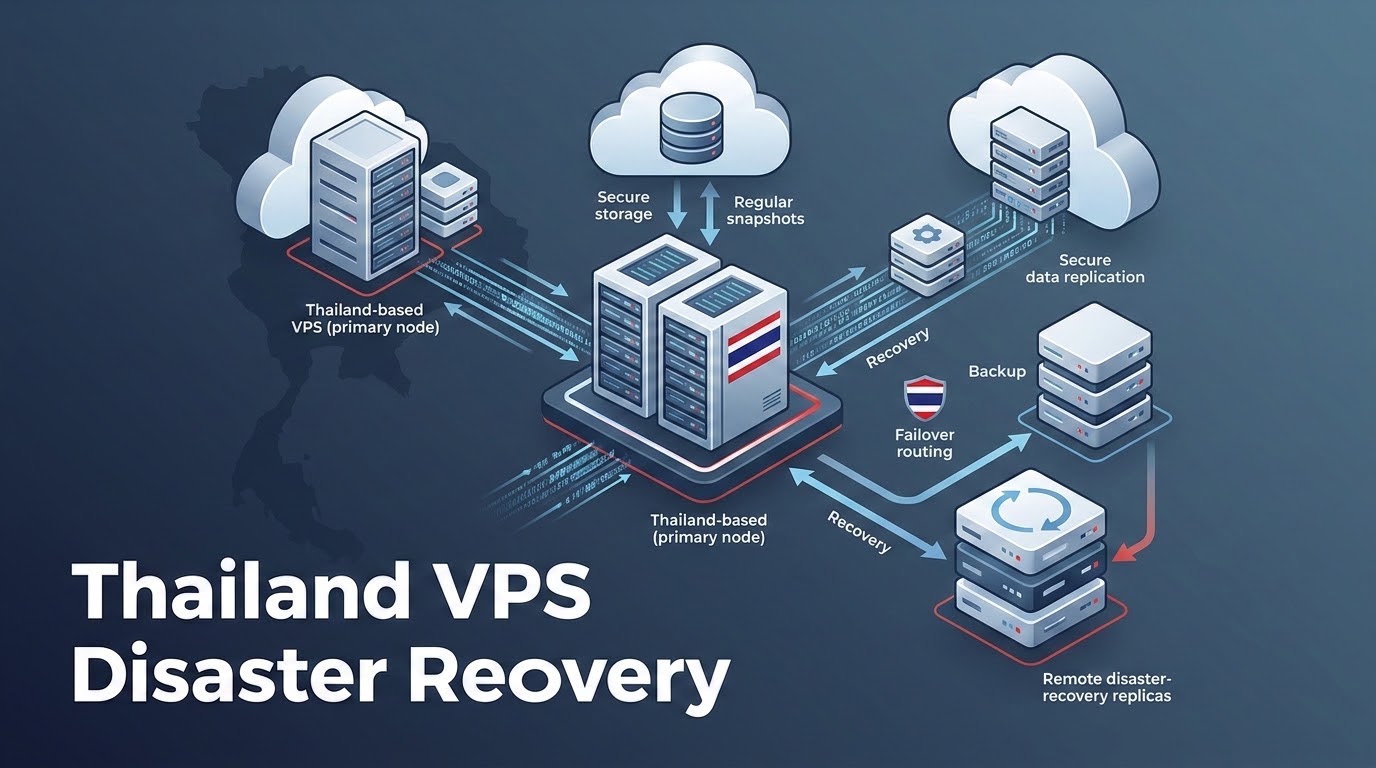
How Do You Architect an Enterprise Backup Strategy for a Thailand VPS?
Specifically, when planning an enterprise deployment for VPS Backup Thailand, an enterprise Thailand VPS backup strategy must follow the 3-2-1 rule: maintain 3 copies of data across 2 different storage media types, with at least 1 copy offsite in an independent geographic zone (like Singapore). Deploy automated, encrypted incremental backups using Restic or BorgBackup with database transaction hooks, replicating daily snapshots to S3 storage.
Furthermore, in enterprise IT operations, data loss is rarely caused by dramatic physical datacenter catastrophes. Far more frequently, catastrophic data loss stems from mundane human errors: an engineer running a truncated SQL DELETE statement, a botched WordPress plugin update corrupting database tables, or ransomware encrypting web files through an unpatched vulnerability. When disaster strikes, your organization’s survival depends not on the frequency of your backups, but on the speed and integrity of your restores. Deploying on reliable Thailand VPS hosting with automated backups provides enterprise NVMe snapshots; architecting an automated offsite replication pipeline ensures your business achieves near-zero Recovery Point Objectives (RPO) and lightning-fast Recovery Time Objectives (RTO).
✔ Disaster Recovery Key Architecture Takeaways
- Consequently, aligning these configurations with your VPS Backup Thailand environment ensures optimal uptime and throughput. Snapshots ≠ True Backups: A snapshot is a point-in-time differential disk index dependent on the parent volume; it is not an independent offsite backup.
- Consequently, aligning these configurations with your VPS Backup Thailand environment ensures optimal uptime and throughput. The 3-2-1 Imperative: Keep 3 total copies of critical business data, on 2 separate storage media, with 1 offsite copy outside of Bangkok.
- Consequently, aligning these configurations with your VPS Backup Thailand environment ensures optimal uptime and throughput. Database Consistency: Never snapshot live database files without flushing tables (
--single-transaction) to prevent corrupted InnoDB pages upon restore. - Consequently, Client-Side Encryption: Encrypt all backup archives with AES-256 before transmitting over public internet networks to comply with Thailand’s PDPA.
- In addition, RTO / RPO Metrics: Define your Recovery Point Objective (how much data you can afford to lose) and Recovery Time Objective (how fast you must recover).
- In particular, The Anatomy of Modern Data Disasters in Cloud Hosting
- Snapshots vs. Backups: Why Confusing the Two Causes Catastrophic Loss
- Therefore, Implementing the 3-2-1 Rule on a Bangkok Cloud VPS Node
- Moreover, Automating Encrypted Incremental Backups with Restic and Rclone
- In fact, Cross-Border Replication: Why Your Offsite Copy Should Reside in Singapore
- Similarly, Database-Consistent Backups: Avoiding Corrupted Tables with Pre-Freeze Hooks
- Meanwhile, Testing Your Recovery Time Objective (RTO): How to Run a Realistic Disaster Drill
- Additionally, Frequently Asked Questions (FAQ)
1
As a result, every digital enterprise in Thailand operates under the assumption that their production data is secure. However, empirical telemetry across enterprise cloud datacenters reveals the true root causes of operational downtime:
- Specifically, Operator Error (58% of incidents): An administrator executes an accidental drop table command, misconfigures an rsync deletion script, or deploys buggy code that silently overwrites customer records.
- Furthermore, Software & CMS Corruption (24% of incidents): Failed database migrations, broken WooCommerce plugin updates, or corrupted filesystem metadata that locks MySQL tables.
- Consequently, Malware & Ransomware (12% of incidents): Attackers exploit zero-day CMS vulnerabilities to execute local root kits, encrypting local disk volumes and demanding Bitcoin ransoms.
- In addition, Physical Hardware Failures (6% of incidents): Simultaneous multi-drive failures inside RAID storage arrays, hypervisor motherboard burnouts, or localized datacenter electrical anomalies.
In particular, notice that nearly 95% of data loss events originate from within the software layer rather than the physical datacenter. Relying entirely on your hosting provider’s local disk redundancy does not protect you from a corrupted database or a rogue deletion command.
2
Therefore, one of the most dangerous misconceptions in cloud systems administration is treating hypervisor storage snapshots as true backups:
| Architectural Dimension | Hypervisor Snapshot | True Offsite Encrypted Backup |
|---|---|---|
| Storage Location | Same physical SAN/storage pool in Bangkok. | Independent remote cloud repository (Singapore/S3). |
| Data Dependency | Dependent on parent volume disk blocks. | 100% self-contained standalone archive. |
| Ransomware Protection | Vulnerable if host hypervisor credentials leak. | Protected via S3 Object Lock (Immutable WORM). |
| Primary Operational Purpose | Short-term rollback before high-risk OS updates. | Long-term disaster recovery & regulatory compliance. |
Moreover, snapshots are exceptional for short-term rollbacks (e.g., snapping the server right before upgrading from Ubuntu 22.04 to 24.04). However, if catastrophic volume corruption strikes the primary storage SAN, snapshots are destroyed alongside the production disk. A true backup must exist on an entirely independent storage infrastructure.
3
In fact, the gold standard of enterprise business continuity is the 3-2-1 Backup Rule. Here is how to apply this architecture to an OnliveServer Bangkok VPS: Automated snapshot snapshots and block-level replication form the foundation of seamless server moves; discover our proven zero-downtime VPS migration methodology to transfer workloads without interrupting client operations. Standardized criteria for data survivability, fault tolerance, and backup terminology are established in the IETF RFC 2828 Internet Security Glossary.
- Similarly, 3 Copies of Critical Data:
- Copy 1: Live production files and database tables on the primary NVMe disk in Bangkok.
- Copy 2: Local hourly hot backup archive stored on a secondary mounted volume or local directory (
/opt/backups) for rapid 5-minute accidental file rollbacks. - Meanwhile, copy 3: Automated daily encrypted archive pushed offsite to an external cloud repository.
- Additionally, 2 Different Media Formats:
- Format 1: Block-level NVMe storage on the virtual machine hypervisor.
- As a result, format 2: Deduplicated, content-addressable chunked blob storage on S3 object storage.
- 1 Offsite Copy in a Separate Region:
- Stationed outside the Bangkok metropolitan area (e.g., Singapore, Frankfurt, or Tokyo) to ensure business continuity even during catastrophic regional grid failures.
4
Restic is an acclaimed, secure backup program that provides client-side AES-256 encryption, content-defined chunk deduplication, and snapshot versioning. Paired with Rclone, it can stream encrypted backups directly to any S3-compatible cloud storage (Wasabi, Backblaze B2, AWS S3, Cloudflare R2).
1. Install Restic and Rclone on Ubuntu 22.04/24.04
2. Initialize Encrypted Backup Repository
3. Automated Backup Script with Retention Pruning
Create an automated execution script at /opt/scripts/run_backup.sh:
Automating with Systemd Timers
While traditional cron is widely used, modern Linux systems benefit from systemd timers, which provide monotonic execution, retry logic upon network reboot, and detailed telemetry via systemctl status:
Because Restic deduplicates at the block level, if a 50GB website only modifies 200MB of images and database rows today, only that exact 200MB is encrypted and transmitted over the network, saving massive bandwidth and storage fees.
5
When selecting a secondary offsite destination for your Bangkok server backups, Singapore is the ideal regional candidate: Implementing automated snapshots with disaster recovery and server backup management ensures rapid recovery points and minimal recovery time objectives during hardware or software failures.
- Sub-30ms Optical Fiber Transit: High-bandwidth connectivity between Bangkok and Singapore allows multi-gigabyte differential syncs to finish in minutes during nightly off-peak windows.
- Geographic & Grid Separation: Singapore resides outside Thailand’s national power grid, telecommunications regulatory framework, and localized tropical weather patterns.
- Thailand PDPA Cross-Border Adequacy: Under Thailand’s Personal Data Protection Act, transferring encrypted personal data to jurisdictions with recognized high cybersecurity standards (such as Singapore) is legally permitted under standard contractual clauses, provided end-to-end AES-256 encryption is maintained.
6
Backing up live databases by simply copying raw files from /var/lib/mysql while the database daemon is running is a recipe for disaster. Active write transactions exist in CPU memory buffers and undo logs. Copying files mid-write produces an inconsistent “split-brain” state, leading to unrecoverable table corruption upon restore.
The Single-Transaction Guarantee for InnoDB
When using MySQL or MariaDB with InnoDB tables, always execute dumps with the --single-transaction flag:
The --single-transaction flag initiates a repeatable read transaction state. Active web customers can continue purchasing on your WooCommerce store while the backup runs smoothly in the background without table locks or checkout errors.
7
A backup is completely unproven until you have successfully executed a full restoration drill. An untested backup strategy is merely a hypothesis.
The Quarterly 4-Step Disaster Drill Framework
- Spin Up a Staging Node: Launch a fresh, empty 4GB KVM VPS in our Bangkok datacenter.
- Execute Restic Restore: Pull the latest encrypted snapshot from your offsite S3 repository:
restic restore latest --target /staging. - Restore Database & Check Tables: Import the SQL dump into a clean MySQL instance and run
CHECK TABLEacross all database entities. - Measure Clock Time (RTO Audit): Calculate the exact time elapsed from initiating the drill to loading a working web page. If the process took 45 minutes, your documented business Recovery Time Objective is officially 45 minutes.
8
Core Technical Specifications
Protect Mission-Critical Data with Automated VPS Backups
Safeguard against data loss, accidental file deletion, and ransomware. Configure block-level snapshot backups and rapid one-click disaster recovery restoration points.
