

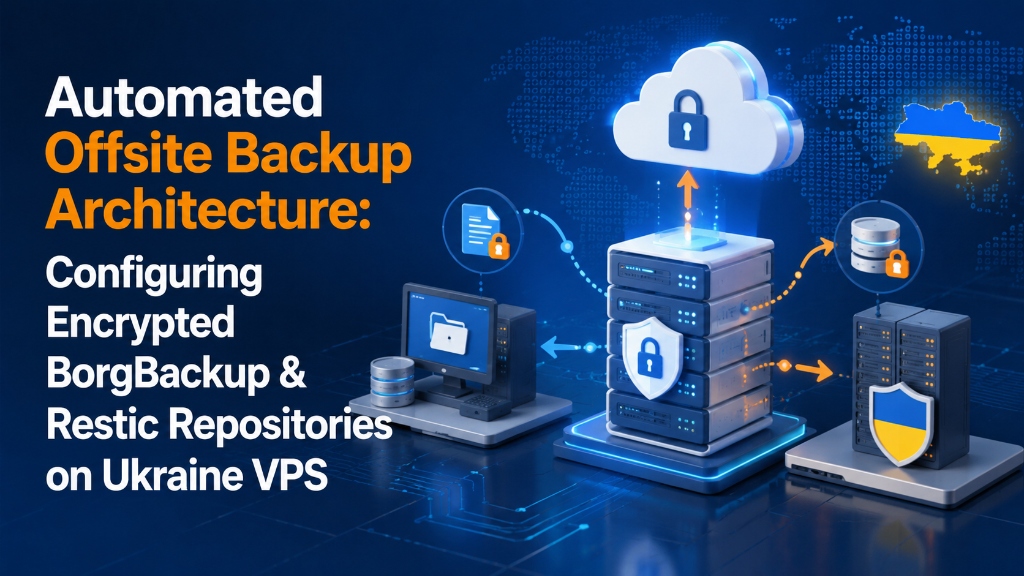
Verified Architecture Solution
To configure an automated VPS offsite backup pipeline on Linux, initialize a client-side encrypted repository using BorgBackup or Restic with authenticated AES-256 or ChaCha20-Poly1305 ciphers.
Automate nightly incremental snapshots via systemd timers, transferring deduplicated blocks over SSH or S3 storage while enforcing a Grandfather-Father-Son (GFS) retention pruning policy.
Zero-Knowledge Crypto
Sub-1s Chunk Dedup
Tested Disaster Runbook
Table of Contents: Automated Offsite Backup Guide
- 1. Automated VPS Offsite Backup: Implementing the 3-2-1 Cloud Rule
- 2. Architectural Comparison: BorgBackup vs. Restic
- 3. Step-by-Step Implementation: Configuring Encrypted BorgBackup over SSH
- 4. Production Automation Script: MySQL Dumps & Retention Pruning
- 5. Deploying Restic: Streaming Snapshots Directly to S3 Storage
- 6. Disaster Recovery Runbook: FUSE Mounting & Restores
- 7. Hardening Against Ransomware: Immutable S3 Object Locking
- 8. Monitoring Backup Success with Healthchecks.io & Webhooks
- 9. Automated Snapshot Verification via Borg Check
- 10. Cross-Border Bandwidth Optimization & Network Throttling
- 11. Frequently Asked Questions (FAQ)
1. Automated VPS Offsite Backup: Implementing the 3-2-1 Cloud Rule
In enterprise server administration, hardware failure, database corruption, or ransomware infection is inevitable.
Storing backup archives on the same physical server or local virtual disk offers zero protection during hypervisor crashes.
Relying solely on local snapshots leaves systems exposed. If local disk arrays fail, both live databases and backups vanish together.
Modern disaster planning requires client-side encrypted, content-addressed repositories streaming to immutable destinations.
To secure infrastructure across your fleet, explore our high-performance Ukraine VPS hosting and enterprise dedicated server hosting platforms.
End-to-End Cryptographic Offsite Backup Pipeline
2. Architectural Comparison: BorgBackup vs. Restic
Designing an offsite disaster recovery pipeline requires balancing cryptographic privacy, storage efficiency, and backend compatibility.
Client Zero-Knowledge Crypto
Files and database dumps are encrypted locally with AES-256 before network transmission.
Variable Chunk Deduplication
Splits data into cryptographic chunks, storing only unique blocks to slash storage by up to 80%.
Automated Systemd Retention
Executes nightly backups and prunes expired snapshots reliably without risking repository corruption.
For complete cipher options and security flags, review the official BorgBackup documentation.
| Backup Capability | BorgBackup (Borg) | Restic Engine |
|---|---|---|
| Primary Target Architecture | Remote Linux Server via SSH (Dedicated storage VPS) | S3 Object Storage, Backblaze B2, Azure, SFTP |
| Compression Support | Native Zstandard (zstd), LZ4, and ZLIB | Zstandard compression (v0.14+) |
| Encryption Standard | AES-256-OCB or ChaCha20-Poly1305 authenticated | AES-256 in Counter Mode + Poly1305 MAC |
| Remote Dependencies | Requires Borg binary on target host | Zero remote dependencies (Pure REST/S3 API) |
| FUSE Filesystem Mounting | borg mount via FUSE filesystem |
restic mount via FUSE filesystem |
3. Step-by-Step Implementation: Configuring Encrypted BorgBackup over SSH
To set up BorgBackup, establish a dedicated SSH key pair and initialize a secured remote repository.
Install BorgBackup on Client & Storage Server
Install the official package on both machines running Ubuntu or Debian:
Install Borg & Generate SSH Key
BASH
# Install Borg on client and storage server
sudo apt-get update && sudo apt-get install -y borgbackup

# Generate dedicated Ed25519 SSH key on Ukraine VPS client
ssh-keygen -t ed25519 -f /root/.ssh/id_borg_backup -N "" -C "borg-automated-backup"

# Copy public key to remote storage server's authorized_keys
cat /root/.ssh/id_borg_backup.pubRestrict SSH Key Permissions on the Storage Server
Lock down the backup user by restricting the key to forced Borg commands:
Lock down authorized_keys on remote server
SSH
# Restrict authorized_keys on the remote storage node:
command="borg serve --restrict-to-path /var/backups/ukraine-vps",no-pty,no-agent-forwarding,no-port-forwarding,no-X11-forwarding ssh-ed25519 AAAAC3NzaC1lZDI1NTE5... borg-automated-backupInitialize the Encrypted Borg Repository
Initialize the remote repository with authenticated Blake2 encryption:
Export variables & init repository
BASH
# Export repository passphrase and remote SSH identity
export BORG_REPO="ssh://[email protected]:22/var/backups/ukraine-vps"
export BORG_PASSPHRASE="SuperStrongCryptographicPassphrase123!"
export BORG_RSH="ssh -i /root/.ssh/id_borg_backup"

# Initialize repository with Blake2 authenticated encryption
borg init --encryption=repokey-blake2 $BORG_REPO
4. Production Automation Script: MySQL Dumps & Retention Pruning
A production backup runbook creates a transactional database dump first, snapshots file paths, and executes retention pruning.
Save this executable script as /usr/local/bin/run-borg-backup.sh:
run-borg-backup.sh
BASH / MARIADB
#!/usr/bin/env bash
set -eo pipefail

# Environment variables
export BORG_REPO="ssh://[email protected]:22/var/backups/ukraine-vps"
export BORG_PASSPHRASE="SuperStrongCryptographicPassphrase123!"
export BORG_RSH="ssh -i /root/.ssh/id_borg_backup -o BatchMode=yes"
BACKUP_DATE=$(date +"%Y-%m-%d_%H%M%S")
DB_TEMP_DIR="/tmp/db_backups"

echo "=== [$(date)] Starting Automated Borg Backup ==="

# 1. Consistent Database Dump
mkdir -p "$DB_TEMP_DIR"
mysqldump --single-transaction --quick --routines --triggers --all-databases | gzip -9 > "$DB_TEMP_DIR/all_databases.sql.gz"

# 2. Execute Borg Archive Creation with Zstd Compression
borg create --verbose --filter AME --list --stats --show-rc     --compression zstd,3     --exclude-caches     --exclude '/var/log/*'     --exclude '/tmp/*'     $BORG_REPO::"vps-backup-$BACKUP_DATE"     /etc     /var/www     /home     "$DB_TEMP_DIR"

# 3. Clean local temporary database dump
rm -rf "$DB_TEMP_DIR"

# 4. Prune Old Snapshots (GFS Retention Policy)
borg prune --list --show-rc     --keep-daily=7     --keep-weekly=4     --keep-monthly=12     $BORG_REPO

echo "=== [$(date)] Backup Completed Successfully ==="
5. Deploying Restic: Streaming Snapshots Directly to S3 Storage
When a secondary Linux server is not available, Restic streams encrypted snapshots directly to S3-compatible cloud buckets.
Install Restic Binary
Install Restic via APT and verify the engine version:
Install Restic
BASH
# Install Restic on Ubuntu / Debian
sudo apt-get install -y restic

# Verify binary version
restic versionInitialize the Restic S3 Repository
Configure S3 API credentials and run repository initialization:
Initialize S3 Restic Repository
BASH / S3
# Export S3 environment variables
export AWS_ACCESS_KEY_ID="YOUR_S3_ACCESS_KEY"
export AWS_SECRET_ACCESS_KEY="YOUR_S3_SECRET_KEY"
export RESTIC_REPOSITORY="s3:s3.eu-central-1.wasabisys.com/your-backup-bucket"
export RESTIC_PASSWORD="YourStrongCryptographicPassword456!"

# Initialize remote cloud bucket
restic init

# Execute first encrypted snapshot
restic backup /etc /var/www /home --tag scheduled-vps-backup
6. Disaster Recovery Runbook: FUSE Mounting & Restores
An unverified backup offers false security. Operational readiness requires regular file verification and instant retrieval capabilities.
A. Interactive FUSE Filesystem Mounting
Borg and Restic allow mounting entire snapshot archives as read-only virtual filesystems using FUSE.
To recover single Nginx configurations or deleted theme templates, mount the archive directly and copy the required file:
FUSE Snapshot Mount & File Extraction
FUSE
# Mount Borg repository to local directory
mkdir -p /mnt/backup_inspect
borg mount $BORG_REPO /mnt/backup_inspect

# Navigate through snapshots and copy specific files
cp /mnt/backup_inspect/vps-backup-2026-11-06/etc/nginx/nginx.conf /etc/nginx/

# Unmount cleanly when finished
borg umount /mnt/backup_inspect
B. Full Bare-Metal Restoration
In catastrophic hardware loss, deploy a fresh KVM VPS instance and install Borg or Restic.
Export your passphrase, run borg extract or restic restore, and bring production services online within 15 minutes.
7. Hardening Against Ransomware: Immutable S3 Object Locking
Advanced threats and automated ransomware target backup repositories before executing server-wide encryption routines.
If an adversary compromises root credentials, they immediately attempt to execute repository purge commands like restic forget --prune.
Immutable WORM Enforcement
8. Monitoring Backup Success with Healthchecks.io & Webhooks
Silent backup failures pose an extreme operational danger. Cron jobs can fail unnoticed due to filled storage or expired credentials.
Dead Man’s Snitch Automation
9. Automated Snapshot Verification via Borg Check
Corrupted archives are useless during emergencies. Borg and Restic provide built-in verification routines to inspect cryptographic chunk digests.
Weekly Deep Cryptographic Check
borg check --verify-data. It validates every stored chunk against its cryptographic hash, detecting silent bit rot long before disaster recovery is needed.
10. Cross-Border Bandwidth Optimization & Network Throttling
Replicating multi-gigabyte data sets across borders requires balancing transfer speed against network bandwidth saturation.
Use Borg rate limiting or Linux trickle tools to ensure offsite backup streams do not disrupt production web traffic.
Pairing client-side Zstandard compression with high-throughput optical peering minimizes transit times across European networks.
11. Frequently Asked Questions (FAQ)
Core Architecture & Deduplication Specs
Q
Why are offsite backups crucial for virtual private server disaster recovery?
▾
Q
What are the advantages of BorgBackup and Restic over standard rsync?
▾
Q
How does client-side deduplication save backup storage space?
▾
Q
Where should offsite backup repositories be hosted?
▾
Security, Immutability & Operational Policies
Q
How do you automate and prune backup retention schedules on Linux?
▾
--keep-daily 7 --keep-weekly 4 --keep-monthly 12) to automatically prune expired snapshots without risking corruption.
Q
How do you test offsite backup restoration integrity without overwriting production data?
▾
restic check or mount Borg snapshots in read-only mode via FUSE to an isolated staging directory to inspect file contents without touching live services.
Q
Can I encrypt offsite backup repositories with custom SSH keys and passphrase variables?
▾
Q
What bandwidth throttling options prevent backups from saturating VPS network connections?
▾
trickle and ionice with BorgBackup to throttle network throughput and disk I/O during peak daytime production traffic operations.
Executive Summary: Cryptographic Offsite Disaster Recovery
