

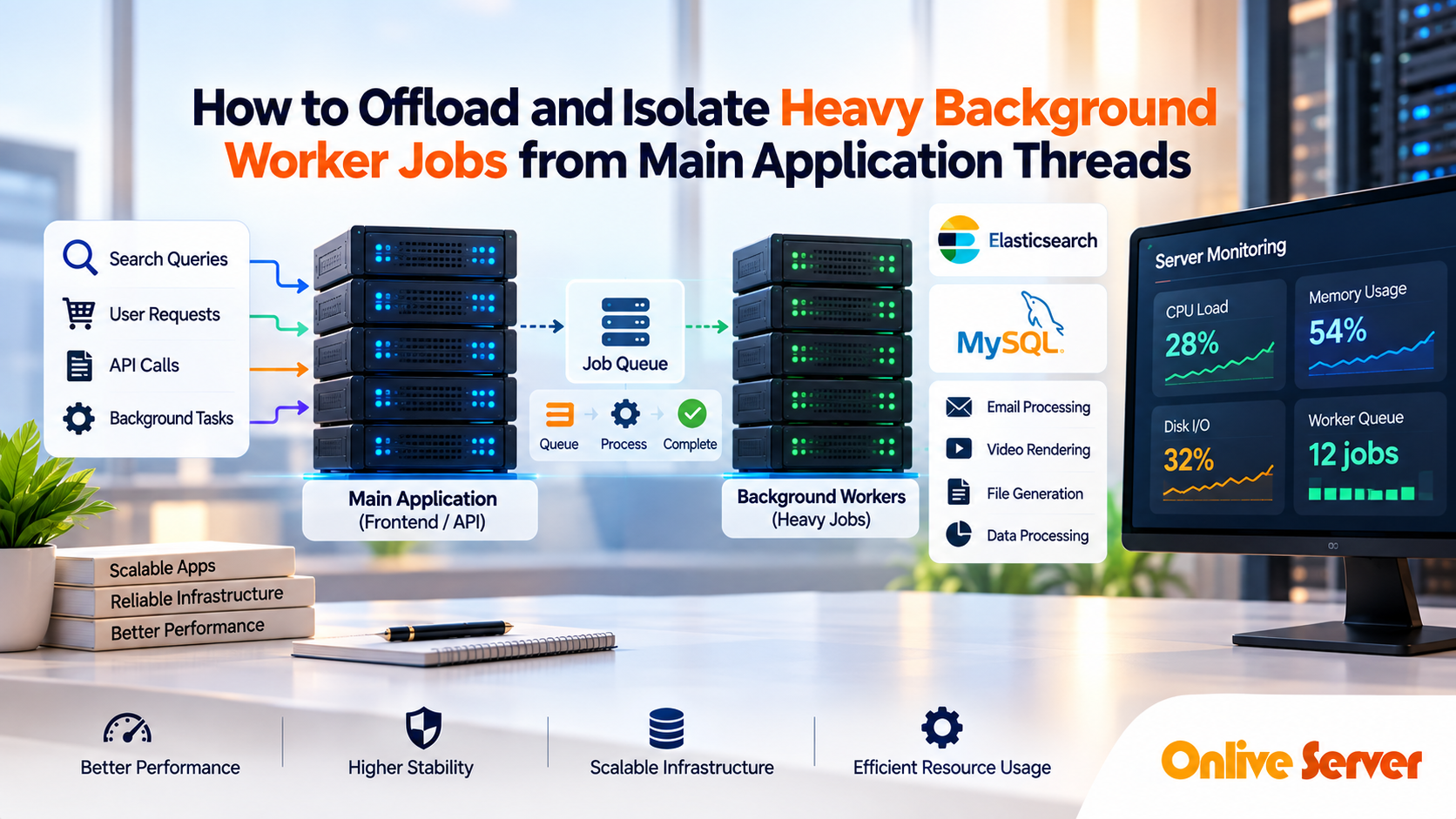
To isolate heavy background jobs from web servers, decouple synchronous HTTP request threads from execution workloads using a three-tier architecture: Web Dispatcher → Message Broker → Dedicated Worker Pool. The web tier receives user requests and pushes task payloads to an asynchronous message broker (Redis or RabbitMQ) within 50 milliseconds. Independent background worker daemons running on isolated server instances pull tasks from the queue and execute them out-of-band. This prevents web thread exhaustion, eliminates HTTP 504 gateway timeouts, and ensures your customer-facing interface remains fast during resource-intensive operations.
Modern software-as-a-service (SaaS) applications, e-commerce portals, and enterprise platforms regularly execute computational workloads that cannot complete within a standard 200-millisecond web response cycle. Generating a 100-page accounting report in PDF format, processing video uploads, syncing thousands of inventory items through third-party APIs, and aggregating analytics metrics require intense CPU cycles, sustained disk I/O, and substantial RAM allocations. For verified technical specifications and deployment parameters, consult the official Linux Kernel Documentation.
When engineering teams execute these heavy background operations within the same process pool that serves incoming user HTTP requests, application responsiveness collapses across three core failure modes: To eliminate multi-tenant noisy neighbor contention and resource bottlenecks, deploying workloads on high-compute dedicated server hosting for background workers guarantees dedicated physical CPU cores and non-throttled NVMe disk I/O.
- 1. Worker Concurrency Exhaustion: Web application pools (such as PHP-FPM, Node.js event loops, Gunicorn, or Puma) quickly exhaust available concurrency limits while waiting for background jobs to finish.
- 2. Cascading Gateway Timeouts: As incoming traffic queues behind stalled execution threads, edge reverse proxies drop connections and return frustrating HTTP 504 Gateway Timeout errors.
- 3. Critical Resource Starvation: Intensive background calculations monopolize CPU cycles and physical RAM, depriving interactive web visitors of baseline server capacity.
Solving this architectural bottleneck requires moving from synchronous execution to an isolated, asynchronous background processing model. This guide explains how to separate compute-heavy worker workloads from user-facing web servers, design high-throughput queue pipelines, and choose the right infrastructure to maintain fast, stable application response times.
Why Running Heavy Background Tasks on Web Servers Causes Outages
In standard monolithic deployments, the web server handles both frontend requests and backend data processing on a single server instance. While this setup works during early prototyping, production traffic quickly exposes severe architectural limitations across three primary dimensions:
- Synchronous Thread Starvation: Web servers use process managers designed to handle short-lived request-response cycles. When a user requests a large CSV export and the web server processes it synchronously, that process remains blocked for 30 to 60 seconds. A few dozen concurrent export requests can tie up every available web worker, causing all subsequent visitors to hang indefinitely.
- Memory Exhaustion and Out-Of-Memory (OOM) Crashes: Operations like image manipulation and document parsing cause sudden, unpredictable memory spikes. If a background task consumes 2GB of RAM on a web server running low on free capacity, the Linux kernel’s OOM Killer may terminate critical web server processes (such as Nginx, Apache, or database connections), causing a complete site outage.
- Disk I/O and CPU Saturation: Heavy data migrations, log indexing, and video encoding drive CPU usage to 100% and generate intense storage queue depth. While the server struggles to process disk reads and writes, lightweight web requests waiting to serve static CSS, JavaScript, and database results face severe latency spikes.
Core Architecture: Decoupling Web Traffic via Message Queues
To eliminate contention between user traffic and background computing, production systems decouple the workload into three distinct, independently scalable architectural tiers:
1. The Ingestion Tier (Web Application Servers)
The web tier focuses exclusively on processing incoming HTTP/HTTPS requests, evaluating authentication tokens, rendering user interfaces, and executing lightweight database lookups. When an operation requires heavy computational work, the web server does not execute it directly. Instead, it delegates execution through structured asynchronous handoffs:
- Rapid Task Dispatch: Serializes task parameters into a compact JSON payload and publishes it to the message broker in under 40 milliseconds.
- Immediate Client Response: Returns an immediate
202 AcceptedHTTP status with a tracking job ID, keeping browser interfaces responsive and fast. - Zero Thread Blocking: Eliminates long-running synchronous execution blocks, ensuring web worker pools remain free for incoming traffic.
2. The Routing Tier (Message Brokers & Queues)
Acting as an asynchronous buffer between web servers and background workers, the message broker reliably receives and stores task messages until a worker node is ready to process them. High-throughput message brokers such as Redis, RabbitMQ, and Apache Kafka maintain job persistence, priority ordering, and retry queues. If traffic surges and 10,000 tasks are scheduled within a single minute, the queue simply grows in memory while the web servers continue operating smoothly without slowing down. For comprehensive implementation details and operational workflows, review our guide on consolidating multi-tenant agency workloads on dedicated infrastructure.
3. The Processing Tier (Dedicated Worker Servers)
Dedicated worker nodes run continuously as background daemons (such as Celery, Sidekiq, Laravel Horizon, or custom Go/Node workers). These processes do not expose any public HTTP endpoints or web ports. Instead, they poll the message broker via secure internal networks, pull pending tasks, execute the intensive processing locally, store the final outputs in object storage or primary databases, and acknowledge message completion. Because these nodes sit on separate infrastructure, a CPU spike on a worker has zero impact on user browsing speeds.
Infrastructure Sizing: Web Tier vs. Message Broker vs. Worker Nodes
Because each component of an asynchronous application handles different computing profiles, deploying all roles onto identical server hardware leads to wasted budget and hardware bottlenecks. Below is an engineering comparison of optimal hardware configurations across tiers:
| Architectural Tier | Workload Characteristics | Primary Bottleneck | Optimal Hardware Profile | Recommended Hosting Model |
|---|---|---|---|---|
| Web Application Tier | Synchronous HTTP requests, TLS termination, HTML rendering | Network latency, memory concurrency | Balanced CPU, DDR4/DDR5 RAM, fast 1Gbps public network | High-availability Cloud VPS or Scalable Node cluster |
| Message Broker (Queue) | In-memory key/value operations, pub/sub queues, state cache | RAM capacity, single-thread memory bandwidth | Ultra-fast memory bus, fast NVMe persistence, isolated private LAN | Dedicated Redis/RabbitMQ instance on high-compute dedicated server hosting for background workers |
| Dedicated Worker Tier | Data parsing, PDF compilation, AI image inference, CSV generation | Multi-core sustained CPU, heavy disk I/O, large heap allocations | High core-density AMD EPYC / Intel Xeon, 64GB+ RAM, PCIe Gen4 NVMe | Enterprise consolidating multi-tenant agency workloads on dedicated infrastructure |
When background queues handle massive parallel jobs, shared virtual resources can suffer from “noisy neighbor” core contention. Deploying workers on dedicated bare-metal servers guarantees 100% uninterrupted CPU time and non-throttled NVMe disk input/output, ensuring consistent processing speeds even during peak business hours. Similar isolation principles are critical when orchestrating containerized queue workers using Docker on VPS to prevent heavy operations on one tenant from impacting others.
Configuring a Resilient Worker Daemon with systemd
Background workers must run continuously and recover automatically from memory leaks, unhandled exceptions, and system reboots. Managing worker processes manually or inside screen sessions is risky in production. The standard enterprise approach uses systemd to supervise worker pools, enforce resource caps, and auto-restart failed tasks. To strengthen overall system reliability and security, explore our technical tutorial on orchestrating containerized queue workers using Docker on VPS.
The following example shows how to configure a systemd service unit for a Python/Celery or PHP/Laravel background worker daemon on Ubuntu/Debian or AlmaLinux/Rocky Linux:
[Unit]
Description=Background Queue Worker Instance %i
After=network.target redis.service
Requires=redis.service

[Service]
Type=simple
User=deploy
Group=deploy
WorkingDirectory=/var/www/application
# Command starts worker listening on the default high-priority queue
ExecStart=/usr/bin/php artisan queue:work redis --queue=high,default --sleep=3 --tries=3 --max-time=3600 --memory=512
# Automatically restart if worker process crashes or exceeds memory limit
Restart=always
RestartSec=5
# Hard limits to prevent runaway background jobs from crashing the host
MemoryMax=1G
CPUQuota=95%

[Install]
WantedBy=multi-user.target
To scale and enable multiple parallel workers across CPU cores, deploy them using a structured three-step lifecycle:
- 1. Reload Manager Configuration: Notify systemd of newly created or updated template service files.
- 2. Enable and Start Daemons: Instantiate parallel worker processes matching available CPU core capacity.
- 3. Monitor Active Telemetry: Verify execution state, memory consumption, and process PID bindings.
# Reload systemd manager configuration
sudo systemctl daemon-reload

# Start 4 parallel worker instances (instances 1 through 4)
sudo systemctl enable --now app-worker@{1..4}.service

# Inspect the active status of worker pool
sudo systemctl status [email protected]
Best Practices for Preventing Worker Process Failures
Even with isolated servers, background workers can run into operational bottlenecks without proper failure handling and memory controls. Implement these architectural safeguards:
- Mitigate Memory Leaks with Task Limits: Background runtimes in PHP, Python, and Ruby can accumulate memory fragmentation over long operational runs. Configure workers to self-terminate and spawn a clean process after processing a fixed number of tasks (e.g.,
--max-tasks-per-child=500in Celery, or--max-jobs=250in Laravel). - Enforce Hard Execution Timeouts: A worker that hangs indefinitely while waiting for an external HTTP webhook blocks a queue thread forever. Always enforce both soft timeouts (allowing the task to clean up) and hard timeouts (forcefully terminating the process after 120 seconds).
- Implement Dead Letter Queues (DLQ): If an unexpected database exception or corrupt payload crashes a worker, the message must not loop endlessly in the primary queue. Failed jobs should be retried up to 3 times with exponential backoff and then transferred to a Dead Letter Queue for engineering analysis.
- Segregate Queue Priorities: Never mix password reset emails with bulk CSV exports in the same queue. Maintain distinct priority channels (e.g.,
critical,default,low) and dedicate dedicated worker threads exclusively to high-priority user-facing jobs.
Frequently Asked Questions
What happens if a web server processes background jobs directly?
When web servers process heavy jobs directly, user-facing worker threads (like PHP-FPM or Node.js) remain blocked while waiting for tasks to finish. Under moderate traffic, new visitors cannot obtain an available connection thread, leading to severe latency spikes and HTTP 504 Gateway Timeout errors.
Which message broker is best for SaaS background worker queues?
Redis is the most popular broker for small-to-medium SaaS platforms due to its ultra-low in-memory latency and simple operational setup. For complex enterprise routing, guaranteed message durability, and strict priority routing, RabbitMQ or Apache Kafka is recommended.
Should worker servers run on the same machine as the web server or separately?
In early staging environments, workers can share hardware if isolated using cgroups or Docker CPU/RAM limits. However, in production, worker nodes should always run on independent server instances to prevent memory spikes or heavy CPU loads from degrading user-facing web performance.
How do dedicated worker servers resolve HTTP 504 Gateway Timeout errors?
They eliminate 504 timeouts by converting synchronous request handling into asynchronous processing. The web server merely writes task parameters to a queue broker in under 50ms and returns an instant response to the client, while dedicated worker servers complete the lengthy execution independently in the background.
How do you scale background worker servers when queue backlogs increase?
Queue workers scale horizontally by adding more worker server nodes subscribed to the same central queue broker. Because task messages are distributed across all active consumers, adding worker servers increases job throughput linearly without requiring changes to the web application code.
Conclusion: Building a Resilient Worker Architecture
Isolating heavy computational jobs from user-facing web servers is essential for sustaining sub-second response times and 99.99% uptime. By routing PDF generation, media encoding, and data exports through an asynchronous message broker to dedicated worker nodes, web tiers remain thoroughly protected against to memory starvation and thread exhaustion.
