

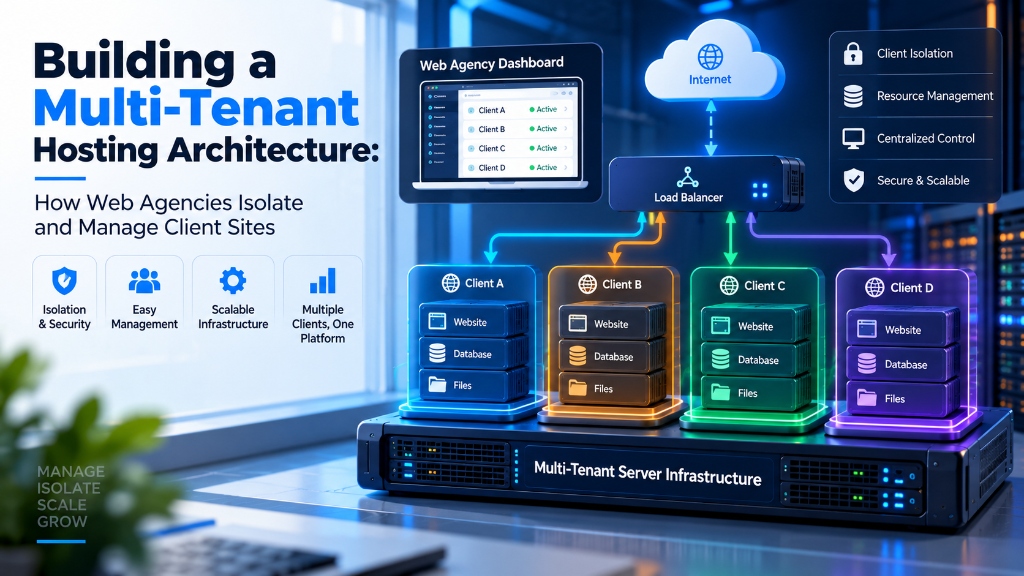
For digital agencies hosting multiple client sites, the most secure multi-tenant architecture uses per-client OS user isolation (CageFS or Linux cgroups/LVE) with independent PHP-FPM pools and separate database credentials to prevent cross-site contamination. Combining this with automated NGINX virtual host provisioning, isolated resource ceilings (CPU/RAM/IOPS), and scheduled offsite backup rotation protects agency infrastructure from rogue plugins and noisy-neighbor crashes.
Building a Secure Multi-Tenant VPS Environment for Client Websites
Hosting multiple client websites on one VPS requires more than adding CPU and RAM. Agencies need proper tenant isolation so that one compromised website, traffic spike, or resource-heavy application does not affect other clients.
A secure multi-tenant VPS uses separate Linux users, PHP-FPM pools, database credentials, filesystem permissions, resource controls, independent backups, and monitoring to create safer hosting boundaries.
Multi-Tenant VPS Hosting for Agencies: How to Isolate Client Websites Securely
When an agency hosts dozens of client websites on the same VPS, adding more hardware is only one part of the solution. The bigger challenge is creating proper separation between different customer environments.
A vulnerable WordPress plugin installed on one website should not expose another client’s files or database credentials. Similarly, a sudden traffic increase on one ecommerce website should not consume all available CPU, memory, or PHP workers.
A properly designed multi-tenant VPS architecture creates boundaries using Linux users, PHP-FPM pools, database permissions, filesystem controls, resource management, backups, and monitoring.
Start With Separate Linux Users and File Ownership
One of the biggest mistakes in agency hosting environments is placing all websites under a single Linux user. Although this setup is simple to manage, it creates unnecessary risk because every application runs with similar permissions.
A better approach is assigning every client website its own Linux user, directory structure, and ownership model.
/home/clients/

├── client_alpha/
│   ├── logs/
│   ├── public_html/
│   └── tmp/

├── client_beta/
│   ├── logs/
│   ├── public_html/
│   └── tmp/

└── client_gamma/
    ├── logs/
    ├── public_html/
    └── tmp/
Creating a Separate Client User
sudo useradd -m \
-d /home/clients/client_alpha \
-s /usr/sbin/nologin \
client_alpha
Linux permissions are an important foundation, but they should not be the only security mechanism. Combine file ownership with process isolation, database separation, and resource controls.
Create Separate PHP-FPM Pools for Each Client
PHP-FPM is one of the most practical isolation layers for PHP-based websites. Instead of allowing every website to share the same PHP worker pool, each client can have its own PHP-FPM configuration.
This allows administrators to assign separate execution users, PHP sockets, worker limits, and monitoring points for each website.
[client_alpha]

user = client_alpha
group = client_alpha

listen = /run/php/php8.2-fpm-client_alpha.sock

pm = ondemand

pm.max_children = 12

pm.process_idle_timeout = 60s

pm.max_requests = 500
Do Not Use The Same Worker Limit For Every Website
A small business website and a high traffic WooCommerce store have completely different PHP requirements.
Worker limits should be calculated according to:
- Average PHP worker memory usage
- Peak concurrent requests
- Application response time
- Available VPS memory
- Database resource requirements
A higher PHP worker count does not always improve performance. If available RAM is exhausted, additional workers can actually slow down the entire VPS.
Use open_basedir as an Additional Protection Layer
PHP provides configuration options that can restrict where scripts are allowed to access files. The open_basedir setting can reduce accidental access outside the assigned website directory.
php_admin_value[open_basedir] =
/home/clients/client_alpha/public_html:
/home/clients/client_alpha/tmp
However, open_basedir should not be treated as a complete security boundary. It works best as one additional layer combined with Linux permissions, separate users, secure credentials, and proper application updates.
No single PHP configuration option can replace proper server hardening. Multi-layer security reduces risk more effectively than depending on one control.
Route Each Website Through Its Own PHP Socket
After creating separate PHP-FPM pools, each website should point to its own PHP socket. This keeps execution separated and makes troubleshooting easier.
server {

listen 443 ssl;

server_name clientalpha.co.uk;

root /home/clients/client_alpha/public_html;

location ~ \.php$ {

include fastcgi_params;

fastcgi_pass
unix:/run/php/php8.2-fpm-client_alpha.sock;

fastcgi_param SCRIPT_FILENAME
$document_root$fastcgi_script_name;

}

}
This structure keeps website files, PHP execution, and logs organized per client. It also makes future migration, troubleshooting, and monitoring simpler for agency teams.
Separate PHP sockets create clearer boundaries between applications and allow administrators to identify which website is consuming resources.
Separate Database Users and Permissions for Every Client
Filesystem isolation is only one part of a secure multi-tenant VPS. Database access should also be separated. Giving every website the same MySQL credentials creates unnecessary risk.
Each client website should normally have its own database, database user, and password. The user should receive only the permissions required by that specific application.
CREATE DATABASE db_client_alpha
CHARACTER SET utf8mb4
COLLATE utf8mb4_unicode_ci;

CREATE USER
'usr_client_alpha'@'localhost'
IDENTIFIED BY
'strong-random-password';

GRANT SELECT, INSERT, UPDATE, DELETE,
CREATE, DROP, INDEX, ALTER
ON db_client_alpha.*
TO 'usr_client_alpha'@'localhost';

FLUSH PRIVILEGES;
Avoid Shared Database Administrator Accounts
A common mistake in agency environments is using one powerful database account for multiple WordPress installations.
If one application is compromised, shared database credentials can increase the impact. Separate users create clearer boundaries and make permission management easier.
Every application should have the minimum database permissions it needs. Avoid using MySQL root credentials inside website configuration files.
Prevent One Client From Consuming the Entire VPS
Separate users and PHP-FPM pools improve security, but they do not automatically guarantee fair resource usage.
A single website can still create heavy CPU usage, memory pressure, database load, or excessive disk activity through plugins, imports, background jobs, or unexpected traffic.
Using Linux Resource Controls
Linux control groups (cgroups) allow administrators to create resource boundaries around services and processes.
Depending on the operating system and service architecture, cgroups can help control:
- CPU allocation
- Memory usage
- Number of running processes
- Disk I/O limits
[Slice]

CPUQuota=150%

MemoryHigh=896M

MemoryMax=1024M

TasksMax=100
Creating resource limits alone does not guarantee protection. Processes must actually run inside the correct cgroup or service boundary. Always verify resource assignment after configuration.
When Should a Client Move to a Separate VPS?
Multi-tenant VPS hosting works well for many agency environments. However, some clients require stronger separation, dedicated resources, or different server configurations.
Situations Where Separate VPS Makes Sense
Large ecommerce stores, membership platforms, or applications with constant traffic may require dedicated resources.
Some businesses need stronger infrastructure boundaries because of internal policies or compliance requirements.
Applications requiring different PHP versions, databases, or server configurations may be easier to manage separately.
Large imports, queues, reports, and automation jobs can affect other clients when hosted together.
The decision should be based on workload behaviour, security needs, maintenance requirements, and recovery expectations rather than only the number of websites.
Keep Production and Staging Environments Separate
Developers should avoid testing major changes directly on production websites. A staging environment allows updates, plugin testing, and configuration changes before they reach customers.
/home/clients/client_alpha/

├── public_html/

├── staging_html/

├── logs/

└── tmp/
Production and Staging Should Have Separate Data
A staging environment should not accidentally modify production databases. Use separate database credentials and controlled deployment workflows.
- Git-based deployment
- CI/CD pipelines
- Automated testing
- Controlled release process
If production customer data is copied into staging, sensitive information should be removed or anonymized before developers access it.
Create Independent Backup Systems for Every Client
A single large backup containing every customer website can make recovery slower and increase management complexity.
A better approach is maintaining client-level backups that allow individual website restoration without affecting unrelated customers.
Protect themes, plugins, uploads, configurations, and application files.
Store independent database copies for each website.
Keep backup copies outside the production VPS.
A backup is useful only when restoration works correctly.
Backup Monitoring Checklist
- Backup completion status
- Failed transfer alerts
- Storage availability
- Retention policy
- Successful restore tests
Run Scheduled Tasks With Minimum Privileges
Client automation tasks should run with the minimum permissions required. Running every scheduled job as root increases unnecessary risk.
sudo crontab -u client_alpha -e
This approach keeps WordPress cron jobs, imports, reports, and maintenance scripts associated with the correct client identity.
A restricted user account limits the impact of a compromised script or incorrect automation task.
Monitor Every Tenant Separately
Monitoring only overall VPS usage is not enough for agencies managing multiple client websites.
Administrators should identify which tenant is consuming CPU, memory, storage, or database resources before performance issues affect customers.
# CPU and memory usage

ps -eo user,pid,%cpu,%mem,cmd \
--sort=-%cpu | head -n 20

# Process count by user

ps aux | awk '{print $1}' \
| sort | uniq -c | sort -nr

# Client directory usage

du -sh /home/clients/* | sort -h
Important Metrics to Track
Identify websites creating sustained processor load.
Detect PHP, database, or application memory problems.
Find storage-heavy workloads and backup impact.
Monitor HTTP errors, failed jobs, and service issues.
Early monitoring helps agencies fix problems before clients notice performance degradation.
Multi-Tenant VPS vs Separate VPS Instances
There is no single hosting architecture that fits every agency. A multi-tenant VPS can reduce infrastructure cost and simplify management for multiple moderate workloads.
However, separate VPS instances provide stronger infrastructure boundaries and allow independent resource allocation, maintenance schedules, and software configurations.
| Area | Multi-Tenant VPS | Separate VPS Instance |
|---|---|---|
| Isolation Level | Application and user-level isolation with shared infrastructure | Independent server environment with stronger separation |
| Resource Usage | Resources are managed across multiple clients | Dedicated allocation for one customer |
| Management | Centralized maintenance is easier for agencies | Each VPS requires separate administration |
| Scaling | Suitable for groups of smaller websites | Better for applications with predictable high demand |
| Security Boundary | Requires careful configuration and monitoring | Provides stronger infrastructure separation |
| Cost | Usually more economical for multiple clients | Higher cost due to dedicated resources |
| Maintenance | One server stack to maintain | Multiple environments to manage |
The correct approach depends on security requirements, application workload, client expectations, and operational complexity. A larger number of websites does not automatically require separate servers.
Frequently Asked Questions About Multi-Tenant VPS Hosting
How can an agency prevent one client website from affecting other websites on the VPS?
Agencies can reduce cross-client impact by using separate Linux users, dedicated PHP-FPM pools, independent database credentials, filesystem permissions, resource limits, backups, and monitoring. These layers work together to reduce security and performance risks.
Should every client website have its own PHP-FPM pool?
For agencies that need stronger tenant separation and better resource control, separate PHP-FPM pools are a practical approach. Each pool can run under its own user account and have independent worker settings based on actual workload requirements.
Is open_basedir enough to secure multiple websites on one VPS?
No. open_basedir is an additional PHP restriction layer, but it should not be considered a complete security boundary. Proper Linux permissions, separate users, database isolation, secure updates, and monitoring are still required.
Why should every client use a separate database user?
Separate database users reduce unnecessary access between applications. If one website has a configuration problem or security issue, database permissions can help limit the possible impact.
When should an agency move a client website to a separate VPS?
A separate VPS may be useful when a website requires dedicated resources, stronger isolation, special software versions, compliance requirements, or workloads that regularly affect other applications.
How should agencies backup multiple websites hosted on one VPS?
Maintain independent backups for each client website including files, databases, and required configuration data. Store backup copies outside the production VPS and regularly test restoration procedures.
Conclusion: Strategic Architecture & Performance Summary
Implementing these technical optimizations for building a multi-tenant hosting architecture: how web agencies isolate and manage client sites ensures robust throughput, predictable latency, and maximum system reliability across production environments. Rigorous benchmarking and proactive parameter tuning eliminate latent resource bottlenecks before they impact end users.
Pairing disciplined operating system administration with reliable compute foundations is essential for mission-critical operations. Deploying workloads on secure Linux server infrastructure provides the dedicated resources, network resilience, and hardware acceleration necessary to sustain high availability under heavy production load.
For developers and organizations scaling web applications or requiring dedicated virtual environments, exploring high-performance Linux VPS hosting delivers guaranteed NVMe storage, KVM hypervisor isolation, and full root access for production workloads.
Build Multi-Tenant VPS Hosting Around Isolation, Not Just Server Capacity
A professional agency VPS is not simply a server containing multiple website folders. Each client application should have clear boundaries around files, processes, databases, resources, and backups.
Separate Linux users, PHP-FPM pools, database accounts, deployment workflows, and monitoring create a more predictable hosting environment. Resource controls and backup planning add additional protection when multiple customers share the same infrastructure.
For workloads requiring stronger separation, dedicated VPS instances or isolated environments may be the better choice. The right architecture depends on business requirements, application behaviour, security needs, and operational goals.
Need More Control Over Your Hosting Environment?
Choose infrastructure that gives your agency the flexibility to manage multiple client websites with better performance visibility and security control.
Explore VPS Hosting Options