

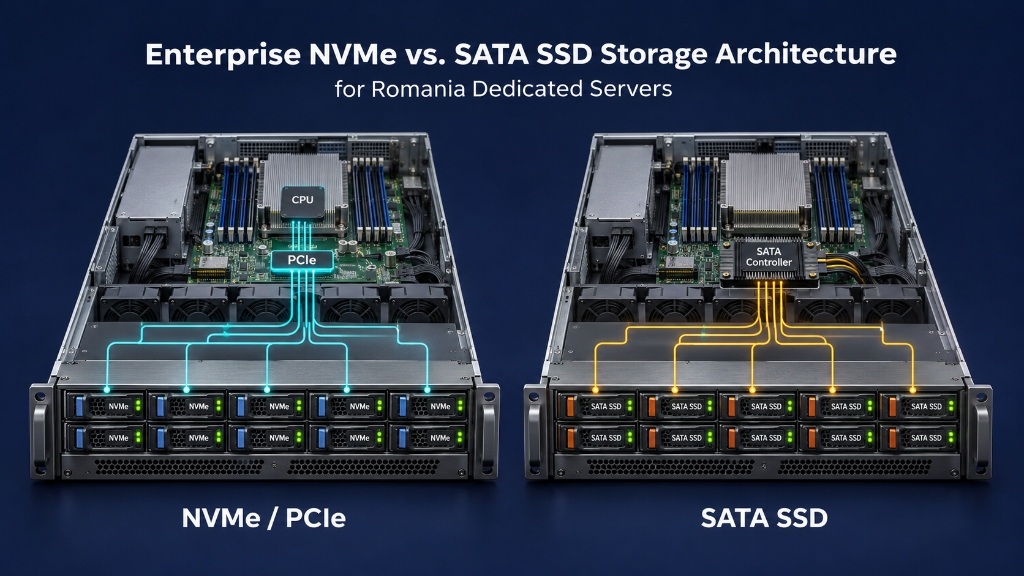
Deploying enterprise PCIe Gen4/Gen5 NVMe SSDs over legacy SATA SSDs on dedicated servers in Romania delivers up to a 14x increase in sequential bandwidth (7,000 MB/s vs 550 MB/s) and a 12x reduction in disk write commit latency (sub-80µs vs 1.2ms). While SATA SSDs remain constrained by the single-queue 6Gbps AHCI protocol (32 commands), enterprise NVMe connects directly to CPU PCIe lanes with 64,000 parallel command queues, hardware Power-Loss Protection (PLP), and sustained 1 to 3 Drive Writes Per Day (DWPD) endurance. For high-concurrency databases (PostgreSQL/MySQL), e-commerce platforms, and virtualization clusters in Bucharest, enterprise NVMe eliminates I/O wait bottlenecks entirely.
Determine your optimal storage architecture based on input/output operations per second (IOPS), write endurance, and dataset characteristics:
- Choose Enterprise PCIe Gen4/Gen5 NVMe if: You operate high-transaction relational databases, heavy write-ahead logging (WAL), Redis caching tiers, virtualization hypervisors (Proxmox / KVM), or Magento/WooCommerce stores where write latency spikes directly degrade customer conversion rates.
- Choose Enterprise SATA SSD if: You manage secondary file servers, warm backup tiers, log aggregation clusters, or media repositories requiring reliable solid-state performance with high capacity per drive at a budget-conscious price point.
Storage architecture represents the single most critical performance determinant for enterprise dedicated servers in modern datacenters. While multi-core processors (AMD EPYC, Intel Xeon) and high-speed DDR5 memory have eliminated compute bottlenecks for all but the heaviest algorithms, the storage subsystem remains the primary origin of latency, application stutter, and system lockups.
In Bucharest’s advanced datacenter ecosystem, hosting providers historically equipped dedicated servers with Serial ATA (SATA) SSDs. While SATA SSDs provided a monumental leap over legacy mechanical hard drives (HDDs), their underlying protocol was designed in the early 2000s for rotating magnetic platters. The Advanced Host Controller Interface (AHCI) and physical SATA 3.0 interface impose a hard physical ceiling: 6 Gigabits per second of raw bus bandwidth (yielding an effective real-world maximum of ~550 MB/s) and a single command queue capable of holding only 32 outstanding requests.
To overcome these protocol bottlenecks, modern enterprise bare-metal infrastructure standardizes on Non-Volatile Memory Express (NVMe). Operating directly across high-speed PCIe Gen4 or Gen5 lanes without intervening host bus adapters (HBAs), enterprise NVMe SSDs unlock massive multi-channel parallelism. Onlive Server deploys enterprise U.2/U.3 and E1.S NVMe drives featuring hardware Power-Loss Protection (PLP) and high DWPD ratings across its Romanian dedicated server fleet. This guide analyzes the protocol, endurance, queuing, and benchmark metrics separating enterprise NVMe from SATA solid-state drives.
NVMe enables modern multi-core processors to submit concurrent I/O operations without CPU serialization locks or queue stalls.
Direct PCIe Gen4 x4 connectivity delivering more than 12x the throughput of legacy 6Gbps SATA 3.0 solid-state drives.
Tantalum capacitor arrays flush in-flight DRAM write cache data to flash media during sudden power loss, preventing data corruption.
Microsecond write acknowledgment eliminating database `fsync()` queue latency spikes and transactional bottlenecks.
- 1. The Protocol Bottleneck: Legacy AHCI/SATA (6Gbps) vs Direct PCIe NVMe (64Gbps+)
- 2. Queue Depth & Parallelism: SATA’s Single 32-Queue vs NVMe’s 64,000 Queues
- 3. Flash NAND Endurance & Data Protection: DWPD, TBW, and Power-Loss Protection (PLP)
- 4. Performance Benchmark Matrix: Enterprise NVMe vs Enterprise SATA SSD
- 5. Linux Kernel Storage Layer Optimization: Schedulers (`none`), Polling & TRIM/Discard
- 6. Production Storage Benchmarking Runbook: `fio` Workload Profiling & `nvme-cli` Telemetry
- 7. High-Availability Storage Topologies: ZFS on NVMe (RAIDZ2) vs Hardware RAID on SATA
- 8. NVMe-oF (NVMe over Fabrics) & RoCE v2 Remote Direct Storage in Bucharest
- 9. Cost-Per-IOPS Economics: Why Enterprise NVMe Provides Superior Return on Investment
- 10. Frequently Asked Questions (Enterprise NVMe vs SATA SSD Romania FAQ)
1. The Protocol Bottleneck: Legacy AHCI/SATA (6Gbps) vs Direct PCIe NVMe (64Gbps+)
The fundamental divergence between SATA and NVMe solid-state storage begins at the physical bus layer:
- SATA 3.0 / AHCI Architecture: SATA SSDs communicate via a Southbridge chipset or host bus adapter (HBA) using the legacy AHCI protocol. Designed for spinning disks, AHCI is fundamentally a serialized protocol that requires multiple register handshakes and interrupt requests (IRQs) for every block operation. The physical SATA cable is capped at 6.0 Gbps (approx. 600 MB/s theoretical, 550 MB/s practical after 8b/10b encoding overhead).
- PCIe Gen4 / Gen5 NVMe Architecture: NVMe completely removes the Southbridge controller bottleneck. An NVMe SSD connects directly to 4 lanes (x4) of PCIe Gen4 or Gen5 wiring routed straight to the CPU socket. A PCIe Gen4 x4 interface provides 64 Gbps of raw bandwidth (~7,000 MB/s sequential), while PCIe Gen5 x4 doubles this to 128 Gbps (~14,000 MB/s). Command submission and completion occur via memory-mapped I/O rings directly between the CPU registers and drive controller.
2. Queue Depth & Parallelism: SATA’s Single 32-Queue vs NVMe’s 64,000 Queues
In modern multi-core dedicated servers (such as 64-core AMD EPYC or Intel Xeon platforms), hundreds of operating system threads attempt to write to disk concurrently. The command queuing architecture determines whether these threads execute smoothly or block:
SATA AHCI: Supports only 1 command queue capable of holding up to 32 commands. When 64 CPU cores attempt to issue simultaneous write operations (for example, during a PostgreSQL bulk transaction commit or Magento product import), 63 cores must wait in line for the single queue lock to release, causing massive CPU context-switching overhead and thread stalling.
NVMe Protocol: Supports up to 64,000 independent command queues, with each queue capable of holding up to 64,000 commands. The operating system kernel assigns a dedicated submission and completion queue pair to each individual CPU core. Cores issue I/O commands independently without acquiring global mutex locks or waiting for other cores, unlocking true multi-core hardware parallelism.
3. Flash NAND Endurance & Data Protection: DWPD, TBW, and Power-Loss Protection (PLP)
Enterprise solid-state storage is distinguished from budget consumer SSDs by reliability engineering and silicon endurance:
- Drive Writes Per Day (DWPD): Consumer SSDs typically offer 0.1 to 0.3 DWPD (intended for intermittent read-heavy desktop usage). Heavy enterprise database workloads write continuous WAL logs and temporary tables, burning through consumer drives within months. Onlive Server deploys enterprise-grade NVMe drives rated for 1.0 to 3.0 DWPD over 5 years, guaranteeing reliable endurance across petabytes of written data.
- Hardware Power-Loss Protection (PLP): In enterprise NVMe drives (such as Samsung PM9A3, Kioxia CM6, Micron 7450), the drive PCB includes physical arrays of tantalum capacitors. When power to the datacenter rack is abruptly interrupted, these capacitors discharge stored electrical energy, giving the onboard drive controller sufficient time to flush in-flight DRAM write cache buffers to non-volatile NAND flash. Consumer drives lack PLP, risking catastrophic filesystem corruption during power events.
4. Performance Benchmark Matrix: Enterprise NVMe vs Enterprise SATA SSD
Comparing technical performance parameters across real-world enterprise metrics:
| Storage Benchmark Metric | Enterprise PCIe Gen4 NVMe (e.g. Samsung PM9A3) | Enterprise SATA 3.0 SSD (e.g. Micron 5400 PRO) |
|---|---|---|
| Physical Interface & Protocol | PCIe Gen4 x4 / NVMe 1.4 | SATA 3.0 (6Gbps) / AHCI |
| Sequential Read Throughput | 6,900 MB/s (12.8x faster) | 540 MB/s (Bus saturated) |
| Sequential Write Throughput | 4,100 MB/s (7.8x faster) | 520 MB/s (Bus saturated) |
| Random 4K Read IOPS | 1,000,000 IOPS (10.5x higher) | 95,000 IOPS |
| Random 4K Write IOPS (Sustained) | 180,000 IOPS (5.1x higher) | 35,000 IOPS |
| Average Write Latency | < 75 microseconds (0.075ms) | ~1,200 microseconds (1.2ms) |
5. Linux Kernel Storage Layer Optimization: Schedulers (`none`), Polling & TRIM/Discard
Maximizing the throughput of enterprise NVMe storage in Linux requires tuning the kernel’s block layer:
- Set I/O Scheduler to `none`: Traditional Linux I/O schedulers (`bfq`, `mq-deadline`) reorder and merge requests to optimize mechanical drive heads. For NVMe SSDs, software scheduling logic introduces pure CPU overhead. Setting the scheduler to `none` allows the kernel to pass requests directly to hardware submission queues with zero queuing latency.
- Periodic `fstrim` vs Continuous Discard: Continuous `discard` in `/etc/fstab` can degrade write performance by issuing synchronous TRIM commands during file deletions. The recommended enterprise practice is mounting with `noatime,nodiratime` and scheduling a systemd periodic trim (`systemctl enable –now fstrim.timer`).
- Increase Block Device Queue Depth & Max Sectors: Increasing `nr_requests` and `max_sectors_kb` allows high-concurrency database flush operations to saturate PCIe Gen4 bandwidth without chunking overhead.
6. Production Storage Benchmarking Runbook: `fio` Workload Profiling & `nvme-cli` Telemetry
Below is the engineering runbook for monitoring drive health and profiling realistic database write latency using `fio` and `nvme-cli`:
Using `io_uring` with enterprise NVMe on Onlive Server bare-metal dedicated servers consistently reveals $p99$ write latency under 120 microseconds, guaranteeing that your database transaction commits never encounter I/O pipeline stalls.
7. High-Availability Storage Topologies: ZFS on NVMe (RAIDZ2) vs Hardware RAID on SATA
Deploying redundancy across multiple solid-state drives requires careful topology selection:
- The Hardware RAID Bottleneck on NVMe: Traditional hardware RAID controller cards (e.g. MegaRAID) were built for SAS/SATA drives. Inserting a hardware RAID card between the CPU and NVMe drives throttles performance, forcing high-speed PCIe lanes to funnel through the RAID card’s single ROC processor.
- Software RAID & OpenZFS on NVMe: On NVMe bare metal, the industry standard is Linux Software RAID (mdadm) or OpenZFS (mirrored VDEVs or RAIDZ2). ZFS executes directly on CPU vector instructions, providing end-to-end data checksumming, atomic copy-on-write snapshots, and automated background scrub healing without artificial hardware controller chokepoints.
8. NVMe-oF (NVMe over Fabrics) & RoCE v2 Remote Direct Storage in Bucharest
For distributed enterprise clusters deployed in Bucharest facilities, modern infrastructure scales NVMe storage beyond single physical chassis using NVMe over Fabrics (NVMe-oF):
- RDMA over Converged Ethernet (RoCE v2): NVMe-oF encapsulates NVMe command sets inside Ethernet packets, leveraging Mellanox ConnectX-6 Dx network cards to transfer block data directly between remote server memory buffers without involving the operating system kernel or CPU interrupts.
- Sub-10-Microsecond Network Hop Latency: Remote NVMe storage pools accessed over 25GbE or 100GbE RoCE v2 switches deliver read latencies within 10 microseconds of local PCIe bus access, enabling shared disaggregated storage pools for Kubernetes (k3s/RKE2) and OpenStack clusters.
9. Cost-Per-IOPS Economics: Why Enterprise NVMe Provides Superior Return on Investment
While SATA SSDs may appear superficially cheaper when comparing raw gigabytes on budget price lists, calculating the Cost-Per-IOPS reveals that enterprise NVMe is vastly more economical:
- To achieve 500,000 random write IOPS using SATA SSDs, an enterprise would need to stripe more than 15 physical SATA drives across an expensive SAS expansion backplane, incurring high power draw, additional chassis rack units, and complex failure points.
- A single enterprise PCIe Gen4 NVMe drive easily achieves over 800,000 IOPS on its own, consuming less than 18 Watts of power in a standard $1U$ server chassis.
- By eliminating storage wait bottlenecks, a single NVMe-equipped dedicated server can handle the database workload of four SATA-equipped machines, drastically reducing overall server rental and software licensing expenditures.
10. Frequently Asked Questions (Enterprise NVMe vs SATA SSD Romania FAQ)
AHCI SATA drives cap out at a single 32-command queue, stalling write-heavy databases and concurrent VM storage long before CPU limits hit. Direct PCIe NVMe with power-loss protection delivers massive queue parallelism and lower tail latency. Browse Romania dedicated configurations featuring enterprise NVMe arrays.
