

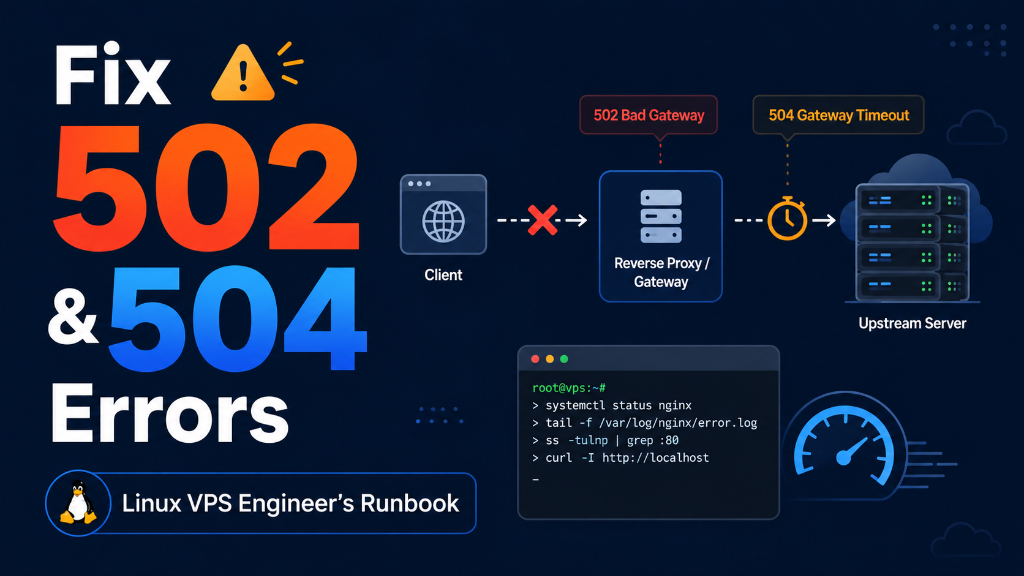
A 502 Bad Gateway error occurs when Nginx receives an invalid response from PHP-FPM or an upstream app (commonly due to process crashes or socket permission issues; fix with systemctl restart php-fpm). A 504 Gateway Timeout happens when the upstream server takes too long to respond; resolve it by increasing request_terminate_timeout and fastcgi_read_timeout in Nginx and tuning max_children pools.
Introduction: Resolving 502 Bad Gateway & 504 Gateway Timeout Errors
Few server issues cause more immediate panic for website administrators and e-commerce store owners than HTTP 502 Bad Gateway and HTTP 504 Gateway Timeout error screens. When these gateway errors appear, visitors are completely locked out of your web application, checkout funnels are instantly severed, and search engine crawlers log critical availability failures.
Strategic Considerations & Core Architecture Drivers
In a modern web architecture, Nginx or Apache acts as an edge reverse proxy gateway, receiving incoming HTTPS requests and forwarding dynamic execution tasks to an upstream backend application daemon—most commonly PHP-FPM for WordPress/WooCommerce, Node.js / PM2 for JavaScript apps, or Gunicorn/uWSGI for Python backends.
While both error codes represent communication failures between the reverse proxy and the backend application, their underlying root causes are fundamentally different:
- 502 Bad Gateway: The upstream application actively refused the connection, crashed due to an Out-Of-Memory error, or unexpectedly severed the Unix domain socket connection while processing.
- 504 Gateway Timeout: The upstream application accepted the connection but failed to complete its execution and return a response within Nginx’s configured timeout threshold (typically 60 seconds).
Effectively diagnosing and permanently resolving these errors requires a systematic approach: analyzing Nginx and PHP-FPM error logs, calibrating worker process pools (pm.max_children), tuning FastCGI socket queues, and identifying stalled database queries.
Furthermore, aligning Linux kernel network buffer parameters with application timeout directives ensures that unexpected surges in web traffic are buffered smoothly rather than dropped at the socket layer.
Deploying on the best USA VPS hosting provides the dedicated KVM computing power, isolated RAM, and enterprise NVMe storage necessary to handle high-concurrency workloads without upstream process bottlenecks. In this comprehensive technical guide, we break down log error signatures, review troubleshooting matrices, explain worker pool sizing formulas, and deliver an actionable PuTTY diagnostic runbook.
Architectural Models: 502 Bad Gateway vs. 504 Gateway Timeout
Understanding the exact protocol failure points between Nginx and upstream backends allows administrators to target the true root cause instantly.
For upstream timeout directives and socket buffer management, consult the official NGINX FastCGI module documentation.
|
Active Rejection / Crash
HTTP 502 Bad GatewayThe upstream daemon (PHP-FPM/Node) crashed (OOM), was not running, refused the connection, or returned an invalid HTTP response header to Nginx. Log Signature:
connect() failed (111: Connection refused) |
Execution Stalled / Timeout
HTTP 504 Gateway TimeoutThe upstream daemon accepted the request but failed to finish processing (slow database query, external API hang) before Nginx’s timeout expired. Log Signature:
upstream timed out (110: Connection timed out) |
Core Concept: Deconstructing the 5 Primary Upstream Bottlenecks
Resolving gateway errors requires identifying the exact failure mechanism inside the server stack:
Optimizing PHP worker execution times and caching database objects directly aligns with proven strategies for how to optimize hosted websites for maximum speed and uptime.
1. PHP-FPM Process Pool Exhaustion (pm.max_children reached)
When web traffic spikes, if the number of simultaneous dynamic requests exceeds pm.max_children, additional requests are placed into the socket queue. Once the queue is full, PHP-FPM drops new connections immediately, causing Nginx to return 502 Bad Gateway. The PHP-FPM error log reports: [WARNING] [pool www] server reached pm.max_children setting, consider raising it.
2. Upstream Timeout Window Misalignment (504 Gateway Timeout)
If a complex WooCommerce checkout, large CSV export, or PDF generation takes 75 seconds to execute, but Nginx’s fastcgi_read_timeout is set to the default 60 seconds, Nginx severs the client connection at exactly 60.00 seconds and returns a 504 Gateway Timeout, even though the PHP worker was still running in the background.
3. Linux Kernel Out-Of-Memory (OOM) Daemon Termination
When total server memory consumption exceeds physical RAM and swap space, the Linux kernel invokes the OOM Killer to protect operating system integrity. The kernel often terminates the largest memory consumer—frequently php-fpm or node. With the daemon dead, all subsequent requests trigger instant 502 Bad Gateway errors until systemd restarts the service.
4. Unix Domain Socket Backlog Overflows
By default, PHP-FPM communicates with Nginx via a Unix domain socket (/run/php/php8.3-fpm.sock). If the socket connection queue backlog exceeds listen.backlog = 511 or the Linux kernel’s net.core.somaxconn = 128, incoming socket handshakes are silently dropped, producing connect() to unix:/run/php/php8.3-fpm.sock failed (11: Resource temporarily unavailable) in Nginx logs.
5. Upstream Database Locks & Unindexed Query Deadlocks
A single unindexed SQL query executing a full table scan can lock multi-gigabyte database tables. Subsequent PHP worker processes attempting to read or write to those locked tables freeze while waiting for the lock to release. Within seconds, all available PHP-FPM worker processes are tied up in a waiting state, cascading into global 504 Gateway Timeouts across the entire website.
6. PHP Memory Limit Exhaustion & Fatal Exceptions
When a script exceeds PHP’s configured memory_limit (e.g., 128MB or 256MB), PHP-FPM terminates the worker process abruptly with a fatal error: Allowed memory size of bytes exhausted. If output buffering was active, Nginx receives an empty response body or truncated headers, triggering an immediate 502 Bad Gateway response to the client.
7. Node.js & Python WSGI Event Loop Freezes
In asynchronous architectures (such as Node.js Express or Python FastAPI), executing heavy synchronous CPU operations (e.g., image resizing or synchronous cryptographic hashing) blocks the single-threaded event loop. While the event loop is blocked, incoming HTTP requests queue up until Nginx’s proxy_read_timeout fires, resulting in 504 Gateway Timeouts.
8. Unix Domain Sockets vs. TCP Loopback Socket Scalability
While Unix domain sockets (unix:/run/php/php8.3-fpm.sock) offer slightly lower latency by avoiding the network stack, they suffer from strict kernel file-descriptor and inode limits during sudden traffic surges. Switching to a local TCP loopback socket (127.0.0.1:9000) combined with TCP socket reuse (net.ipv4.tcp_tw_reuse = 1) provides superior stability for enterprise multi-core servers processing thousands of requests per second.
9. PHP OpCache Starvation & Lock Contention
When PHP OpCache runs out of memory (opcache.memory_consumption), it forces PHP-FPM to repeatedly recompile scripts from disk on every single web hit. Under heavy traffic, disk I/O wait spikes to 100%, causing worker processes to stall and triggering cascading 504 Gateway Timeouts across the entire VPS.
502/504 Error Diagnostic Signatures & Resolution Matrix
Identify exact error messages from Nginx error logs and apply targeted configuration fixes:
| HTTP Code | Nginx Error Log Signature | Underlying Root Cause | Resolution Action |
|---|---|---|---|
| 502 Bad Gateway | connect() failed (111: Connection refused) | PHP-FPM/Node daemon is completely stopped | Restart daemon & enable systemd auto-restart |
| 502 Bad Gateway | recv() failed (104: Connection reset by peer) | PHP worker segfaulted or OOM killed | Increase php memory_limit & inspect dmesg |
| 504 Timeout | upstream timed out (110: Connection timed out) | Script execution exceeded fastcgi_read_timeout | Increase fastcgi_read_timeout to 300s |
| 502 Bad Gateway | connect() failed (11: Resource temporarily unavailable) | Socket backlog queue overflowed | Increase listen.backlog & somaxconn |
| 504 Timeout | upstream prematurely closed connection | PHP max_execution_time killed worker | Optimize SQL queries & raise max_execution_time |
Real-World Scenarios: Workloads Prone to Gateway Bottlenecks
Examine how gateway timeouts occur in real-world production environments and how to prevent them:
🛒 E-Commerce Checkout Surges
Prevent 502 errors during flash sales by sizing PHP-FPM static pools to match available RAM and utilizing Redis session storage.
📊 Heavy Data Exports & Report Generation
Offload multi-minute CSV/PDF exports to background queue workers (RabbitMQ / Redis Queue) rather than blocking web worker threads.
🔄 Third-Party Webhook & API Ingestion
Set aggressive timeouts on external cURL API requests in PHP (e.g., 5s timeout) to prevent external service outages from stalling local workers.
📰 High-Traffic Media Portals
Implement Nginx FastCGI micro-caching (fastcgi_cache_use_stale error timeout updating) to serve cached pages even if PHP-FPM crashes.
Hands-On Implementation: Diagnostic & Tuning Runbook (PuTTY Terminal Guide)
Execute these production commands directly in your PuTTY terminal to audit live error logs, scale PHP-FPM worker pools, calibrate Nginx timeouts, and monitor active socket queues:
Expanding socket backlogs and mitigating malicious traffic surges forms a vital component of troubleshooting server security and preventing connection failures under heavy network load.
Step 1: Live Stream Nginx & PHP-FPM Error Logs via tail CLI
Capture exact upstream error signatures as they happen in real time:
Step 2: Calibrate PHP-FPM Worker Pools (/etc/php/8.3/fpm/pool.d/www.conf)
Scale worker children and expand socket backlog for an 8GB RAM VPS:
Step 3: Expand Nginx FastCGI & Proxy Timeouts (/etc/nginx/nginx.conf)
Prevent premature Nginx 504 drops during long-running application scripts:
Step 4: Align PHP Maximum Execution Time & Memory Limits (/etc/php/8.3/fpm/php.ini)
Ensure PHP runtime limits match your Nginx FastCGI read timeout:
Step 5: Expand Linux Kernel Socket Queues (/etc/sysctl.conf)
Increase kernel connection backlog to eliminate Resource Temporarily Unavailable drops:
Step 6: Audit Real-Time PHP-FPM Pool Utilization & Active Queue Length
Query PHP-FPM status page to verify active workers and queue health:
Step 7: Optimize PHP OpCache In-Memory Bytecode Caching
Eliminate disk script compilation overhead by expanding OpCache RAM buffers:
Include fastcgi_cache_use_stale error timeout invalid_header http_500 http_502 http_504; in your Nginx cache configuration. If PHP-FPM crashes or times out during a sudden traffic surge, Nginx will instantly serve a cached version of the page to the visitor instead of displaying an ugly error screen.
Increasing fastcgi_read_timeout to 600 seconds without optimizing the root application creates a severe vulnerability. If multiple visitors trigger slow 10-minute database queries simultaneously, all PHP-FPM workers will remain occupied, causing complete server starvation for standard fast-loading pages.
Frequently Asked Questions (FAQ)
Explore essential questions and architectural best practices for this deployment on Ukraine VPS:
Troubleshoot 502 and 504 Gateway Errors: Executive Summary
pm.max_children and expand listen.backlog to prevent worker starvation and socket connection drops during traffic spikes.
fastcgi_read_timeout, proxy_read_timeout, and PHP max_execution_time to prevent premature gateway terminations.
