

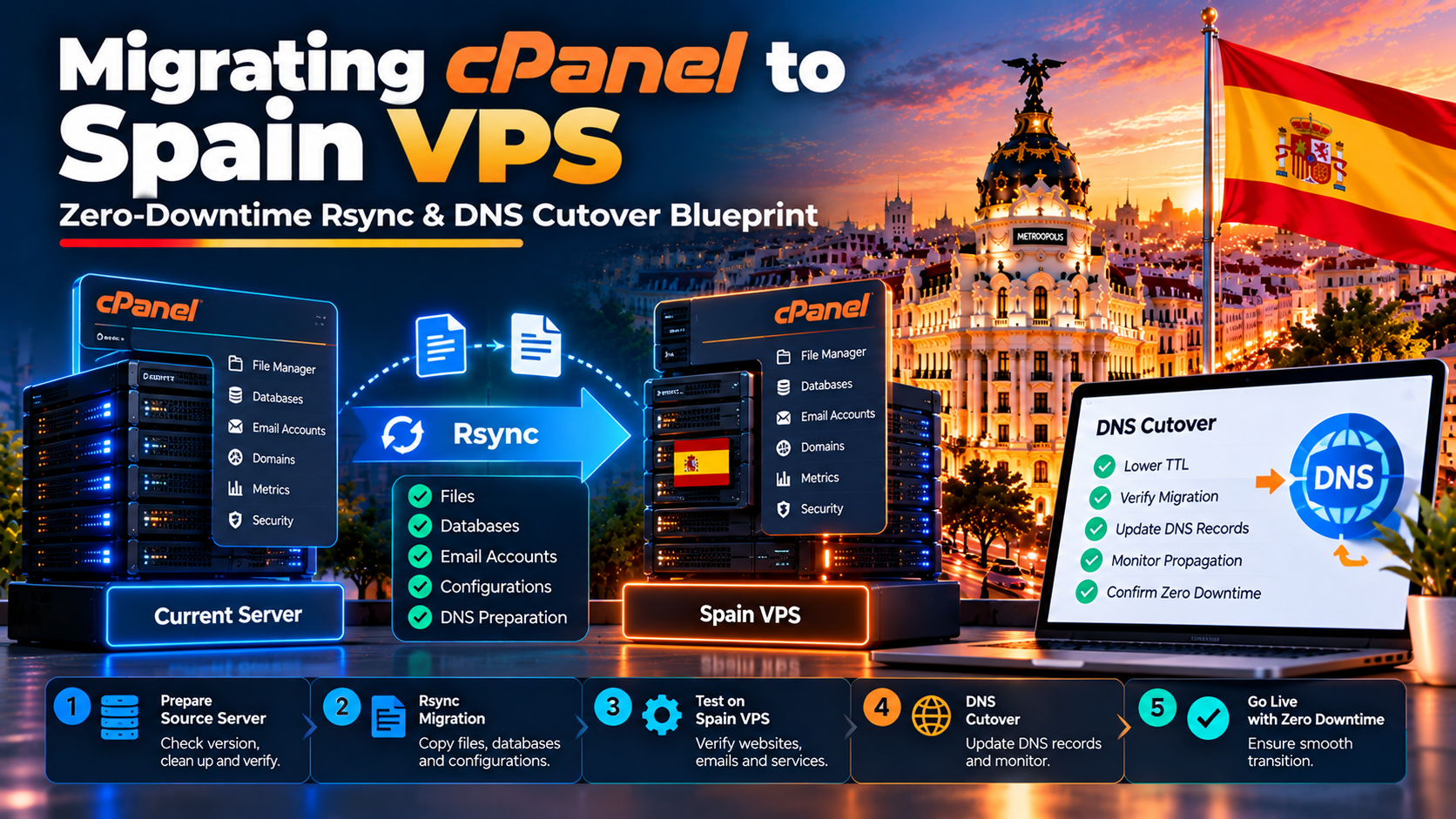
Executing a seamless migration to migrate to spain vps infrastructure without downtime requires a staged synchronization protocol: lowering DNS TTLs to 300 seconds 48 hours prior, pre-syncing heavy web assets via incremental SSH Rsync, establishing MySQL master-replica replication or dumping final transactional delta tables during a planned 60-second read-only window, verifying SPF/DKIM/DMARC mail records, and completing immediate DNS cutover to your dedicated Madrid IP address.
Specifically, deciding to migrate to spain vps infrastructure from an aging shared cPanel account or an overpriced foreign cloud provider is one of the most effective operational upgrades an organization can execute. By transitioning your workloads into a modern Madrid Tier-III datacenter, your websites gain immediate sub-10ms network latency across Spain, dedicated KVM compute resources, and complete data sovereignty under European GDPR and Spanish LOPDGDD laws.
However, the fear of server downtime, lost customer orders, broken email routing, and transient database discrepancies frequently paralyzes digital teams. A botched migration can corrupt transactional databases, disrupt payment gateway webhooks from Redsys or Stripe, drop critical customer correspondence, and cause temporary organic search ranking drops on Google Spain.
Furthermore, this comprehensive technical migration blueprint provides an battle-tested, step-by-step engineering methodology for migrating production cPanel environments to an OnliveServer Spain VPS with zero downtime and zero data loss. We detail pre-migration audit checklists, demonstrate automated Rsync commands with progress flags, outline MySQL transactional dumping techniques, review email mailbox preservation with IMAPSync, and explain how to orchestrate precision DNS cutovers that keep your business operating continuously throughout the transition.
📌 Master Chapter Index
- Consequently, migrate to spain vps: Pre-Migration Audit: Inventorying Assets, Databases & Mailboxes
- migrate to spain vps: DNS TTL Preparation: Minimizing Propagation Windows to 300 Seconds
- In addition, Incremental File Synchronization: The Power of SSH Rsync
- In particular, Database Migration: Consistent mysqldump & Transaction Isolation
- Therefore, Zero-Loss Email Migration: IMAPSync & MX Record Cutover
- Moreover, SPF, DKIM & DMARC Mail Authentication Realignment
- In fact, Staging Verification via Local Hosts File Before DNS Cutover
- Similarly, Executing the Final DNS Cutover and Post-Migration Telemetry
- Meanwhile, Post-Migration Regression Testing & Database Integrity Scripts
- Additionally, Migration Strategy Comparison Matrix
- Frequently Asked Questions
migrate to spain vps: Pre-Migration Audit: Inventorying Assets, Databases & Mailboxes
As a result, flawless server migrations require a methodical pre-flight inventory before initiating data transfer pipelines:
Account & Storage Quota Audit
Specifically, tally all active cPanel accounts, MySQL database sizes, and email storage quotas across the source server.
PHP & Database Version Matching
Furthermore, verify matching PHP extensions (opcache, imagick) and MariaDB/MySQL collation formats on the Madrid target VPS.
DNS TTL Lowering to 300s
Consequently, reduce Time-To-Live on all A and MX records 48 hours in advance to guarantee instantaneous cutover without DNS propagation stalls.
Pre-Migration Technical Audit Checklist
Runtime Environment Versions:
In addition, record exact versions of PHP, MySQL/MariaDB, Apache/Nginx, and Perl. Verify that your applications support PHP 8.2 or 8.3 on the target Spain VPS.
Active CRON Schedules:
In particular, export all user crontabs (crontab -l) to identify background indexing routines, automated report generators, and feed exports.
SSL Certificates:
Therefore, identify whether your sites utilize Let’s Encrypt automated certificates or commercial Wildcard SSLs that require certificate key export.
Database Collation & Charsets:
Moreover, check table character sets (e.g., utf8mb4_unicode_ci) to prevent character corruption during database imports.
Custom Apache / .htaccess Directives:
In fact, document custom URL rewrites, password-protected directories, and specialized reverse proxy headers.
migrate to spain vps: DNS TTL Preparation: Minimizing Propagation Windows to 300 Seconds
Similarly, domain Name System (DNS) records are cached aggressively by ISPs worldwide according to their Time to Live (TTL) value. If your domain’s TTL is set to the default value of 86,400 seconds (24 hours), updating your DNS record to point to your new Madrid VPS IP address will take up to a full day to propagate globally. During this window, some visitors will reach the old server while others reach the new server, causing chaotic data fragmentation.
Automated account migration and rsync package restoration procedures conform directly to the official cPanel Transfer Tool documentation, guaranteeing seamless data synchronization with zero transaction loss.
The 48-Hour TTL Rule: Exactly 48 hours prior to your planned migration cutover, log into your DNS management portal (Cloudflare, cPanel DNS Zone Editor, Route 53) and lower the TTL of all A, AAAA, and CNAME records to 300 seconds (5 minutes). When you execute the final cutover, DNS resolvers will query authoritative nameservers every 5 minutes, achieving near-instantaneous global traffic redirection.
Incremental File Synchronization: The Power of SSH Rsync
Meanwhile, many administrators attempt to migrate websites by creating a giant .zip or .tar.gz archive in cPanel File Manager, downloading it locally, and re-uploading it. For websites containing 50GB to 200GB of media files, this method is extraordinarily slow, prone to network interruptions, and forces extended site downtime.
To safeguard migration states and maintain historical disaster recovery snapshots before DNS propagation, deploy our automated snapshot and backup strategies.
Additionally, the industry gold standard for large-scale data transfer is rsync over secure SSH. Rsync utilizes a delta-transfer algorithm, copying only the differences between files. This allows you to perform an initial bulk synchronization days in advance while your old site remains live, followed by a blazing-fast incremental sync during the final cutover that completes in seconds.
As a result, # Initial Pre-Migration Bulk Sync (Executed on target Spain VPS)
rsync -avzPh -e 'ssh -p 22' --exclude='*.log' --exclude='cache/*' \
[email protected]:/home/username/public_html/ /var/www/vhosts/domain.com/public_html/

# Final Incremental Delta Sync (Executed during cutover)
rsync -avzPh --delete -e 'ssh -p 22' --exclude='*.log' --exclude='cache/*' \
[email protected]:/home/username/public_html/ /var/www/vhosts/domain.com/public_html/
The --delete flag ensures that any temporary files deleted on the source server are mirrored cleanly on the target Spain VPS, maintaining identical filesystem state.
Database Migration: Consistent mysqldump & Transaction Isolation
Specifically, migrating dynamic relational databases requires guaranteeing transactional consistency. If a customer places an order or updates an account profile while a raw database dump is executing, the resulting SQL export can suffer from orphaned records or corrupt foreign key constraints.
Once your data and databases are restored on the target virtual private server, execute our comprehensive post-migration security hardening protocols.
Furthermore, for InnoDB-based databases (WordPress, PrestaShop, Magento), execute mysqldump with the --single-transaction flag. This creates an isolated snapshot read without locking database tables, allowing your live site to continue accepting traffic during export:
Consequently, # Exporting consistent database dump with compression
mysqldump --single-transaction --quick --routines --triggers \
-u db_user -p db_name | gzip > /home/username/db_migration_dump.sql.gz

# Transferring dump directly to Spain VPS over SSH
scp -P 22 /home/username/db_migration_dump.sql.gz root@spain-vps-ip:/tmp/

# Importing database on Spain VPS
gunzip < /tmp/db_migration_dump.sql.gz | mysql -u target_db_user -p target_db_name
Zero-Loss Email Migration: IMAPSync & MX Record Cutover
Email accounts represent the operational lifeblood of corporate communication. Migrating mailboxes across servers frequently results in lost emails, missing folder structures, and confused desktop email clients.
In addition, to achieve zero-loss email migration, utilize imapsync. Imapsync connects directly to both source and destination mail servers via IMAP, synchronizing all folders (Inbox, Sent, Drafts, Archive) and flags (Read, Starred) without requiring user password resets or desktop reconfiguration:
In particular, # Synchronizing user mailbox via IMAPSync
imapsync --host1 mail.old-host.com --user1 [email protected] --passfile1 /etc/secret1 \
         --host2 mail.onliveserver-spain.es --user2 [email protected] --passfile2 /etc/secret2 \
         --ssl1 --ssl2 --syncinternaldates
Execute an initial synchronization 24 hours prior to cutover, and run a final incremental sync immediately following MX record updates to capture any lingering messages delivered to the old server.
SPF, DKIM & DMARC Mail Authentication Realignment
A frequent post-migration disaster occurs when outgoing business emails land directly in customer spam folders. This occurs because the new Madrid VPS IP address has not been authorized in the domain’s SPF (Sender Policy Framework) TXT record, or the DKIM (DomainKeys Identified Mail) cryptographic signature does not match the public key published in DNS.
Post-Migration Email DNS Realignment Checklist
Update SPF TXT Record:
Add the new Madrid IP address to your SPF policy: v=spf1 ip4:185.123.45.67 include:_spf.google.com ~all
Generate Matching DKIM Key:
Generate a fresh 2048-bit DKIM keypair in your Spain VPS mail agent (Rspamd or OpenDKIM) and publish the public key in your DNS zone under your chosen selector.
Configure Reverse DNS (PTR):
Ensure that an rDNS lookup for your Spain VPS IP returns your exact mail server fully qualified domain name (FQDN).
Verify DMARC Compliance:
Maintain a strict DMARC alignment record (v=DMARC1; p=quarantine; rua=mailto:[email protected]) to prevent domain spoofing.
Staging Verification via Local Hosts File Before DNS Cutover
Never change public DNS records before rigorously testing your website on the new server. Testing ensures that database credentials, PHP module extensions, SSL certificates, and URL rewrites function flawlessly.
You can preview your website on the new Spain VPS without affecting public visitors by editing your local workstation’s hosts file (/etc/hosts on macOS/Linux or C:\Windows\System32\drivers\etc\hosts on Windows):
# Add temporary testing entry pointing your domain to Spain VPS IP
185.123.45.67  yourdomain.es www.yourdomain.es
Open a browser, navigate to your domain, test administrative logins, execute test shopping cart additions, verify checkout page generation, and ensure that no hardcoded paths or broken database links exist.
Executing the Final DNS Cutover and Post-Migration Telemetry
With pre-synchronization complete and staging verified, you are ready to execute the final cutover during your lowest traffic window (typically 02:00 AM to 04:00 AM Spanish time).
The 5-Step Final Cutover Execution Blueprint
- Place Old Site in Maintenance Mode: Prevent new orders or comments from being written to the old database.
- Perform Final Delta Sync: Run the final incremental Rsync command and export/import the latest database delta.
- Update DNS A Records: Change your root and www A records to your dedicated Madrid VPS IP. Because your TTL was lowered to 300s, traffic shifts globally in minutes.
- Issue Production SSL Certificates: Provision automated Let’s Encrypt SSL certificates on the new Spain VPS.
- Remove Maintenance Mode: Verify live orders flowing into the new Madrid server and monitor Nginx error logs (
tail -f /var/log/nginx/error.log).
Post-Migration Regression Testing & Database Integrity Scripts
Following public DNS cutover, execute automated diagnostic scripts to verify that database tables are intact, SSL chains are fully trusted, and web application endpoints return HTTP 200 OK.
# Automated Post-Migration Verification Script
# 1. Verify MySQL Table Integrity
mysqlcheck -u root -p --auto-repair --check --all-databases

# 2. Check TLS Certificate Expiry and Cipher Handshake
curl -Iv https://yourdomain.es 2>&1 | grep -E "Server certificate|SSL connection"

# 3. Benchmark TTFB from Local Madrid Loopback
curl -o /dev/null -s -w 'Lookup: %{time_namelookup}s\nConnect: %{time_connect}s\nTTFB: %{time_starttransfer}s\nTotal: %{time_total}s\n' https://yourdomain.es/
These validation checks provide immediate empirical evidence that your production application is running smoothly, delivering sub-second response times, and maintaining complete operational integrity.
Migration Strategy Comparison Matrix
| Migration Methodology | Rsync + Staged Cutover (Our Blueprint) | cPanel Backup Archive (.tar.gz) | Automated WP Plugin Migration |
|---|---|---|---|
| Downtime Window | Zero Downtime (Sub-Minute Delta) | 2 to 8 Hours Offline | Unpredictable (Timeouts) |
| Data Loss Risk | 0% Guaranteed (Delta Sync) | High Risk for Transactional Data | High Risk (Incomplete Dumps) |
| Large Media Scaling (>50GB) | Seamless Incremental Transfer | Frequent Archive Corruption | PHP Memory Limit Exhaustion |
| Email Account Preservation | Complete (IMAPSync Folders) | Complete (if cPanel target) | Ignored (Web Files Only) |
| DNS Propagation Impact | Under 5 Minutes (Pre-Lowered TTL) | 24 to 48 Hours Legacy | 24 to 48 Hours Legacy |
Frequently Asked Questions
Core Technical Specifications
How do I avoid website downtime when migrating to a Spain VPS?
Lower your DNS TTL to 300 seconds 48 hours prior to migration, synchronize files and databases in advance using Rsync and mysqldump, verify your staging site via your local hosts file, and perform a rapid incremental delta sync during final DNS record updates.
Does OnliveServer offer free migration assistance to Madrid servers?
Yes. Our engineering team provides complimentary white-glove migration services. We handle database transfers, file syncing, SSL certificate installation, and DNS cutover testing with zero downtime for your business.
Will my SEO rankings drop during or after the server migration?
No. Because there is zero downtime and URL structures remain identical, search engines experience no crawl interruptions. In fact, migrating to a Madrid VPS typically boosts Google Spain rankings due to improved Core Web Vitals and lower TTFB.
How are corporate email accounts migrated without losing messages?
We utilize IMAPSync over secure SSL connections to synchronize all email folders, attachments, and read flags directly between mail servers, followed by an incremental sync after updating MX records to ensure no email is dropped.
Deployment & Operational Inquiries
Can I migrate from cPanel to a server running Webuzo or CloudPanel?
Yes. Modern control panels such as Webuzo and CloudPanel include automated cPanel archive import utilities or support standard Rsync and SQL dump restoration with zero compatibility issues.
What information do I need to provide for OnliveServer to handle my migration?
Simply provide access credentials for your current hosting control panel (cPanel, Plesk, or SSH root credentials) and your DNS management portal. Our team will schedule the transfer at your convenience and execute the migration seamlessly.
How do I reduce DNS TTL to ensure zero downtime during a cPanel migration?
Lower your domain DNS zone TTL to 300 seconds (5 minutes) at least 48 hours prior to migration. Once files and MySQL databases are synchronized to your new Madrid VPS via rsync, updating the A record will propagate to global visitors almost instantaneously without traffic loss.
Does OnliveServer technical support provide assistance with cPanel account restoration?
Yes. For all clients provisioning a Spain VPS with cPanel/WHM or Webuzo, our migration engineering team offers free white-glove migration assistance, transferring cPanel account archives (.tar.gz), mailboxes, and databases with complete data verification.
Migrate Your Workloads to Madrid Cloud VPS with Zero Downtime
Transition your websites, databases, and mailboxes effortlessly. Benefit from complimentary white-glove migration, dedicated KVM hardware, sub-10ms ESPANIX peering, and unmetered 1Gbps bandwidth starting from €12/month.
