

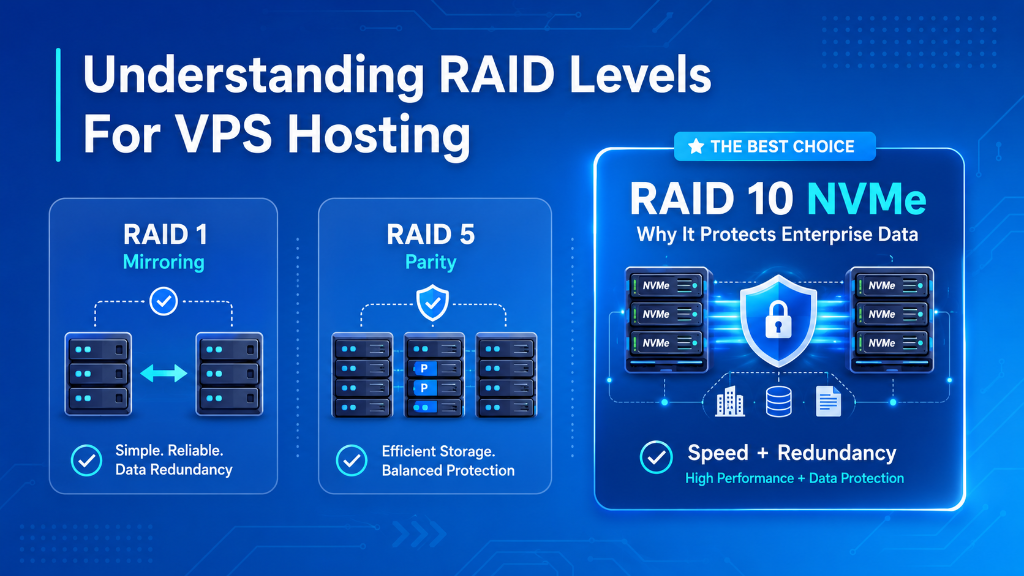
Quick Answer: Why RAID 10 NVMe Storage is Essential for Database Servers
RAID 10 (striping with mirroring) delivers the gold standard for database workloads by providing 100% data redundancy combined with maximum read and write throughput, completely eliminating the write-penalty overhead inherent in RAID 5 and RAID 6 parity calculations. For transactional MySQL and PostgreSQL databases on VPS, RAID 10 NVMe arrays withstand drive failures without downtime while sustaining sub-millisecond random I/O latency.
- The Parity Write Penalty in RAID 5/6: Parity-based arrays require 4 disk I/O operations (2 reads, 2 writes) for every single block modification, creating severe I/O bottlenecks during heavy database write operations.
- Why RAID 10 Dominates Enterprise VPS: RAID 10 (1+0) combines disk mirroring with striping, delivering 100% write performance with zero mathematical parity overhead and rapid rebuild speeds.
- Surviving Multi-Drive Failures: A 4-drive or 8-drive RAID 10 array can withstand simultaneous physical disk failures across different mirrored pairs without experiencing a single millisecond of downtime.
- Enterprise NVMe Infrastructure: Deploying on a secure USA VPS hosting cluster backed by hardware-redundant PCIe Gen4 NVMe RAID 10 pools guarantees maximum transactional throughput and data resilience.
Introduction: The Foundation of Enterprise Data Resilience
In high-availability enterprise cloud hosting, data integrity and storage subsystem throughput represent the fundamental backbone of application reliability. While CPU cores and RAM allocations determine processing concurrency, the storage architecture directly governs database transaction commit speeds, backup window durations, and disaster recovery survivability. In a production environment, a single unrecoverable storage failure can cause catastrophic business disruption, corrupted databases, and permanent revenue loss. For verified technical specifications and deployment parameters, consult the official MySQL Documentation.
Strategic Considerations & Core Architecture Drivers
To protect against physical solid-state drive wear and hardware controller degradation, enterprise hosting infrastructure relies on Redundant Array of Independent Disks (RAID) architectures. RAID combines multiple physical storage drives into a unified logical storage unit managed by hardware controllers or kernel-level software drivers. However, not all RAID configurations are created equal; selecting the wrong RAID level introduces devastating parity write penalties, sluggish rebuild times, and silent data corruption risks.
While budget hosting providers frequently deploy RAID 5 or single-drive configurations to maximize usable disk capacity and cut infrastructure expenses, enterprise-grade cloud platforms standardize exclusively on RAID 10 PCIe Gen4 NVMe arrays. Striped mirroring eliminates complex XOR parity mathematical computations, providing the sub-millisecond random I/O latency required by modern relational databases and high-traffic ecommerce applications.
Furthermore, modern enterprise hosting architectures integrate advanced filesystem technologies like ZFS and Linux mdadm software RAID. These storage engines incorporate automatic block checksumming, end-to-end data integrity verification, and instant snapshot rollbacks. By eliminating single points of failure across drive controllers and physical silicon channels, enterprise RAID arrays ensure continuous data availability even during unexpected hardware anomalies.
Deploying on secure USA VPS hosting backed by enterprise RAID 10 NVMe storage pools ensures your mission-critical applications operate with maximum IOPS performance and full hardware fault tolerance. In this comprehensive technical guide, we break down the mechanics of RAID levels, analyze real-world benchmark metrics, expose the dangers of parity rebuilds, and deliver an actionable Linux storage diagnostic runbook.
Architectural Models: Parity-Based RAID 5 vs. Striped Mirroring RAID 10
Comparing the internal read/write mechanics of parity-based arrays against striped mirroring illustrates why RAID 10 is the industry gold standard.
|
Parity-Based Architecture
RAID 5 (Distributed Parity)Requires 4 disk operations per write (2 reads + 2 writes for XOR parity). Rebuilds stress remaining drives for days, risking secondary drive failure and total array loss. Vulnerability: High write penalty & catastrophic rebuild risks.
|
Striped Mirroring Architecture
RAID 10 (1+0 NVMe Array)Combines RAID 1 mirroring with RAID 0 block striping. Zero mathematical parity calculation overhead. Blazing 100% write speed and rapid, low-stress disk rebuilds. Advantage: Maximum IOPS, zero write penalty & total redundancy.
|
Core Concept: Understanding RAID Levels & Mathematical Mechanics
To understand how RAID impacts enterprise server performance, we must examine the mathematical operations governing data distribution across physical drives:
For a foundational breakdown of disk striping and mirroring topologies, check out our easy guide for understanding RAID 0, RAID 1, and RAID 10 to compare fault tolerance across array types.
RAID 0 (Data Striping with Zero Fault Tolerance)
RAID 0 splits incoming data blocks evenly across two or more physical drives without calculating parity or storing redundant copies. This delivers 100% storage capacity utilization and high sequential throughput. However, RAID 0 provides zero fault tolerance. If a single drive in a 4-drive RAID 0 array experiences a hardware failure, 100% of data across the entire array is permanently destroyed. Consequently, RAID 0 is completely unsuitable for production hosting environments.
RAID 1 (Pure Disk Mirroring)
RAID 1 writes identical copies of every data block simultaneously to two physical drives. Read performance doubles because the operating system can read independent data blocks from both drives concurrently. Write performance is equal to the speed of a single drive. If Drive A fails, Drive B continues operating without interruption. The limitation of RAID 1 is capacity efficiency: usable storage is strictly 50% of the total raw disk capacity.
RAID 5 (Block-Level Striping with Distributed Parity)
RAID 5 requires a minimum of three physical drives. Data blocks are striped across all drives, while XOR parity checksums are distributed across the array. Usable storage equals (N - 1) × Drive Capacity, offering high capacity efficiency. However, RAID 5 suffers from a severe Parity Write Penalty (4:1). Every single data write requires four distinct operations: read existing data, read existing parity, calculate new XOR parity, and write new data + new parity. In high-concurrency database workloads, this parity bottleneck severely throttles write IOPS.
RAID 10 (Striped Mirrors: The Enterprise Standard)
RAID 10 (also known as RAID 1+0) combines the fault-tolerant mirroring of RAID 1 with the high-speed striping of RAID 0 across a minimum of four physical drives. Data is first mirrored across disk pairs and then striped across the mirrored groups. Because no XOR parity calculations are involved, write performance achieves 100% raw hardware capability.
Furthermore, RAID 10 can survive multiple simultaneous drive failures as long as the failed drives belong to separate mirrored pairs. When a replacement drive is inserted, rebuilding the array involves a straightforward sequential block copy from its healthy mirrored twin, completing in minutes without degrading read/write performance across the remaining disks.
Hardware RAID Controllers vs. Modern Software Storage (ZFS & mdadm)
Historically, hardware RAID controllers equipped with dedicated processing ASICs and Battery-Backed Write Caches (BBWC) were required to offload parity math from slow host CPUs. However, modern multi-core server processors possess computational power orders of magnitude beyond legacy RAID controllers.
Today, kernel-level software RAID solutions (such as Linux mdadm) and advanced Copy-on-Write filesystems (such as ZFS with mirrored vdevs) vastly outperform hardware RAID controllers on PCIe Gen4 NVMe arrays. ZFS provides end-to-end cryptographic checksumming on every data block, automatically detecting and repairing ‘silent data corruption’ (bit rot) on the fly without controller vendor lock-in.
Additionally, modern software RAID and hypervisor passthrough layers provide native support for the NVMe TRIM command (deallocate). TRIM actively informs the physical solid-state drive controller which blocks of data are no longer considered in use, allowing internal flash garbage collection daemons to maintain maximum write speeds and extend silicon drive longevity over years of heavy enterprise usage.
Comprehensive RAID Storage Performance & Resilience Matrix
The table below compares performance metrics, fault tolerance, and write overhead across standard enterprise RAID configurations:
| RAID Level | Min Drives | Write Penalty | Capacity Yield | Fault Tolerance |
|---|---|---|---|---|
| RAID 0 (Striping) | 2 Drives | 1:1 (None) | 100% | 0 Drives (Fatal) |
| RAID 1 (Mirroring) | 2 Drives | 1:1 (None) | 50% | 1 Drive |
| RAID 5 (Parity) | 3 Drives | 4:1 (Heavy) | 67% – 85% | 1 Drive |
| RAID 6 (Dual Parity) | 4 Drives | 6:1 (Severe) | 50% – 75% | 2 Drives |
| RAID 10 (1+0 NVMe) | 4 Drives | 1:1 (Zero Penalty) | 50% | Up to 50% of Drives |
Real-World Applications: Workloads Requiring RAID 10 NVMe Storage
Deploying high-speed RAID 10 storage provides immediate transactional and data safety advantages across enterprise workloads:
🛒 High-Volume Ecommerce Checkout
Transactional shopping carts require synchronous ACID disk writes. RAID 10 eliminates parity wait states, ensuring instant checkout completion without database thread locking.
🗄️ Relational Databases (MySQL / Postgres)
Heavy write-ahead logging (WAL) and InnoDB redo log flushes execute with sub-millisecond latency, supporting thousands of concurrent queries per second.
🏢 Multi-Tenant Agency VPS Fleets
Agencies hosting dozens of client portals prevent cross-tenant disk I/O contention, ensuring fast media uploads and automated background backup generation.
📊 Real-Time Financial Log Processing
High-frequency telemetry logging streams write continuously to disk without queue delay, preventing application buffer overflows and packet drops.
Hands-On Implementation: Storage Diagnostics & Health Monitoring (PuTTY Terminal Guide)
Execute these production storage commands directly in your PuTTY terminal to audit RAID array health, check NVMe wear indicators, and test disk write throughput:
Combining drive redundancy with hardware-level monitoring reinforces overall server resilience, as outlined in our budget dedicated server security and hardware hardening guide.
Check Linux Software RAID Array Health (/proc/mdstat)
Verify that all member drives in your RAID 10 array are active and synchronized:
Audit NVMe Drive Health and Wear Percentage via nvme-cli
Inspect SMART telemetry, operational temperature, and available spare endurance:
Measure Direct Synchronous Disk Write Speed with dd
Perform direct physical block writes bypassing operating system RAM buffer caches:
Configure Automated mdadm Email Alerts for Degraded Arrays
Set up instant administrator notifications if a physical drive drops from the array:
Benchmark 4K Random Write IOPS with fio
Stress test transaction commit latency and IOPS capacity using 32 parallel I/O queue depths:
Configure a monthly cron job to execute echo 'check' > /sys/block/md0/md/sync_action. Storage scrubbing reads every block across all mirrored pairs to detect and repair latent bad sectors before a physical drive fails.
When a drive fails in a RAID 5 array, the controller must read every single remaining sector on all other drives to reconstruct lost data via XOR math. This intense I/O stress frequently triggers an Unrecoverable Read Error (URE) on an aging second drive, causing total catastrophic array failure and permanent data loss. RAID 10 avoids this by simply copying data from the healthy mirror.
🎯 Key Takeaways & Storage Summary
- RAID 10 Eliminates Write Penalties: Delivers 100% write performance with zero XOR parity calculation overhead.
- Rapid Disaster Recovery: Rebuilds execute in minutes via direct mirror duplication rather than CPU-draining parity calculations.
- Multi-Drive Fault Tolerance: Survives concurrent disk failures across separate mirrored pairs with zero downtime.
- Enterprise NVMe Storage: Deploying on a USA VPS hosting platform provides enterprise PCIe Gen4 NVMe RAID 10 storage pools to guarantee mission-critical data integrity.
Frequently Asked Questions (FAQ)
Conclusion: Strategic Architecture Roadmap for US Businesses
Building a high-performance, secure, and scalable cloud infrastructure requires aligning compute resources, network proximity, and storage subsystems with application demands.
By deploying on dedicated KVM virtual private servers powered by modern Linux kernels and enterprise hardware, US organizations ensure maximum operational uptime, seamless scalability, and superior user experiences across North American and global markets.
