

How Do You Diagnose and Fix 502 Bad Gateway and 504 Gateway Timeout Errors on a UAE VPS?
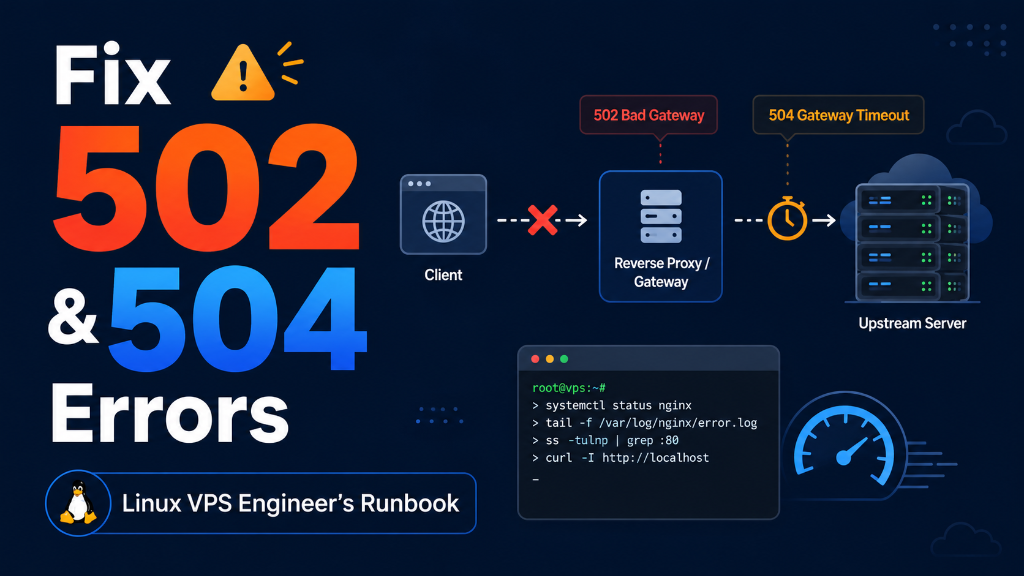
When troubleshooting 502 Bad Gateway and 504 Gateway Timeout errors on a UAE VPS, resolving 502 Bad Gateway errors requires increasing PHP-FPM pm.max_children worker limits, expanding the socket connection backlog (listen.backlog = 65535), and enlarging Nginx FastCGI buffer allocations (fastcgi_buffer_size 128k). Resolving 504 Gateway Timeouts requires optimizing unindexed database queries and extending fastcgi_read_timeout to 300 seconds.
- Diagnostic Precision: HTTP 502 Bad Gateway signals that the upstream application runtime (PHP-FPM) crashed or terminated the connection abruptly, whereas HTTP 504 Gateway Timeout indicates that the upstream worker took too long to complete execution.
- Gulf Evening Traffic Spikes: Traffic surges between 8:00 PM and 2:00 AM Gulf Standard Time (GST) routinely exhaust static PHP-FPM process worker pools, causing requests to queue until Nginx timeout thresholds are breached.
- Buffer & Timeout Tuning: Sizing
fastcgi_buffers, increasingfastcgi_read_timeoutto 300 seconds, and configuring dynamic PHP-FPM worker pools eliminates transient gateway dropouts during flash promotions. - Furthermore, Guaranteed Compute Power: Deploying OnliveServer stable high-concurrency UAE VPS nodes with un-oversold KVM dedicated CPU cores ensures your application processes thousands of concurrent dynamic checkouts without bottlenecking.
Introduction: The Anatomy of Gateway Failures During Middle Eastern Peak Hours
Consequently, there is no digital failure more damaging to an e-commerce platform, corporate service portal, or fintech API in the United Arab Emirates than encountering intermittent “502 Bad Gateway” or “504 Gateway Timeout” error screens. When high-value customers in Dubai, Abu Dhabi, and across the GCC click “Proceed to Checkout” or attempt to finalize a property booking, an abrupt gateway error shatters consumer trust, drives immediate cart abandonment, and forfeits hard-won digital advertising spend.
In addition, in Middle Eastern hosting environments, gateway failures exhibit a distinct temporal rhythm. Rather than failing uniformly throughout the day, unoptimized servers crash predominantly during the evening hours—between 8:00 PM and 2:00 AM Gulf Standard Time (GST)—as well as during seasonal shopping festivals such as Ramadan nocturnal promotions and White Friday flash sales. When thousands of mobile shoppers simultaneously access dynamic, un-cached application endpoints, default server configurations rapidly exhaust their processing capacity.
In particular, effectively resolving 502 Bad Gateway and 504 Gateway Timeout issues on UAE VPS hosting environments requires looking beyond surface-level web server restarts. Systems engineers must diagnose the root causes of upstream socket exhaustion, size PHP-FPM worker pools to match physical RAM, tune Nginx FastCGI buffer allocations, and implement intelligent caching layers. This definitive engineering guide details the exact diagnostic workflows and configuration runbooks required to permanently eliminate 502 and 504 gateway errors.
Therefore, resolving upstream gateway timeout thresholds and FastCGI buffer allocations is documented in the official NGINX FastCGI module documentation.
Diagnostic Matrix: Decoupling HTTP 502 vs HTTP 504 Errors
While both 502 and 504 errors appear identical to the end-user as gateway failures, their underlying architectural causes are fundamentally different:
| Error Code | Architectural Definition | Underlying Technical Trigger | Primary Log Signature |
|---|---|---|---|
| HTTP 502 Bad Gateway | Nginx received an invalid or truncated response from the upstream runtime. | PHP-FPM crashed, Out-Of-Memory (OOM) killer terminated worker, or socket refused. | connect() failed (111: Connection refused) while connecting to upstream |
| HTTP 504 Gateway Timeout | Nginx waited for upstream response, but execution exceeded timeout threshold. | Slow database query, external API timeout (SMS/payment gateway), or infinite loop. | upstream timed out (110: Connection timed out) while reading response header |
Moreover, if chronic gateway timeouts stem from legacy hosting resource constraints, implement our zero-downtime website migration procedures to transition to isolated virtual compute.
Root Cause 1: PHP-FPM Worker Pool Exhaustion & Queue Starvation
In fact, the most pervasive culprit behind 502 errors during UAE evening traffic surges is the default configuration of PHP-FPM. On fresh Linux distributions, PHP-FPM frequently defaults to conservative process limits—often setting pm.max_children = 5. In this default state, the server can service only five simultaneous dynamic PHP requests at any given millisecond.
When a flash sale announcement is dispatched via WhatsApp or mobile push notification in Dubai, hundreds of customers arrive within seconds. The five available PHP-FPM workers become immediately saturated. Subsequent incoming requests enter the Unix socket listen queue (listen.backlog). Once the listen queue fills completely, the operating system drops subsequent connection attempts. Nginx, unable to establish a connection with the PHP-FPM socket, instantly throws 502 Bad Gateway errors to incoming shoppers.
Similarly, to eliminate queue starvation, systems administrators must dynamically size pm.max_children based on available physical RAM, ensuring that the server can spawn dozens of concurrent workers without triggering memory thrashing.
Root Cause 2: Nginx FastCGI Buffer Truncation
Meanwhile, another frequent cause of 502 errors occurs when dynamic applications—such as WooCommerce product catalogs with multiple variations, or complex WordPress administrative panels—generate exceptionally large HTTP response headers. By default, Nginx allocates small FastCGI buffers (typically 4KB or 8KB).
Additionally, when the response header generated by PHP exceeds the allocated fastcgi_buffer_size, Nginx cannot parse the upstream data block. Nginx abruptly closes the connection and writes the following fatal error into /var/log/nginx/error.log:
Expanding FastCGI buffer allocations allows Nginx to handle massive dynamic response headers smoothly without truncating connections.
Root Cause 3: External UAE Payment Gateway & SMS API Timeouts (504 Errors)
While 502 errors stem from upstream process crashes, 504 Gateway Timeouts represent latency bottlenecks. In the United Arab Emirates, e-commerce checkout flows frequently integrate synchronous external REST APIs—such as local payment gateways (Network International, Telr, PayTabs), SMS verification gateways (Etisalat, du), or courier logistics APIs (Aramex, Fetchr).
If an external payment gateway’s 3DS server experiences elevated latency and takes 65 seconds to respond, while Nginx’s fastcgi_read_timeout is configured to the default 60 seconds, Nginx severs the client connection and serves an HTTP 504 Gateway Timeout error—even though the bank transaction may have actually succeeded! Tuning read timeouts and transitioning external API calls to asynchronous background queues eliminates these false checkout failures.
Production Runbook: Sizing PHP-FPM Pools & Tuning Nginx Buffers
As a result, below is a production-hardened configuration runbook to optimize PHP-FPM process management and configure resilient Nginx FastCGI buffers on your UAE VPS instance:
1. Hardened PHP-FPM Pool Configuration:
2. Resilient Nginx FastCGI Buffer Configuration:
Applying these parameters via systemctl restart php8.2-fpm && systemctl reload nginx equips your server to absorb high-concurrency traffic rushes smoothly without gateway drops.
Specifically, detecting emerging gateway timeouts before users notice requires continuous real-time telemetry metrics and system alerting.
Database Deadlock Diagnosis & Slow Query Log Optimization
While gateway errors manifest at the HTTP layer between Nginx and PHP-FPM, the root bottleneck frequently resides deeper in the architecture—inside the MySQL/MariaDB database. When dozens of shoppers attempt to purchase limited-stock items simultaneously during an evening flash sale, poorly indexed database tables force MySQL into exclusive row-level and table-level locks.
Furthermore, subsequent PHP-FPM worker processes requesting inventory updates stall, waiting for database lock releases. Within seconds, all available PHP workers become blocked waiting on the database socket, causing Nginx to throw 504 Gateway Timeout errors. Systems administrators can diagnose active deadlocks directly via the MySQL command line:
Enabling the MySQL Slow Query Log (slow_query_log = 1 with long_query_time = 1) allows database administrators to identify unindexed queries, add composite indexes to high-traffic database columns, and eliminate transaction bottlenecks before they trigger gateway dropouts.
Furthermore, systems engineers should implement automated health checks using cURL within local cron jobs that continuously verify that /healthz or /ping endpoints return HTTP 200 status codes. If three consecutive failed pings occur, the script executes an automated graceful reload of the PHP-FPM service, restoring availability before customers notice any disruption.
In addition, maintaining clear escalation matrices ensures that application developers and hosting support personnel collaborate seamlessly during major sales campaigns, guaranteeing rapid resolution of any emerging software bottlenecks.
Frequently Asked Questions (FAQ)
Core Technical Specifications
Eliminate 502 Bad Gateway Errors with Guaranteed Server Resources
Prevent PHP-FPM process exhaustion and upstream proxy timeouts with dedicated CPU cores, tuned FastCGI buffers, and Redis caching.
