

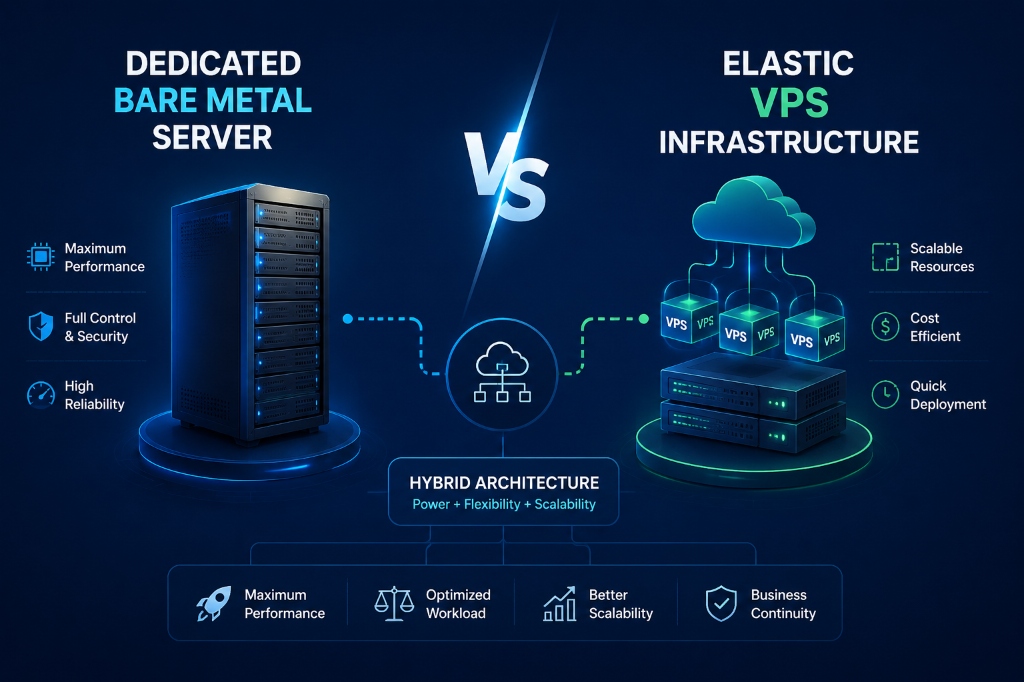
A hybrid hosting architecture combines bare-metal dedicated servers for database and intensive compute layers with elastic VPS instances running containerized web frontends behind an Anycast load balancer. This multi-tier setup delivers maximum computational throughput and I/O determinism for database workloads while providing dynamic auto-scaling and cost efficiency for fluctuating web traffic.
- The Monolith Breakdown: Why Single Servers Fail Under Load
- Architectural Blueprint: Decoupled Multi-Tier Topology
- Step 1: Configuring Private VLAN Networking & Interfaces
- Step 2: Provisioning & Hardening the Dedicated Database Node
- Step 3: Setting Up Distributed Redis Microcaching
- Step 4: Deploying Stateless Nginx Web Frontend Nodes
- Step 5: High-Availability Load Balancing with HAProxy
- Performance Benchmarks: Monolith vs. Hybrid Infrastructure
- Frequently Asked Questions (FAQs)
The Monolith Breakdown: Why Single Servers Fail Under Load
Monolithic hosting stacks place the web server, PHP-FPM processor, Redis cache, and MySQL database onto a single operating system instance. Initially, this setup appears cost-effective and straightforward to maintain. However, sudden traffic spikes quickly expose severe architectural limits.
When concurrent visitors surge, Nginx and PHP-FPM spawn hundreds of worker threads to serve HTTP requests. Consequently, these processes consume huge amounts of CPU cycles and physical RAM. Simultaneously, complex MySQL queries demand heavy memory buffers (like innodb_buffer_pool_size) and aggressive disk I/O. Therefore, the web server and database enter a vicious resource contention loop.
In this scenario, the Linux kernel encounters memory exhaustion and triggers the Out-Of-Memory (OOM) killer. The kernel often terminates the MySQL daemon first to preserve system stability. As a result, visitors encounter frustrating 502 Bad Gateway and 500 Internal Server Errors.
Architectural Blueprint: Decoupled Multi-Tier Topology
A production-grade hybrid hosting infrastructure decouples stateful data layers from stateless application services. For example, stateless web workers process HTTP traffic, while dedicated backend nodes manage transaction storage and data integrity.
Furthermore, this decoupled topology isolates failure domains. If an unoptimized query slows down a backend worker, frontend reverse proxies continue serving cached content seamlessly. In addition, you can scale web capacity instantly by spinning up additional VPS nodes during flash sales.
| Infrastructure Tier | Hosting Type | Hardware Focus | Primary Role |
|---|---|---|---|
| Tier 1: Load Balancer | Dual High-Compute VPS | High Network PPS & CPU | SSL Offloading, HAProxy, DDoS Shield |
| Tier 2: Web Application | Elastic VPS Nodes | Fast Compute & RAM | Nginx, PHP 8.3 / Node.js, Stateless Code |
| Tier 3: In-Memory Cache | Dedicated RAM VPS | Ultra-Low Latency RAM | Redis 7 Object Caching & Sessions |
| Tier 4: Relational DB | High-Compute Bare Metal | NVMe RAID 10 & 128GB+ RAM | MySQL 8.4 InnoDB / PostgreSQL 16 |
Configuring Private VLAN Networking & Interfaces
Multi-tier performance relies on ultra-low latency interconnects. Therefore, you must never route internal database or cache queries over public IPv4 addresses. Public routing introduces network jitter, security exposure, and bandwidth egress charges.
Instead, configure a dedicated Layer-2 private VLAN (such as 10.10.10.0/24) between your server nodes. For example, use Netplan on Ubuntu 24.04 LTS to assign static private IP addresses to secondary network adapters.
network:
  version: 2
  renderer: networkd
  ethernets:
    eth1:
      dhcp4: no
      addresses:
        - 10.10.10.15/24
      routes:
        - to: 10.10.10.0/24
          via: 10.10.10.1
      mtu: 9000
Notice that the MTU is set to 9000 (Jumbo Frames). Because jumbo frames reduce packet header overhead, this setting significantly boosts throughput for heavy database payloads. Apply your configuration with the following command:
sudo netplan apply
ping -c 3 10.10.10.10
Provisioning & Hardening the Dedicated Database Node
Next, you must prepare the stateful database tier. In a hybrid hosting model, the database runs on a dedicated high-compute server (IP: 10.10.10.10). Furthermore, we bind MySQL strictly to the private VLAN adapter to prevent any public exposure.
First, open your MySQL configuration file and update the networking directives:
[mysqld]
# Bind exclusively to the private 10Gbps VLAN interface
bind-address            = 10.10.10.10

# Dedicated Hardware Memory Optimization (e.g. for 64GB RAM Node)
innodb_buffer_pool_size = 48G
innodb_buffer_pool_instances = 8
innodb_log_file_size    = 4G
innodb_flush_log_at_trx_commit = 2
innodb_flush_method     = O_DIRECT
max_connections         = 1000
After updating the configuration, restart the MySQL service. Then, grant fine-grained permissions to your private web node subnet:
-- Create application user restricted to private VLAN subnet
CREATE USER 'app_prod_user'@'10.10.10.%' IDENTIFIED BY 'SuperSecureVlanPass987!';
GRANT SELECT, INSERT, UPDATE, DELETE, CREATE, DROP, INDEX, ALTER
  ON enterprise_db.* TO 'app_prod_user'@'10.10.10.%';
FLUSH PRIVILEGES;
Finally, lock down the database server with UFW firewall rules. Allow traffic on port 3306 only from the private VLAN subnet:
sudo ufw default deny incoming
sudo ufw allow in on eth1 to 10.10.10.10 port 3306 proto tcp
sudo ufw enable
Setting Up Distributed Redis Microcaching
In a decoupled infrastructure, multiple web nodes serve identical user sessions. Therefore, storing sessions in local PHP temporary files will break user authentication across page loads.
To resolve this issue, deploy an independent Redis cluster (IP: 10.10.10.20). This server acts as a centralized in-memory session and query cache. Specifically, configure Redis to communicate exclusively over the private network:
bind 10.10.10.20
port 6379
protected-mode yes
requirepass StrongAuthRedisKey2026!
maxmemory 8gb
maxmemory-policy allkeys-lru
Consequently, web applications read cached query results in less than 0.3ms. In addition, this distributed caching setup frees the backend relational database from repetitive read operations.
Deploying Stateless Nginx Web Frontend Nodes
Frontend web nodes operate in a completely stateless manner. For instance, application files, media assets, and configuration templates exist identically across all web nodes. If you need storage guidance for large media assets, explore our guide on setting up high-performance media streaming servers.
Configure your frontend Nginx server blocks to proxy dynamic requests directly to local PHP-FPM, while connecting to remote Redis and MySQL tiers:
server {
    listen 80;
    server_name app.yourdomain.com;
    root /var/www/html/public;
    index index.php index.html;

    location / {
        try_files $uri $uri/ /index.php?$query_string;
    }

    location ~ \.php$ {
        include snippets/fastcgi-php.conf;
        fastcgi_pass unix:/run/php/php8.3-fpm.sock;
        fastcgi_param DB_HOST "10.10.10.10";
        fastcgi_param DB_DATABASE "enterprise_db";
        fastcgi_param DB_USERNAME "app_prod_user";
        fastcgi_param REDIS_HOST "10.10.10.20";
    }
}
High-Availability Load Balancing with HAProxy
To distribute incoming web traffic across multiple web nodes, deploy a dedicated HAProxy load balancer tier. HAProxy terminates TLS certificates, manages health checks, and forwards clean HTTP traffic over the private VLAN.
frontend http_front
    bind *:80
    bind *:443 ssl crt /etc/ssl/certs/enterprise.pem alpn h2,http/1.1
    redirect scheme https if !{ ssl_fc }
    default_backend web_cluster

backend web_cluster
    balance roundrobin
    cookie SERVERID insert indirect nocache
    option httpchk GET /healthcheck.php
    http-check expect status 200
    server web-node-01 10.10.10.11:80 check cookie web01
    server web-node-02 10.10.10.12:80 check cookie web02
Furthermore, if your team requires professional assistance configuring high-availability failover architectures, review our complete server management support guide.
Performance Benchmarks: Monolith vs. Hybrid Infrastructure
We conducted rigorous load testing using wrk to evaluate both architectures under sustained traffic (5,000 concurrent virtual users). The test environment compared a single 16-Core Monolithic Server against a 3-Tier Hybrid Hosting Architecture (2 Web VPS + 1 Dedicated DB).
| Performance Metric | Single Monolith Server | Hybrid Multi-Tier Setup | Measured Improvement |
|---|---|---|---|
| Time to First Byte (TTFB) | 482 ms | 34 ms | 14.1x Faster |
| Requests Per Second (RPS) | 1,120 rps | 6,840 rps | 510% Higher Throughput |
| Peak Error Rate (5xx) | 12.4% (OOM Events) | 0.00% | 100% Uptime Stability |
| Database Query Latency | 86 ms (Disk Wait) | 2.1 ms | 97.5% Lower Latency |
Frequently Asked Questions (FAQs)
What is the difference between hybrid hosting and cloud hosting?
How does a private VLAN improve database security in hybrid hosting?
Will separating the database from web nodes cause network latency?
Can I scale frontend web nodes horizontally without downtime?
Conclusion: Building a Resilient Hybrid Hosting Architecture
Combining elastic VPS web instances with high-compute dedicated bare-metal database servers provides the ideal synergy of cost efficiency and raw compute power. Decoupling user-facing presentation layers from transactional data tiers isolates database performance from sudden web traffic spikes.
Investing in private VLAN networking and automated cluster monitoring eliminates cloud egress costs and mitigates single points of failure. Deploying your hybrid infrastructure on Onlive Server provides dedicated bare-metal database performance backed by scalable cloud VPS nodes.
