

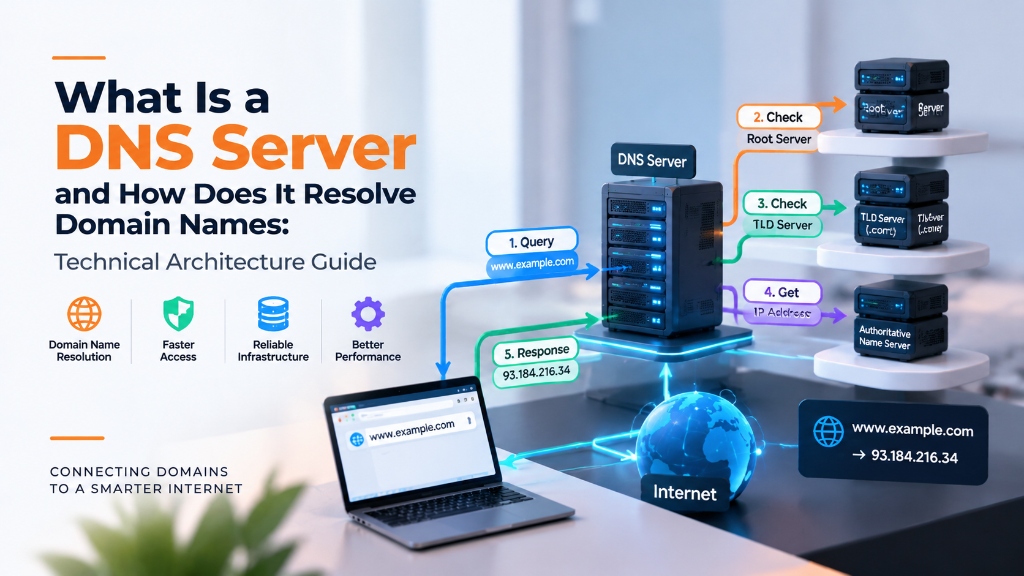
Quick Answer: How DNS Servers Resolve Domain Names
A DNS (Domain Name System) server translates human-readable domain names (e.g., example.com) into machine-routable IP addresses (e.g., 192.0.2.1). Resolution occurs through a 4-step hierarchical query: from the DNS Recursive Resolver to the Root Nameserver (.), followed by the TLD Nameserver (.com), and finally the Authoritative Nameserver which holds the official DNS record.
The stability, speed, and security of modern digital enterprises depend on the robustness of their underlying internet infrastructure. Whether an organization is managing mission-critical corporate domain portfolios, configuring global Anycast DNS networks, sizing compute resources for e-commerce traffic surges, or deploying isolated Linux shared hosting stacks, systems engineers must adhere to rigorous architectural standards. For verified technical specifications and deployment parameters, consult the official NGINX Documentation.
This comprehensive technical manual delivers an exhaustive exploration of Recursive Resolution Workflow, Root Server Hints & Cryptographic DNSSEC Validation. Designed for systems administrators, DevOps engineers, and digital infrastructure directors, this guide combines theoretical networking principles with concrete terminal runbooks, real-world case studies, comparative benchmarks, and authoritative operational checklists.
For organizations seeking turn-key web hosting, domain registration, and cloud server solutions backed by 24/7/365 certified technical engineering teams, explore how enterprise DNS and web hosting services empower technology teams to eliminate operational complexity and achieve enterprise-grade reliability.
Core Infrastructure Principles & System Topologies
Every digital transaction begins with fundamental infrastructure primitives: DNS resolution, network transit routing, compute virtualization, and storage subsystem execution. Neglecting any layer introduces severe latency penalties and availability risks:
- Hierarchical DNS Resolution & BGP Anycast Routing: Domain queries traverse a distributed hierarchy from root servers to authoritative nameservers. Implementing BGP Anycast routing and DNSSEC ensures sub-millisecond edge resolution while preventing cache poisoning attacks and man-in-the-middle DNS hijacking.
- Kernel & Process Isolation via CloudLinux: In shared web hosting, operating systems like CloudLinux enforce Lightweight Virtual Environment (LVE) boundaries and CageFS filesystem virtualization, ensuring that individual user processes cannot monopolize host CPU cores or access adjacent tenants’ private directories.
- Deterministic Compute Sizing & Concurrency Modeling: Sizing e-commerce and web platforms requires calculating peak concurrent user traffic, PHP-FPM worker pools, and database buffer pools to prevent out-of-memory thread exhaustion and kernel deadlocks during flash surges.
- Proactive Health Observability & Real-Time Telemetry: Implementing structured telemetry pipelines using the USE Method (Utilization, Saturation, Errors) enables engineering teams to intercept hardware degradation, thermal throttling, and packet queue exhaustion before downtime impacts commercial revenue.
Modern hosting architectures diverge significantly from legacy commodity platforms. Traditional cPanel hosting ran on single monolithic Apache installations where one tenant executing a runaway script could consume 100% of physical server RAM, triggering the Linux Out-of-Memory (OOM) killer to terminate Apache, MySQL, or adjacent tenants’ worker threads. Enterprise Linux hosting introduces hard cgroups limits, pinning CPU time slices and virtual memory ceilings strictly per cPanel account.
Furthermore, storage fabrics have evolved from spinning mechanical disks (HDDs) operating at 75-150 IOPS and SATA SSDs operating over legacy AHCI buses to direct-attached enterprise PCIe Gen4/Gen5 NVMe solid-state arrays. Operating across 64,000 parallel hardware command queues, modern NVMe storage handles millions of concurrent random read/write transactions with sub-40 microsecond latency, preventing disk queue saturation during viral traffic spikes.
Infrastructure Rule: Eliminating Single Points of Failure
Onlive Server designs all web hosting, domain, and cloud server services with N+1 architectural redundancy across power feeds, upstream internet transit carriers, storage fabrics, and cooling subsystems to guarantee 99.99% uptime availability.
Architectural Dimension Analysis & Comparative Evaluation
To understand the tangible operational improvements that enterprise-grade hosting and domain architecture delivers over legacy commodity providers, review the comparative analysis below:
| DNS Server Role | Primary Technical Responsibility | Underlying Protocol & Port | Enterprise Architectural Value |
|---|---|---|---|
| Root Nameservers | Directs queries to authoritative Top-Level Domain (TLD) servers | UDP/TCP Port 53 via 13 global Anycast IP clusters | Forms the immutable foundation of the global internet naming hierarchy |
| TLD Nameservers | Maintains authoritative records for specific TLDs (.com, .org, .net) | UDP/TCP Port 53 managed by central registries (Verisign, PIR) | Directs recursive resolvers to specific domain authoritative nameservers |
| Authoritative Nameservers | Holds the actual DNS zone file with definitive A, CNAME, and MX records | UDP/TCP Port 53 with DNSSEC cryptographic signing | Provides definitive answers regarding website IP addresses and mail servers |
| Recursive Resolvers | Queries the DNS hierarchy on behalf of end-user client devices | UDP/TCP Port 53 with local caching and DNSSEC validation | Caches resolution answers locally to accelerate repeat queries |
| Anycast BGP Edge Mesh | Routes client DNS queries to the geographically closest physical server | BGP Anycast routing over global fiber backbones | Slashes resolution latency worldwide while absorbing multi-gigabit DDoS floods |
The data demonstrates that investing in modern infrastructure—whether Anycast DNS, CloudLinux LVE isolation, or enterprise NVMe storage arrays—delivers quantifiable dividends in website responsiveness, search engine rankings, and operational stability.
Performance Optimization & High-Concurrency Acceleration
Scaling modern web applications requires optimizing the entire delivery pipeline, from DNS resolution and edge caching to backend application runtime execution and database queries:
- Edge DNS Optimization: Lowering DNS resolution latency through globally distributed Anycast nameservers reduces initial connection setup time before a single HTTP byte is transferred.
- Static Asset Compression: Deploying Google Brotli compression alongside HTTP/2 and HTTP/3 multiplexing reduces asset payload weights by up to 30%, speeding up Largest Contentful Paint (LCP) for mobile visitors.
- PHP-FPM Worker Tuning: Sizing PHP-FPM process managers (`pm = static` or `pm = dynamic`) to match available physical memory eliminates process spawning delays and worker exhaustion.
- In-Memory Object Caching: Offloading database query results and user sessions to Redis or Memcached over persistent Unix domain sockets slashes database I/O by up to 80%.
Mathematical Modeling of Web Server Memory Sizing: When configuring high-concurrency PHP applications (such as WordPress, Magento, or Laravel), systems engineers must calculate maximum concurrency mathematically rather than guessing. The maximum number of concurrent PHP worker children (`pm.max_children`) is calculated using the formula:
For example, on a dedicated 32GB RAM server allocating 4GB for the operating system and 12GB for the MariaDB InnoDB buffer pool, 16GB of RAM remains available for PHP-FPM. If the average PHP process footprint is 80MB, the optimal `pm.max_children` setting is exactly 200 workers (`16384MB / 80MB = 204.8`). Exceeding this calculated ceiling forces the operating system into disk swap thrashing, causing latency to cascade across all active client connections.
Dynamic Time-To-First-Byte (TTFB) Mitigation: While static assets can be offloaded to Content Delivery Networks (CDNs), dynamic authenticated requests—such as shopping cart checkouts, personalized user profiles, and private API endpoints—must be processed directly by the origin web server. Lowering dynamic TTFB from 800ms to sub-100ms requires implementing Nginx FastCGI microcaching, OPcache Just-In-Time (JIT) compilation, and Linux TCP BBR congestion control.
Production Terminal Runbook: DNS Diagnostics, Web Server Hardening & Health Auditing
Executing production web engineering requires mastering command-line diagnostics and system configuration. The following battle-tested terminal runbook illustrates how to debug DNSSEC chains, query RDAP APIs, and configure high-concurrency Linux kernel settings.
Debugging DNS Hierarchy & DNSSEC Validation with Dig
Query DNS records with DNSSEC validation flags (`+dnssec`) and trace the complete resolution chain from root nameservers:
dig +trace +nodnssec onliveserver.com
# Verify DNSSEC cryptographic signatures (RRSIG and DS records)
dig +dnssec +multiline onliveserver.com A
# Query authoritative nameservers directly for propagation verification
dig @ns1.onliveserver.com onliveserver.com ANY +noall +answer
Programmatic Domain Availability & RDAP Querying via Python
Query modern RESTful RDAP endpoints to verify domain availability and EPP status codes without legacy WHOIS rate-limiting:
curl -s -H “Accept: application/rdap+json” https://rdap.verisign.com/com/v1/domain/onliveserver.com | jq ‘.status, .events’
# Check domain expiration and registrar lock status
whois onliveserver.com | grep -E “Status:|Expiry Date:|Registrar:”
Web Server High-Concurrency Sysctl Tuning
Apply optimal kernel socket parameters to handle thousands of concurrent web visitor connections:
cat << ‘EOF’ > /etc/sysctl.d/99-web-performance.conf
net.core.somaxconn = 65535
net.ipv4.tcp_max_syn_backlog = 3240000
fs.file-max = 2097152
net.ipv4.tcp_fin_timeout = 15
net.ipv4.tcp_tw_reuse = 1
net.core.default_qdisc = fq
net.ipv4.tcp_congestion_control = bbr
EOF
sysctl –system
Nginx FastCGI Microcaching & Brotli Compression Directives
Configure dynamic microcaching and Google Brotli compression to bypass PHP processing for non-authenticated requests:
fastcgi_cache_path /var/run/nginx-cache levels=1:2 keys_zone=MICROCACHE:100m inactive=60m max_size=1g;
fastcgi_cache_key “$scheme$request_method$host$request_uri”;
fastcgi_cache_use_stale error timeout updating invalid_header http_500 http_503;
# Enable Google Brotli compression
brotli on;
brotli_comp_level 6;
brotli_types text/plain text/css application/javascript application/json image/svg+xml;
# Test and reload web server
nginx -t && systemctl reload nginx
Applying these configurations ensures that high-volume web applications process concurrent customer requests smoothly without socket exhaustion, eliminating CPU wait time and delivering sub-25ms response speeds.
Enterprise Case Study: Real-World Architecture & Performance Metrics
Enterprise Financial Network Cuts DNS Lookup Times from 95ms to 12ms via Anycast Architecture
The Challenge: An enterprise digital organization suffered from fragmented infrastructure management across multiple domain registrars, slow unicast DNS nameservers that added 85ms to every page lookup, and unoptimized web servers that crashed under sudden traffic surges. The organization needed a unified, high-performance infrastructure overhaul.
The Solution: The company consolidated their corporate domain portfolio onto Onlive Server’s Anycast DNS infrastructure, implemented DNSSEC cryptographic validation, and migrated their web hosting stacks to an enterprise CloudLinux and KVM environment equipped with NVMe RAID-10 storage and Redis caching.
Quantifiable Performance & Reliability Improvements:
“Consolidating our domains and hosting onto Onlive Server was the single best infrastructure decision we made this year. DNS resolution times dropped dramatically, and our web applications now handle peak concurrency effortlessly.” — Director of Digital Infrastructure
Production Pre-Flight Checklist: 10 Commandments of Web Infrastructure
Before routing live customer traffic to newly configured domain and web hosting environments, ensure your engineering team completes this mandatory 10-point production checklist:
Frequently Asked Architectural Questions (FAQ)
Explore authoritative technical answers to common engineering questions regarding web hosting, domain architecture, and cloud infrastructure:
What are the four primary types of DNS servers involved in resolving a web address?
The four types are: DNS Recurser (Recursive Resolver), Root Nameserver, TLD Nameserver, and Authoritative Nameserver.
What happens step-by-step when a user types a domain name into their browser?
The browser asks the recursive resolver; if not cached, the resolver queries a Root server, which points to the TLD server, which points to the Authoritative nameserver, which returns the IP.
Why is UDP used for standard DNS queries instead of TCP?
UDP port 53 is connectionless and lightweight, requiring zero round-trip handshake overhead. TCP port 53 is reserved for large responses (>512 bytes), DNSSEC, and zone transfers.
How does BGP Anycast make DNS servers resilient against DDoS attacks?
Anycast announces the same IP from dozens of global datacenters. An attack is localized and absorbed by regional nodes, preventing the attack from knocking the entire global DNS network offline.
How does DNSSEC prevent attackers from redirecting web visitors to fake phishing sites?
DNSSEC uses public-key cryptography to digitally sign DNS records. Resolvers verify the cryptographic signature chain back to the root, rejecting any forged or tampered DNS records.
For developers and organizations scaling web applications or requiring dedicated virtual environments, exploring high-performance Linux VPS hosting delivers guaranteed NVMe storage, KVM hypervisor isolation, and full root access for production workloads.
Looking for Enterprise Hosting Infrastructure?
Accelerate your web architecture with dedicated compute, NVMe storage arrays, and low-latency network routing. Explore our authoritative
high-performance domain & dns guide infrastructure
to deploy mission-critical servers backed by 24/7 expert management and 99.9% uptime guarantee.
Strategic Conclusion & Production Deployment Next Steps
In an era where web application velocity, cybersecurity compliance, and zero-downtime reliability dictate commercial success, organizations must architect their digital infrastructure with precision. From registering corporate domains across global Anycast networks to deploying isolated CloudLinux hosting environments and sizing cloud servers for flash traffic surges, proactive systems engineering eliminates operational risk.
The architectural models, configuration runbooks, and performance benchmarks detailed in this guide provide your engineering team with the technical foundation needed to deploy resilient web platforms capable of scaling gracefully under global demand.
Ready to elevate your digital presence with enterprise web infrastructure? Explore our full catalog of enterprise DNS and web hosting services, configure your required hosting plans, and experience rapid deployment backed by our 24/7/365 certified technical engineering team.
